
Introduction
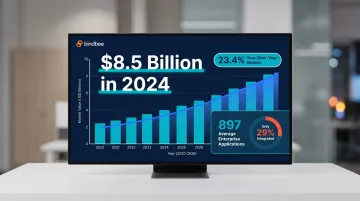
Modern HR Tech and Benefits Administration companies face a growing integration crisis. As customer expectations rise for seamless data flows between HRIS platforms, payroll systems, and benefits carriers, the cost of managing these connections in-house has become unsustainable. Enterprise organizations now manage an average of 897 applications, yet only 29% are integrated, creating data silos that 90% of businesses cite as a significant obstacle.
Those silos hit product and engineering teams hardest. Developers spend 39% of their time building custom integrations rather than core product work — and 83% of organizations say integration delays directly cost them revenue.
iPaaS (Integration Platform as a Service) is the category built to solve this. Not all approaches deliver equal value, though. Generic platforms designed for internal automation lack the domain-specific data models HR Tech and Benefits Tech products require. "Wrapped" iPaaS solutions marketed as embedded often introduce vendor lock-in and ballooning maintenance costs instead.
This guide covers what iPaaS is, how it compares to traditional integration approaches, and how to evaluate the right solution for HR and Benefits technology products.
TLDR
- iPaaS is cloud-based middleware that connects applications and automates data flows; it's technically a SaaS subcategory
- Traditional iPaaS (Zapier, Workato) serves internal automation; embedded iPaaS delivers customer-facing integrations within your product
- Generic iPaaS platforms lack HR-specific data models for employee records, dependents, and enrollment, creating hidden technical debt
- Purpose-built unified APIs normalize HR/benefits data across 60+ systems through one endpoint, eliminating per-integration maintenance
- Choose based on integration volume, customer expectations, and your engineering team's capacity
What Is iPaaS — and Is It the Same as SaaS?
iPaaS (Integration Platform as a Service) is a cloud-based middleware solution that enables companies to connect applications, automate data flows, and orchestrate workflows without building every connection from scratch. It abstracts the complexity of API management, authentication, data transformation, and error handling into a centralized platform.
The SaaS Connection
iPaaS is technically a subcategory of SaaS—both are delivered as cloud-based subscription services. The distinction lies in purpose, not delivery model. While most SaaS tools (CRMs, HRIS platforms, ERPs) help users perform specific business functions, iPaaS exists to connect those tools together.
The Core Problem iPaaS Solves
As organizations adopt more SaaS applications, data becomes siloed across disconnected systems. The average organization now uses 101 SaaS applications, up from 93 just one year ago. iPaaS bridges those silos, enabling real-time data synchronization, workflow automation, and unified visibility across an organization's tech stack.
iPaaS vs. Point-to-Point Integration
Building integrations in-house gives maximum control but requires ongoing engineering investment for each new system. Custom API integrations can cost $50,000–$150,000 per year per connection when you factor in maintenance, vendor API changes, and QA overhead.
iPaaS reduces that burden by providing:
- Pre-built connectors for common SaaS tools
- Managed authentication that removes credential complexity
- Centralized monitoring across all active integrations
- Automatic handling of vendor API changes and versioning
That shift in approach is reflected in adoption rates. The iPaaS market reached $8.5 billion in 2024, growing 23.4% year-over-year—a signal that modern SaaS operations now treat integration infrastructure as essential, not optional.
How iPaaS Works for SaaS Integrations
An iPaaS sits between your SaaS product and external systems, handling authentication, data translation, and workflow execution so your team doesn't have to. Here's what that looks like under the hood.
Core Technical Components
- Manages OAuth flows, API keys, and token refresh logic automatically — no custom authentication handlers per system
- Reformats data between schemas on the fly; for example, mapping
hire_datetostartDatewhen syncing a new employee record from an HRIS to a benefits platform - Executes event-driven workflows via webhooks, so a new hire in an HRIS can trigger payroll setup, benefits enrollment, and communication tool provisioning without manual steps
- Tracks integration health, error rates, and data flow volumes through centralized dashboards — making otherwise invisible background processes visible
Two Deployment Contexts
SaaS companies use iPaaS in fundamentally different ways:
- Internal automation - Syncing your own CRM with billing systems, marketing automation, or analytics platforms
- Customer-facing integrations - Building native integrations into your product so customers can connect their systems
This second use case is where the traditional iPaaS vs. embedded iPaaS distinction becomes critical. The platform optimized for internal automation isn't the right choice for product integrations.
Traditional iPaaS vs. Embedded iPaaS: Understanding the Core Distinction
The iPaaS category splits into two fundamentally different approaches — and choosing the wrong one means either burdening your customers with DIY configuration or giving up control of a critical product surface.
Traditional iPaaS: Customer-Managed Automation
Platforms like Zapier, Tray.io, and Workato (enterprise tier) are designed for internal teams—typically marketing or operations staff—to build automations between the tools they use. When B2B SaaS companies publish a connector on these platforms, they're offloading integration work to their customers.
Key implication: Customers must configure, maintain, and troubleshoot these integrations themselves.
Embedded iPaaS: Vendor-Managed Product Feature
Embedded iPaaS integrates directly into your SaaS product, giving your engineering team the tools to build native, customer-facing integrations. From the end-customer's perspective, the integration feels like a first-party feature—they authenticate once, and you manage all integration logic, monitoring, and updates.
The Hidden Costs of Traditional iPaaS for Customer Integrations
Relying solely on traditional iPaaS for customer integrations creates four significant problems:
- Support overhead: Customers need hand-holding to configure workflows, creating solutions engineering costs that scale poorly with growth
- Zero product visibility: You can't see which integrations customers use most or diagnose failures in their workflows — a blind spot in the customer experience
- Retention risk: SaaS products with native integrations show 10-15% higher retention, rising to 18-22% for products with four or more; competitors offering native integrations give customers a concrete reason to leave
- Lost revenue: Integrations on third-party platforms can't be packaged as premium features or upsold — you've handed off a potential revenue stream
The "Wrapped iPaaS" Trap
These costs don't disappear when vendors rebrand traditional iPaaS as an embedded solution. Some traditional iPaaS vendors have repackaged their core product as an embedded offering, but the underlying architecture wasn't built for developers shipping product features. The result is often:
- Non-white-labeled experiences (redirect URLs, iframes showing third-party branding)
- Poor developer documentation and support
- Distracted roadmaps that prioritize enterprise automation over embedded use cases
Comparison Framework
| Dimension | Traditional iPaaS | Embedded iPaaS |
|---|---|---|
| Primary user | Customer ops teams | Your engineering team |
| Customer experience | DIY configuration | Native/white-labeled |
| Product visibility | None | Full logging and analytics |
| Monetization | Zero | Upsell opportunity |
| Maintenance | Customer's responsibility | Your team manages |
| Integration ownership | Customer builds workflows | You control logic |
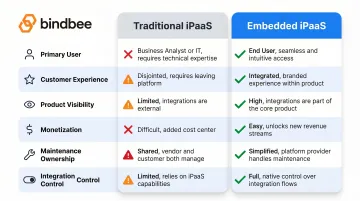
The practical decision point: if integrations are part of your product's value proposition, traditional iPaaS shifts critical work — and critical risk — onto your customers. Embedded iPaaS keeps both the control and the upside with your team.
Key Features to Evaluate in an iPaaS for Your SaaS Product
When selecting an integration platform for customer-facing use cases, prioritize these capabilities:
Pre-Built Connector Coverage
The breadth of pre-built connectors determines how much your team must build from scratch. For HR and Benefits Tech, verify the platform covers:
- HRIS platforms (Workday, ADP, BambooHR, Rippling)
- Payroll systems (Gusto, Paychex, ADP Run)
- Benefits carriers and administration platforms
- ATS tools (Greenhouse, Lever, Workable)
Equally important: confirm the vendor maintains these connectors automatically. When upstream APIs change, you need the platform to absorb that work — not your engineering team.
Data Normalization and Domain-Specific Models
Generic iPaaS platforms return raw, un-normalized data, requiring engineering effort to map and transform fields for every integration. Look for platforms offering standardized data models appropriate to your domain.
For HR/Benefits use cases, this means unified schemas for:
- Employee records (personal info, employment status, compensation)
- Dependent data with relationships and coverage elections
- Benefits enrollment with plan selections and effective dates
- Life events (new hires, terminations, qualifying life events)
Without domain-specific normalization, you'll spend significant engineering time building translation layers. That's the exact overhead a well-chosen iPaaS should eliminate.
Security and Compliance
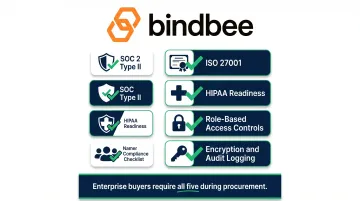
For industries handling sensitive employee or health data, verify:
- SOC 2 Type II and ISO 27001 certifications
- HIPAA readiness for platforms handling health benefits data
- Role-based access controls (RBAC)
- Encryption at rest and in transit
- Comprehensive audit logging
Enterprise HR and benefits buyers will ask for these certifications during procurement. Missing any one of them can stall or kill a deal.
iPaaS for HR Tech and Benefits Administration: What Makes It Different
HR and Benefits integrations present unique complexity that generic iPaaS platforms aren't designed to handle.
Deeply Structured, Relational Data
Unlike CRM or marketing data, HR/Benefits integrations must handle:
- Employee records with dependent relationships
- Benefits enrollment with plan selections, coverage tiers, and effective dates
- Carrier data with provider-specific formats
- Payroll deductions tied to benefits elections
- Life event triggers (new hires, terminations, births, marriages)
Generic iPaaS platforms lack pre-built data models for these relationships. The result is custom mapping work for every integration—adding weeks of development before a single customer goes live.
Extreme Ecosystem Fragmentation
Enterprise employers manage 11-13 HR systems and 55 HR system integrations on average. For Benefits Tech and HR Tech SaaS companies, this means integrating with dozens of HRIS platforms, multiple payroll systems, and numerous benefits carriers. Each uses different APIs, file formats, and data schemas.
37% of organizations cite integration challenges as the top gap in benefits systems specifically, with practitioners noting that "files fail for the smallest detail."
Legacy File-Based Systems
Modern REST APIs represent only part of the landscape. Many benefits carriers and legacy HRIS platforms only support SFTP file drops, CSV exports, or EDI 834 transactions. Generic iPaaS platforms optimize for API-to-API connectivity—they don't provide built-in bridges for file-based legacy systems.
The Integration Tax on Product Development
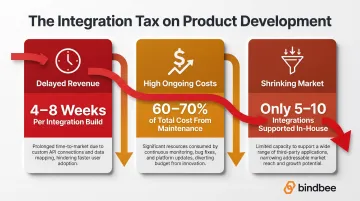
When Benefits Tech or HR Tech companies build integrations natively, engineering teams spend disproportionate time on maintenance rather than core product features. Three consequences compound quickly:
- Delayed revenue: New customers can't go live until their specific HRIS integration is built, extending sales cycles and pushing out revenue recognition.
- High ongoing costs: A single custom integration requires 4-8 weeks of development, with 60-70% of total cost coming from maintenance alone—not the initial build.
- A shrinking addressable market: Most HR Tech startups can realistically support 5-10 integrations in-house. Customers on other systems either can't buy or require expensive custom work.
The Unified API Alternative
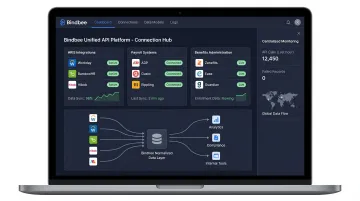
For SaaS companies in HR/Benefits, purpose-built unified APIs take a fundamentally different approach from generic workflow automation. Bindbee, for example, delivers:
- Pre-normalized data across 60+ HRIS, payroll, and benefits systems through a single API endpoint
- Benefits-first data models for employees, dependents, and enrollment that map directly to your product's needs
- Automatic incremental syncs and webhook notifications for life events
- SFTP-to-API bridges for legacy carrier systems that only support file-based exchange
- Setup in hours, not weeks, with authentication handled through embeddable components
The practical difference: companies like Healthee and Newfront have cut onboarding time by 76% and reduced time-to-value by 94%—without adding integration headcount.
Choosing the Right Integration Approach for Your SaaS
Not all integrations warrant the same investment. Use this framework to match approach to strategic importance:
Decision Hierarchy
1. High-demand, core-value integrations: If an integration is requested by a large portion of your customer base and directly impacts onboarding, retention, or core product functionality—build it natively using an embedded iPaaS or unified API.
Example: An employee benefits platform integrating with the top 10 HRIS systems its customers use.
2. Long-tail, one-off requests: When a single customer requests an obscure integration that doesn't justify engineering time—point them to a traditional iPaaS connector as a stopgap.
Example: A customer wants to sync data to a proprietary internal system used only by their organization.
3. Domain-specific, high-volume scenarios: If your product operates in a domain (HR, Benefits, Payroll) where you need to connect to dozens of similar systems—evaluate a domain-specific unified API rather than building each connection individually.
Example: A Benefits Administration platform that needs to support any HRIS and payroll system a prospect might use.
Traditional and Embedded Aren't Mutually Exclusive
The most effective integration strategies use both approaches:
- Native integrations for strategic, high-demand connections protect against churn and create upsell opportunities
- Traditional iPaaS connectors serve as a safety valve for long-tail requests
That said, never substitute a "wrapped" traditional iPaaS for native integrations on your most important connections. The customer experience gap and loss of product control create real competitive vulnerabilities over time.
Total Cost of Ownership Considerations
Building integrations in-house carries hidden costs:
- API maintenance when upstream systems change their schemas or deprecate endpoints
- Engineering bandwidth diverted from product roadmap
- Security review overhead for each new connection
- Support burden when integrations fail
An embedded iPaaS or unified API consolidates these costs and transfers ongoing maintenance to the vendor. For most teams, that shift costs significantly less than the engineering hours required to handle it internally.
Frequently Asked Questions
Is iPaaS a SaaS?
Yes, iPaaS is technically a category of SaaS—it's delivered as a cloud-based subscription service. The distinction is that while most SaaS applications perform specific business functions (CRM, HRIS, accounting), iPaaS is specifically designed to integrate and connect other applications and automate data flows between them.
What is the difference between iPaaS and embedded iPaaS?
Traditional iPaaS is used internally to connect tools within an organization (e.g., syncing CRM to marketing automation). Embedded iPaaS is integrated directly into a SaaS product so the vendor can offer native, customer-facing integrations. With embedded iPaaS, end-customers authenticate once and the SaaS vendor manages all integration logic and maintenance.
How does iPaaS help SaaS companies scale their integrations?
iPaaS provides pre-built connectors, managed authentication, data transformation tools, and centralized monitoring. Together, these reduce the engineering effort per integration, letting SaaS companies expand their connector catalog without proportionally growing their engineering team.
What should HR Tech and Benefits Tech companies look for in an iPaaS?
Generic iPaaS platforms rarely cover the specialized needs of HR Tech and Benefits Tech out of the box. Prioritize platforms that offer:
- Domain-specific data models for employee records, dependents, and enrollment
- Broad HRIS and payroll system coverage
- HIPAA compliance and SOC 2 certification
- Support for legacy file-based systems (SFTP, EDI 834) alongside modern APIs
When should a SaaS company use a unified API instead of a general-purpose iPaaS?
A unified API is preferable when your product needs to connect to many systems within a specific domain (e.g., dozens of HRIS or benefits platforms) and requires normalized, consistent data across all of them. General-purpose iPaaS works well for diverse, cross-domain internal automation but doesn't provide domain-specific data standardization or purpose-built connectors for specialized verticals.
How long does it take to set up an iPaaS integration compared to building natively?
Native integration development typically takes 4-8 weeks per system when building against raw third-party APIs. Purpose-built integration platforms and unified APIs can cut that to less than one day, using pre-built connectors, managed authentication, and normalized data models to get new customers live faster.