

Introduction
Building a Xero integration looks straightforward on paper. In practice, most HR Tech, payroll, and benefits teams hit the same wall: the API behaves differently than expected once you factor in multi-tenant OAuth flows, region-specific endpoints, rate limits, and inconsistent data formats across organization types.
Common sticking points include:
- Authentication complexity — Xero's OAuth 2.0 flow requires careful token management across multiple tenants
- Regional API differences — payroll endpoints, tax fields, and compliance requirements vary by country
- Rate limit behavior — limits apply per app per organization, not globally, which catches many teams off guard
- Data normalization — field names, date formats, and currency handling differ between Xero's API versions
This guide covers how the Xero API works end-to-end — authentication, data models, rate limits, and regional quirks — so whether you're syncing payroll data, managing invoices, or building benefits features, you know what you're dealing with before you write a line of code.
TL;DR
- Xero uses OAuth 2.0 with access tokens expiring in 30 minutes and refresh tokens expiring in 60 days—build your token refresh logic before launch
- Daily rate limit is 5,000 API calls per tenant; use date-range filtering and webhooks to stay within bounds
- Xero has two distinct API families: the Accounting API (global) and the Payroll API (region-specific: AU/NZ vs. UK)—picking the wrong one is a common mistake for HR Tech teams
- Teams integrating Xero alongside other HRIS and payroll systems can use a unified API to avoid rebuilding auth, rate-limit handling, and data normalization for each system separately
What Is the Xero API?
The Xero API is a set of RESTful endpoints that let applications programmatically read and write accounting and payroll data stored in Xero. It covers resources ranging from invoices and bank transactions to employees and pay runs, returning JSON or XML responses.
Two API Families and Why the Distinction Matters
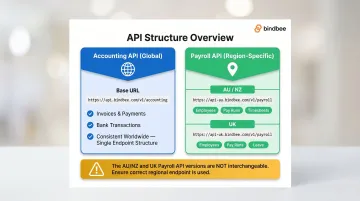
Xero maintains two distinct API families. HR Tech teams need to understand which one applies before writing a single line of code:
Accounting API (globally available):
- Covers financial data: invoices, payments, expenses, bank transactions
- Consistent endpoints and structure worldwide
- Base URL:
https://api.xero.com/api.xro/2.0/
Payroll API (region-specific):
- Separate versions for AU/NZ and UK with different structures, field names, and available data
- Covers employee records, pay runs, payslips, timesheets, and leave
- Base URL:
https://api.xero.com/payroll.xro/2.0/ - HR Tech teams integrating compensation or benefits data must use the Payroll API, not just the Accounting API
Teams building for multi-region customers must maintain separate implementations for AU/NZ and UK payroll endpoints. The two versions share no interchangeable structure, which directly affects how capabilities and limitations get applied in practice.
What the API Enables vs. What It Doesn't
Xero's API supports GET, POST, PUT, and DELETE methods across most resources, but there are meaningful restrictions to plan around:
- Full read/write access: Invoices, payments, bank transactions, employee records, and pay runs
- Read-only endpoints: The Journals endpoint supports only GET requests
- Regional restrictions: Several payroll objects are unavailable or structured differently outside their target region
- Access requirements: Any developer can register through the Xero Developer Portal, but production use requires a paid Xero account
How Xero API Authentication Works
Xero uses OAuth 2.0 with three supported grant types:
- Authorization Code Flow (for web apps)
- PKCE Flow (for mobile/desktop apps)
- Client Credentials Flow (for premium/machine-to-machine integrations)
For B2B SaaS products integrating on behalf of customers, the Authorization Code Flow is standard.
Step 1: Register Your App and Obtain Credentials
Create an app in the Xero Developer Portal to receive a client ID and client secret. You'll need:
- App name and integration type
- Company URL
- Redirect URI
Critical: The client secret is shown only once. Store it securely in an environment variable or secrets vault—never in source code.
Step 2: Initiate the Authorization Flow and Request Scopes
Redirect the user to Xero's authorization URL with the required scopes. Scopes most relevant to HR Tech integrations include:
accounting.invoices.read– for billing and reimbursement trackingpayroll.employeesandpayroll.employees.read– for employee datapayroll.payrunsandpayroll.payruns.read– for compensation datapayroll.payslip.read– for individual pay breakdownsoffline_access– to receive a refresh token for persistent access
Note: Xero is migrating from broad scopes like accounting.transactions to granular scopes. New apps created after March 2, 2026 must use granular scopes; existing apps must migrate by September 2027.
Step 3: Exchange the Authorization Code for Tokens
Make a POST request to https://identity.xero.com/connect/token using your client ID and client secret to receive:
- Access token (valid for 30 minutes)
- Refresh token (valid for 60 days)
Token Lifecycle Management
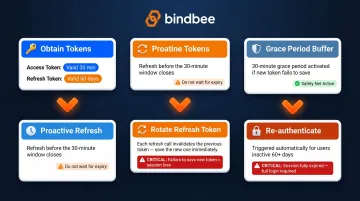
Once you have tokens, keeping them valid requires proactive refresh logic — not reactive error handling. - Refresh access tokens before the 30-minute window closes
- Rotate refresh tokens on every use — each refresh call returns a new refresh token, invalidating the previous one
- Plan for Xero's 30-minute grace period: if the new refresh token fails to save, the previous one will still be honored temporarily
- Re-authenticate users whose tokens haven't been refreshed in 60+ days
- Store tokens in encrypted storage or a secrets manager — never in browser localStorage or plaintext config files
Key Xero API Endpoints for Payroll and HR Workflows
Payroll API Endpoints (Region-Specific)
HR Tech and benefits platforms typically need employee records, pay run data, and timesheet information — but Xero's payroll API uses different structures depending on region. Here's what each endpoint covers and where to find it:
Employees:
- AU:
https://api.xero.com/payroll.xro/1.0/Employees - UK:
https://api.xero.com/payroll.xro/2.0/Employees - Covers personal details, employment start dates, bank accounts
PayRuns:
- UK:
https://api.xero.com/payroll.xro/2.0/payRuns/{payrunID} - NZ:
https://api.xero.com/payroll.xro/2.0/payRuns/{payrunID} - Includes pay period, status, payroll amounts
Payslips:
- UK:
https://api.xero.com/payroll.xro/2.0/payslips?payrunId={PayrunID} - Individual pay breakdowns per employee
Timesheets:
- AU v2.0:
https://api.xero.com/payroll.xro/2.0/timesheets - Supports CRUD plus approve/revert actions
- v2.0 aligns AU with UK/NZ Payroll API behavior
Accounting API Endpoints Relevant to HR/Benefits Workflows
Invoices (/Invoices):
- Billing and reimbursement tracking
https://api.xero.com/api.xro/2.0/Invoices
Payments (/Payments):
- Records settled transactions
https://api.xero.com/api.xro/2.0/Payments
Accounts (/Accounts):
- Chart of accounts mapping for benefits billing reconciliation
https://api.xero.com/api.xro/2.0/Accounts
Contacts (/Contacts):
- Sync employee or vendor records between Xero and external HRIS/CRM systems
- Contacts can represent both customers and suppliers; filter by
IsCustomerorIsSupplierboolean https://api.xero.com/api.xro/2.0/Contacts
BankTransactions (/BankTransactions):
- Records money moving in/out of bank accounts independent of invoices
- Relevant for expense reimbursement workflows
https://api.xero.com/api.xro/2.0/BankTransactions
Webhooks for Real-Time Data
Rather than polling endpoints repeatedly, Xero's webhook functionality pushes updates to your system when data changes. Supported event categories include INVOICE and CONTACT. Each event payload includes eventCategory, resourceId, and tenantId to identify exactly what changed and where.
Verification and delivery:
- Xero uses intent-to-receive validation
- Payload authenticity verified using the
x-xero-signatureHMAC-SHA256 header - Xero retries failed deliveries with exponential backoff for up to 24 hours
- After 24 hours, the webhook may be disabled until reverified
Note: Webhooks cover Accounting resources only — Contacts and Invoices. Payroll resources are not currently supported via webhooks. For payroll data changes, use incremental polling with the
If-Modified-Sinceheader.
Xero API Integration Best Practices
Rate Limit Management Strategy
Xero enforces strict rate limits:
- 5 concurrent requests per tenant
- 60 calls per minute per tenant
- 5,000 calls per day per tenant (1,000 for starter tier)
- 10,000 calls per minute app-wide across all tenants
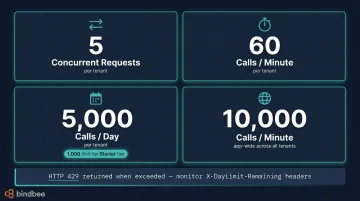
Staying within these limits requires both filtering data on the way in and handling rejections gracefully on the way out.
Date-range filtering: Include the If-Modified-Since header to retrieve only records modified since the last sync. After initial sync, this typically cuts call volume by 80–90%.
Exponential backoff: When limits are exceeded, Xero returns HTTP 429 with a Retry-After header indicating seconds to wait. Response headers also include X-DayLimit-Remaining, X-MinLimit-Remaining, and X-AppMinLimit-Remaining — monitor these to predict throttling before it happens. Always respect the Retry-After value rather than retrying immediately.
Efficient Data Retrieval Patterns
Fetching all records and filtering client-side is one of the fastest ways to burn through your daily call quota. Use Xero's built-in query parameters instead:
- Filter by status, date range, or contact type at the API level (for example, retrieve only AUTHORISED invoices or timesheets for a specific pay period)
- Most Accounting endpoints paginate at 100 items per page; Contacts supports
pageandpageSizeup to 250 - Journals uses offset-based pagination and returns a maximum of 100 entries per response
Know the Difference Between Similar Endpoints
Two pairs of endpoints are commonly confused — and using the wrong one creates data problems that are painful to untangle later.
Journals vs. Manual Journals:
- The Journals endpoint returns all journal entries (manual and system-generated), is read-only, and requires the Advanced tier plus a security assessment
- The Manual Journals endpoint is for creating journals only
- Mixing them up leads to duplicate or missing entries
Payments vs. BankTransactions:
- Payments link to specific invoices and bills
- BankTransactions record money movement independent of any invoice
- Using both without deduplication causes double-counting — a common issue for HR and benefits platforms syncing financial data
Error Handling and Observability
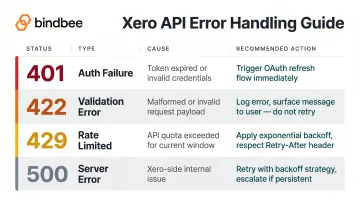
Categorize errors by type so your retry and alerting logic handles each correctly:
- 401 auth failures – token expired or invalid; trigger the OAuth refresh flow
- 422 validation errors – malformed request or missing required fields; log the error and surface it to the user rather than retrying
- 429 rate limits – retry with exponential backoff, respecting the
Retry-Afterheader - 500 server errors – retry with backoff; escalate if errors persist
Beyond catching errors, log all request metadata — including Xero's rate limit headers — so you can spot patterns before throttling becomes a problem. For webhook-based flows, track delivery receipts to confirm event processing and catch any dropped notifications early.
Common Challenges and Misconceptions When Integrating with Xero
Misconception: "The Xero API Works the Same Everywhere"
Xero's Payroll API is not global. Teams building for multi-region customers must handle AU/NZ and UK payroll endpoints separately. Object structures, field names, and available data differ significantly between regions.
The Accounting API is globally consistent, but payroll logic requires region-aware code paths. For example, AU Timesheets v2.0 endpoints differ from UK Timesheets endpoints even though both are version 2.0.
Token Management Is Often Deprioritized Until It Breaks
Many teams implement the initial OAuth flow successfully but neglect refresh logic. This leads to silent integration failures when access tokens expire mid-session.
Critical requirements:
- Access tokens expire in 30 minutes
- Refresh tokens expire in 60 days
- Both require active lifecycle management, not one-time setup
- Refresh tokens rotate on use; you must save the new refresh token returned with each refresh
Data Normalization Complexity Is Underestimated
Xero's response objects are deeply nested — for example, Invoice → LineItems → TrackingCategories → TaxRates. Teams integrating Xero data into HR or benefits platforms need significant preprocessing to map Xero's financial data model to employment-centric data models.
This translation layer is frequently more work than the API calls themselves. As a rule of thumb, budget 60-70% of integration time for data mapping, not API connectivity.
Client Credentials Scope Confusion
Once your data model is sorted, authentication scope is the next common failure point. The three flows serve distinct purposes:
- Client Credentials: Non-tenanted endpoints only — the app acts on its own behalf
- Authorization Code Flow: Required for tenanted accounting and payroll data
- PKCE Flow: The preferred option for tenanted data in public/mobile clients
Developers sometimes use Client Credentials tokens to access tenanted accounting endpoints — this returns a 403 error. Match the flow to the endpoint type before building your auth layer.
When Direct Xero API Integration May Not Be the Right Fit
The Single-System Integration Trap
Building directly to Xero's API makes sense when Xero is the only payroll or accounting system your platform needs to support. But most HR Tech, benefits administration, and payroll platforms need to integrate with dozens of HRIS and payroll systems—BambooHR, Gusto, Workday, ADP, and many others—in addition to Xero.
Maintaining separate auth flows, rate limit logic, and data normalization for each system multiplies engineering overhead significantly. That overhead compounds fast as your integration list grows.
What a Unified API Handles Instead
Platforms like Bindbee provide a single normalized API that abstracts data from 60+ HRIS, payroll, and benefits systems—including Xero—behind one integration layer. Instead of managing Xero's 30-minute token refresh, regional payroll endpoint differences, and custom data mapping, teams connect once and get standardized employment data across all systems.
Key advantages:
- Built-in sync and webhooks across every connected system
- Zero maintenance overhead when individual providers update their APIs
- One authentication model replaces separate auth flows for each payroll provider
- Normalized data schemas eliminate per-system mapping
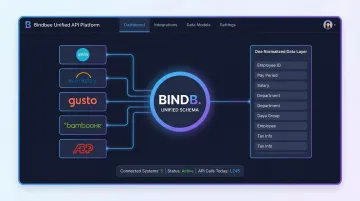
For teams building benefits platforms, HRIS integrations, or payroll sync tools, a unified API reduces integration time from weeks to hours, freeing engineering bandwidth for core product development.
Frequently Asked Questions
Is Xero an open API?
Yes, Xero offers a publicly documented REST API that any developer can access by registering an app in the Xero Developer Portal. While the API documentation is open, production use requires a paid Xero account.
What AI integrates with Xero?
Xero provides an AI Toolkit for developers that includes OpenAI Agents SDK, MCP Server, and LangChain resources. These enable AI platforms to pull financial and payroll data for use cases like anomaly detection and forecasting.
What authentication method does the Xero API use?
The Xero API uses OAuth 2.0, with three supported grant types: Authorization Code Flow (web apps), PKCE Flow (mobile/desktop), and Client Credentials (machine-to-machine). Access tokens expire in 30 minutes and refresh tokens in 60 days.
What are Xero's API rate limits?
Current limits are 5 concurrent requests, 60 calls per minute, and 5,000 calls per day per tenant (1,000 for starter tier). Exceeding these limits returns a 429 error; Xero's response includes a Retry-After header indicating wait time.
What programming languages does Xero support via SDKs?
Xero's officially supported SDK languages are C# (Xero-NetStandard), Java, Node.js, PHP, Ruby, and Python. Each SDK handles request formation and response parsing — developers still need to understand endpoint structures and data objects to work with them effectively.
What is the difference between Xero's Accounting API and Payroll API?
The Accounting API is globally available and covers financial data (invoices, payments, bank transactions). The Payroll API is region-specific (AU/NZ and UK have separate versions) and covers employee records, pay runs, timesheets, and leave. HR Tech teams syncing compensation data must use the Payroll API.