Introduction
Benefits platforms face a persistent challenge: payroll and benefits administration are operationally inseparable, yet most tech stacks treat them as separate systems. The result? 503 benefits errors per 1,000 employees costing organizations $139,230 annually per 1,000 employees, according to EY's 2022 HR Processing Risk and Cost Survey. Deduction mismatches, stale eligibility data, and broken enrollment flows create compliance exposure and manual cleanup that consume weeks of HR time each year.
Connecting payroll to benefits sounds straightforward — until you're debugging mismatched deductions at 11pm before open enrollment closes. Outcomes vary dramatically based on integration approach, data model design, sync architecture, and deduction writeback handling. This guide covers:
- What your benefits platform needs before building
- The step-by-step integration process
- Variables that determine data quality
- Common mistakes that cause integrations to fail
TL;DR
- Payroll-benefits integration creates a live, bidirectional data connection so employee records, deductions, and enrollment data stay synchronized automatically
- Pre-integration checklist: API credentials, a defined data map (employees, dependents, deductions, enrollment), and HIPAA/SOC 2 compliance readiness
- The four core steps: audit data requirements, choose your integration approach, establish bidirectional sync, then automate deductions
- Integration quality hinges on sync frequency, cross-provider data normalization, and webhook coverage for life events like new hires and terminations
- Unified API platforms reduce setup from 4-8 weeks per system to under a day, cutting integration maintenance to near zero
What You Need Before Integrating Payroll with Benefits Administration
Skipping preparation is the single biggest cause of failed payroll-benefits integrations. Data cleanup, access provisioning, and compliance readiness must come before any technical build.
System and API Access Requirements
Identify which payroll systems your employer clients use and confirm API availability for each. Not all payroll providers expose the same endpoints—some limit deduction writeback or dependent data access, which must be scoped before building.
Major payroll providers maintain developer programs:
- ADP, Gusto, Paychex, Ceridian/Dayforce, UKG, Rippling, Paylocity, and Workday all provide REST APIs through partner portals
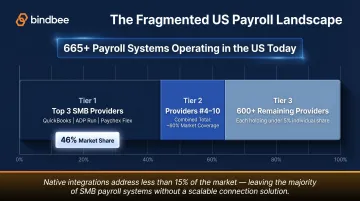
- The top 3 SMB payroll providers (QuickBooks, ADP Run, Paychex Flex) cover 46% of the SMB market
- The top 10 providers cover approximately 60% of the SMB market
- Beyond the top 10, individual providers each hold less than 5% market share
- With 665+ payroll software systems serving US employers, native integrations alone cannot achieve sufficient coverage—most teams rely on a unified API layer to close the gap
Data and Field Requirements
Define the minimum data model your benefits platform needs from payroll:
- Employee identifiers (ID, SSN), employment status, compensation
- Pay frequency and schedule
- Dependent information: full names, relationships, dates of birth
- Existing deduction codes and contribution amounts
- Benefits enrollment elections with effective dates
Missing any of these creates downstream enrollment or deduction errors. For example, incomplete dependent data causes ACA reporting failures—the IRS imposes $340 per incorrect or late Form 1095-C return, with a calendar-year maximum penalty of $4,098,500.
Compliance and Security Readiness
Confirm your platform meets data security requirements for handling payroll-adjacent PII before connecting any systems.
Key compliance requirements include:
- HIPAA BAA (required): Under 45 CFR 160.103, platforms handling protected health information qualify as business associates. Execute a BAA under 45 CFR 164.504(e) before processing any health enrollment data.
- SOC 2 Type II: Enterprise clients routinely require this certification, which audits controls across Security, Availability, Processing Integrity, Confidentiality, and Privacy over a 6-12 month examination period.
Additional requirements:
- Role-based access controls and audit logging for all data operations
- GDPR compliance if processing data for EU-based employers or EU-resident employees
- CCPA/CPRA compliance for California employee data (the employee exemption is no longer in effect)
How to Integrate Payroll with Benefits Administration
The steps below apply whether building direct API connections or using a unified API layer; the sequence and validation logic remain the same.
Step 1: Audit and Map Your Data Requirements
Define every data field your benefits platform needs to read from payroll and write back:
Read requirements:
- Employee census (name, ID, SSN, hire date, termination date)
- Compensation and pay schedule
- Employment status and work location
- Dependent records with coverage eligibility
Write requirements:
- Deduction codes and contribution amounts
- Enrollment effective dates
- Plan elections and coverage tier selections
Document this as a field mapping specification before writing code. Identify data format inconsistencies across target payroll systems—the same field (employment status, pay frequency) may use different values across providers. Resolving this at the mapping stage prevents normalization bugs later.
Step 2: Choose Your Integration Approach
Evaluate three primary approaches:
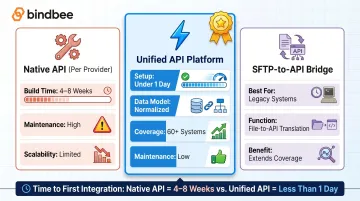
Native API integrations per payroll provider:
- Build time: 4-8 weeks per provider (some estimates range 2-3 sprints to 3-6 months)
- Requires ongoing maintenance as provider APIs change
- Supporting 10+ systems this way consumes significant engineering bandwidth
Unified/aggregated API platforms:
- Setup time: Under a day for initial integration
- Single API connects to 60+ systems with normalized data models
- Eliminates per-provider maintenance overhead
- Platforms like Bindbee provide benefits-first data models with separate Employee Benefits, Employer Benefits, and Dependent Benefits objects—purpose-built for this use case
SFTP-to-API bridge for legacy systems:
- Handles older payroll systems that only export flat files
- Translates file exports into normalized API responses
- Extends coverage to systems without modern API support
Step 3: Connect Employees and Establish Data Sync
Match employees across systems using stable identifiers:
- Typically employee ID or SSN
- Resolve demographic discrepancies before going live
- Confirm dependent records include relationship types and coverage eligibility flags
Configure sync frequency and direction:
- Use real-time incremental syncs for life event triggers (new hire, termination, dependent addition)
- Schedule batch syncs for non-time-sensitive data updates
- Configure webhooks for key events: new hire, termination, status change, dependent addition
Compliance timelines create hard sync requirements. Under 29 USC 1166, employers have 30 days to notify plan administrators of COBRA qualifying events, and administrators have 14 days to notify beneficiaries (a 44-day total window). If payroll termination data syncs weekly, you've already consumed up to 7 days before your benefits platform receives the triggering event.
Step 4: Map and Automate Deduction and Contribution Codes
Map your benefits platform's plan deductions to corresponding payroll deduction codes in each employer's system. Mismatched codes are the leading cause of incorrect paycheck deductions and require manual correction.
Configure bidirectional writeback so that when employees change benefits elections — increasing a 401(k) contribution or adding dependents to health coverage — your platform automatically updates the payroll system deduction without HR intervention.
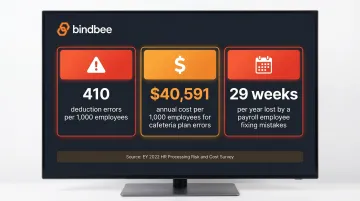
Cost of manual deduction processing: EY's 2022 survey found 410 scheduled earnings and deductions errors per 1,000 employees, with lunch/cafeteria plan errors costing $40,591 per 1,000 employees annually. A full-time payroll employee loses an average of 29 weeks per year fixing payroll mistakes.
Step 5: Test, Validate, and Monitor Post Go-Live
Run a full dry-run against a test payroll cycle before going live:
- Validate employee counts match across systems
- Confirm deduction amounts are correct
- Verify new hire enrollments process within eligibility windows
- Test that terminations trigger benefits offboarding
After go-live, establish ongoing monitoring:
- Check integration health dashboards for sync errors
- Validate deduction accuracy before each payroll run
- Set up alerting for failed webhook deliveries or data mismatches
- Monitor for demographic discrepancies that emerge over time
Key Variables That Determine Integration Quality
Two integrations can both be technically "connected" yet produce completely different outcomes. These four variables separate integrations that hold up under pressure from those that quietly create compliance and data problems.
Data Normalization Across Payroll Systems
Each payroll provider structures data differently — field names, status codes, pay frequency labels, and deduction classifications all vary. Without normalization, your benefits logic breaks the moment an employer switches payroll providers or you onboard a new client on a different system.
Unnormalized data causes enrollment mismatches, incorrect eligibility determinations, and deduction errors that are hard to trace. A normalized data model — where all payroll systems map to a consistent schema — makes your benefits logic portable and reliable across all 60+ providers.
Sync Frequency and Real-Time Trigger Coverage
Benefits administration runs on tight statutory deadlines:
- The ACA sets a 90-day maximum waiting period before health coverage must be effective for eligible employees
- COBRA notification carries a 44-day statutory window from qualifying event to beneficiary notification
- Batch-only syncs — daily or weekly — routinely miss both
The data quality problem compounds this. Research shows 32% of organizations need two or more pay cycles to fix payroll mistakes, and 69% of companies report at least one payroll data problem. Real-time incremental syncs combined with webhooks for life events close these gaps and reduce compliance exposure.
Bidirectionality (Read vs. Read-Write)
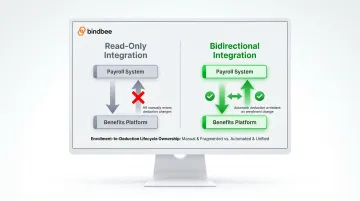
Many early-stage benefits integrations only read payroll data. But true integration requires write access — pushing deduction and contribution updates back into the payroll system. Without it, HR must manually enter every change, which defeats the purpose of automating the process.
Read-only integrations shift the deduction management burden back onto HR admins. Bidirectional integrations let the benefits platform own the full enrollment-to-deduction lifecycle: open enrollment changes, life events, and contribution adjustments all sync automatically.
Dependent Data Completeness
Health insurance, FSA, and COBRA administration all depend on accurate dependent records — full names, dates of birth, relationships, and coverage elections. Payroll systems often store this data inconsistently or leave it incomplete.
The downstream consequences are concrete:
- Enrollment failures when dependent fields don't validate
- Incorrect premium calculations tied to wrong coverage tiers
- ACA reporting errors on Forms 1094-C and 1095-C (IRS Part III requires name, SSN, and coverage months per covered individual)
- Penalties of $340 per incorrect return, up to $4,098,500 annually
Treat dependent records as distinct data objects in your integration — not as a subset of employee records — and validate them explicitly at each sync.
Common Mistakes When Integrating Payroll with Benefits Administration
Most payroll-benefits integration failures aren't architectural — they're execution mistakes that show up weeks or months after go-live. Here are the most common ones to avoid:
- Skipping the pre-integration data audit: Connecting systems before resolving employee record discrepancies means sync errors compound over time. Fix data quality issues in both systems before establishing the live connection.
- Treating deduction writeback as optional: Read-only integrations force HR to manually update deductions for every enrollment change and life event, eliminating most of the time savings the integration was meant to deliver.
- Building each payroll provider connection as a one-off: Separate, unmaintained native integrations create long-term technical debt. When payroll providers update their APIs, each connection breaks independently. Plan for normalized, maintainable connectivity from the start.
- Relying solely on scheduled syncs: Without event-driven triggers, late new hire enrollments, terminated employees retaining benefits access, and missed COBRA windows become real compliance risks.
When to Build Native vs. Use a Unified API Approach
The integration approach decision affects how many employers you can onboard, how quickly you can launch, and how much engineering time gets consumed by maintenance versus core product development.
Native API Builds
Best when:
- You have a small, well-defined set of payroll systems to support (1-3)
- Your enterprise clients require deep custom field access
- You have dedicated engineering bandwidth for ongoing API maintenance
Trade-offs to consider:
- Each native integration takes 4-8 weeks to build
- Requires ongoing upkeep as payroll provider APIs evolve
- Scaling to cover 10+ payroll systems this way is expensive and slows product velocity by months per system added
- With 665 payroll systems in the US market, native builds create a structural coverage ceiling at 60% market penetration (top 10 providers only)
That ceiling is where unified API platforms become the practical alternative.
Unified API Platforms
Best when:
- You need to support a broad range of employer payroll systems quickly
- Your team wants to avoid per-provider API maintenance
- You need a normalized data model out of the box for benefits-specific fields (enrollment elections, dependent coverage, deduction codes)
Example: Bindbee's unified API connects to 60+ HRIS and payroll systems through a single integration. It includes separate Employee Benefits, Employer Benefits, and Dependent Benefits objects — distinct data models that map directly to how benefits administration platforms consume and write enrollment data.
Key benefits:
- Setup time reduced from 4-8 weeks to under a day
- Eliminates ongoing maintenance burden as provider APIs change
- Provides normalized data schema across all systems
- Includes SFTP-to-API bridging for legacy systems
- SOC 2 Type II, ISO 27001, and HIPAA compliant
Where it falls short:
- Some edge-case custom fields may require additional configuration
- Vendor dependency means you're subject to platform-level API access decisions for deeply proprietary payroll fields
Frequently Asked Questions
What is payroll and benefits administration?
Payroll administration covers calculating and distributing employee compensation and tax withholdings, while benefits administration manages employee enrollment, eligibility, and deductions for health, retirement, and other benefit plans. Integrating the two syncs data between these functions automatically, removing manual deduction entry and the mismatches that come with it.
What data needs to sync between payroll and benefits systems?
Core data objects include:
- Employee demographics and employment status
- Compensation and pay frequency
- Dependent information (names, relationships, date of birth)
- Existing deduction codes
- Benefits enrollment elections and effective dates
Missing any of these creates errors in enrollment processing or paycheck deductions.
How long does it take to integrate a benefits platform with payroll systems?
Timelines vary by approach. Native API integrations per payroll provider typically take 4-8 weeks each, plus ongoing maintenance. Unified API platforms can reduce initial setup to under a day, with employer connections completing in hours rather than weeks.
What is the difference between a read-only and bidirectional payroll integration?
Read-only integrations pull employee and payroll data into the benefits platform but cannot push deduction updates back. Bidirectional integrations allow the benefits platform to write deduction and contribution changes back into the payroll system. This closes the enrollment-to-deduction loop without requiring HR to touch the data manually.
How should a benefits platform handle deduction updates when employees change their elections?
Changes to enrollment elections should trigger an automatic deduction update written back to the payroll system via API, matched to the correct deduction code for that employer. Without this writeback, HR must manually enter each change before the next pay cycle — a process that routinely causes missed deductions and compliance gaps.
What compliance requirements apply to payroll-benefits data integration?
Benefits platforms handling employee payroll data must meet several compliance standards:
- HIPAA: Required for health data, including a signed Business Associate Agreement
- SOC 2 Type II: Confirms security controls over data handling
- GDPR: Applies to EU employee data
- CCPA/CPRA: Covers California employee PII
- Audit logs: Required for eligibility and enrollment changes