Introduction
HR and Benefits Tech teams face a fundamental choice with every new system connection: FTP file transfers or API integration. The choice directly determines how quickly employee data moves between systems, how accurately eligibility records stay synchronized, and whether life events trigger coverage changes in time-sensitive COBRA and qualifying life event windows.
The stakes are tangible. When eligibility data lags by even 24 hours, downstream problems compound: incorrect benefit enrollments, failed carrier feeds, compliance exposure during COBRA election periods, and employer onboarding timelines that stretch from days into weeks. That rework adds up: CMS enrollment reconciliation data shows that delayed or inaccurate 834 enrollment feeds drive costly reconciliation cycles across exchanges and carriers.
For platforms managing eligibility data across dozens of employer groups, the integration method also determines whether your engineering team scales with your customer base — or gets buried maintaining it.
TL;DR
- FTP transfers data as scheduled batch files; APIs enable real-time system-to-system calls with immediate responses
- APIs deliver lower latency, token-based authentication, and structured error handling — making them the standard choice for real-time HR data flows
- FTP still fits where legacy HRIS vendors lack APIs or carriers mandate specific file formats (like 834 EDI)
- Your choice comes down to data freshness requirements, HIPAA-grade security needs, and your team's capacity to scale across employer systems
- Many teams need both — an SFTP-to-API bridge connects legacy file systems to modern pipelines without waiting on vendor roadmaps
API vs FTP: Quick Comparison
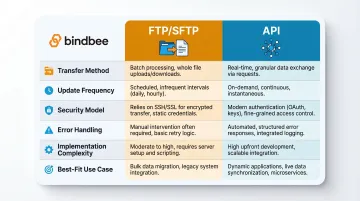
The table below frames the core differences between FTP and API integration across the dimensions that matter most for HR and Benefits data:
| Dimension | FTP/SFTP | API |
|---|---|---|
| Transfer method | Batch file drops to a file server (CSV, XML, fixed-width) | Direct system-to-system calls with structured requests and responses (typically JSON) |
| Update frequency | Scheduled (nightly, hourly, or manual) | Real-time or near-real-time (seconds to minutes) |
| Security model | System credentials, SSH encryption in transit (SFTP) | Token-based authentication (OAuth 2.0), scoped endpoint access |
| Error handling | File-level validation, often post-delivery; silent failures common | Structured per-record HTTP responses, immediate error feedback |
| Implementation complexity | File format negotiation, column mapping, scheduled polling | API endpoint integration, authentication flow, webhook configuration |
| Best-fit use case | Legacy systems without APIs, bulk carrier file submissions, historical migrations | Real-time eligibility syncs, event-driven workflows, multi-employer scale |
Important security note: When HR teams reference "FTP," they almost always mean SFTP (Secure File Transfer Protocol), which runs over SSH and encrypts data in transit. Plain FTP sends credentials and data unencrypted and is obsolete in HR contexts.
NIST recommends encrypted channels and FIPS-validated cryptography for all file exchange; base FTP does not meet this standard.
For HIPAA-regulated benefits data, verify that any file-based integration explicitly uses SFTP — not plain FTP — before approving it as a compliant data transfer channel.
What is FTP Integration?
FTP (File Transfer Protocol) — and its encrypted successor SFTP — transfers structured data files between systems via a file server. One system drops a file (typically CSV, XML, or fixed-width format), and another picks it up on a schedule. Like a mailbox, the sender leaves a package and the receiver checks back on a schedule to retrieve it.
This model dominated HRIS-to-benefits carrier connections before modern APIs existed. It required no direct system-to-system communication, worked with batch-oriented mainframe systems, and aligned with nightly payroll processing cycles that were already batch-driven.
Core limitations stem from the batch nature:
- Eligibility records lag until the next scheduled file drop — data freshness is capped by transfer frequency
- Format mismatches only surface after delivery, once parsing and validation run on the received file
- Every sender-receiver pair requires manual format negotiation: column order, date formats, null-value handling, and field mappings
SFTP improves security by encrypting credentials and payload over SSH (typically port 22), addressing the most critical vulnerability of plain FTP. However, it inherits all the operational constraints of batch file exchange.
Use Cases of FTP in HR and Benefits
Where FTP still fits:
- Older payroll platforms and traditional insurance carriers that have never built REST API endpoints still require file-based exchange
- Bulk enrollment submissions: 834 EDI (Benefit Enrollment and Maintenance) files mandated by HIPAA; state exchanges and Medicaid agencies specify SFTP or AS2 transport in their companion guides
- Historical data migrations during platform implementation — loading years of employee records in bulk is often simpler than thousands of sequential API calls
These use cases persist not by preference, but because vendor constraints force it — carriers, government programs, and legacy payroll systems dictate the transport, and downstream teams have no choice but to comply.
What is API Integration?
An API (Application Programming Interface) creates a direct, real-time connection between two systems. One system requests specific data or triggers an action and receives an immediate, structured response. Contrast this with FTP's asynchronous file-drop model using a concrete example:
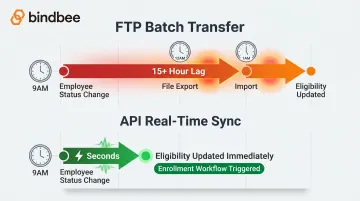
FTP scenario: A new hire is added in Workday at 10 a.m. The nightly eligibility export runs at midnight. The benefits platform imports the file at 1 a.m. The employee appears eligible 15 hours after being hired.
API scenario: The new hire is added in Workday at 10 a.m. A webhook notifies the benefits platform within seconds. Eligibility updates immediately, and enrollment workflows trigger before the employee's first day.
Modern REST APIs in HR Tech use token-based authentication (OAuth 2.0), return data in JSON format, and support webhook notifications. With webhooks, systems push updates proactively rather than waiting to be polled, enabling event-driven architecture where actions in one system automatically propagate to connected platforms.
Use Cases of API Integration in HR and Benefits
Where APIs excel:
- Keeps benefits platforms current with real-time eligibility syncs as HRIS records change throughout the day
- Triggers time-sensitive workflows for life events — new hires, terminations, and dependent additions
- Handles dependent coverage changes (additions, removals, relationship updates) the moment they occur
- Syncs enrollment confirmations, including employee elections and effective dates, back to HRIS and payroll
- Flows payroll deduction updates accurately between benefits and payroll systems
Stale data causes tangible downstream errors across every one of these scenarios. Wrong plan assignments, coverage gaps, incorrect deductions, and missed COBRA notices trace directly back to integration latency.
Major HRIS platforms — Workday, BambooHR, Rippling, and ADP — have each built out substantial API capabilities. For HR Tech vendors building on top of these systems, native file-based integrations are increasingly a design constraint, not a design choice.
API vs FTP: What Matters Most for HR and Benefits Data
Data Freshness and Latency
Benefits eligibility errors — wrong plan enrollments, coverage gaps, incorrect deductions — often trace back to stale data from batch FTP transfers. When an employee's status changes at 9 a.m. but the next file export runs at midnight, eligibility records lag by 15+ hours. During that window:
- Benefits platforms display outdated enrollment information
- Enrollment workflows apply incorrect eligibility rules
- Payroll deductions calculate against superseded data
API-based incremental syncs keep eligibility records current throughout the day. Rather than replacing the entire dataset nightly, APIs fetch only changed records — new hires added since the last sync, terminated employees, dependents added during a qualifying life event. This cuts latency from hours to minutes and removes the reconciliation overhead of figuring out what changed between batch runs.
CMS enrollment reconciliation data tracks acceptance rates and error remediation for 834 enrollment feeds — direct evidence that batch file processing creates reconciliation cycles and exposes plans to compliance risk when transactions fail or lag.
Security and Compliance
FTP security risks in HR contexts:
- Credentials stored on remote servers — SFTP requires system-level usernames and passwords, often stored in plain text configuration files
- Shared system user profiles — a single SFTP credential may grant access to the entire file directory, not just the specific data needed for integration
- No built-in encryption in base FTP — only SFTP adds encryption; plain FTP is fundamentally insecure
The 2023 MOVEit managed file transfer vulnerability exposed approximately 93.3 million individuals and over 2,700 organizations, including impacts to payroll provider Zellis that propagated to BBC, British Airways, Boots, and Aer Lingus. File transfer systems, even "secure" ones, present a broad attack surface when system credentials grant wide access.
API security advantages for HIPAA compliance:
- OAuth 2.0 token-based authentication — access tokens are scoped to specific endpoints and expire automatically
- Principle of least privilege — each integration receives only the permissions it needs (read employee data, write enrollment elections), not system-wide access
- Alignment with HIPAA technical safeguards — 45 CFR § 164.312 requires transmission security and access controls to guard against unauthorized access to ePHI; scoped API tokens directly support these requirements
For Benefits Tech platforms handling protected health information, API integrations with OAuth reduce the compliance surface area by eliminating shared system credentials and limiting access to only requested data models.
Error Handling and Reconciliation
With FTP: A malformed file may fail silently — the SFTP server accepts the file, but the downstream parser encounters formatting errors and rejects individual records. Identifying which records failed, why they failed, and how to remediate often requires manual log review and coordination between sender and receiver. Large batch files compound this: a single formatting error can block processing of thousands of valid records.
With APIs: Each request returns a structured HTTP response with explicit success or error codes. If an employee record fails validation (missing required field, invalid date format, referential integrity error), the API responds immediately with a machine-readable error message. This enables:
- Automated retry logic — the integration layer can re-attempt failed records without manual intervention
- Real-time alerting — engineering teams know within seconds when an integration breaks
- Faster resolution — structured error messages pinpoint the exact field and validation rule that failed
At scale — processing thousands of employee records across many employer groups — this difference compounds. Small error rates across thousands of records become major eligibility incidents without proactive handling.
Maintenance Burden at Scale
Connecting to dozens of HRIS systems — each with its own file format, column mapping, and delivery schedule — makes maintaining FTP integrations an engineering tax. Each new HRIS requires:
- Negotiating file format (CSV column order, date format, null-value encoding)
- Configuring SFTP credentials and directory structure
- Writing custom parsers for that system's file layout
- Monitoring scheduled transfers and handling missed or delayed files
- Updating parsers when HRIS vendors change export formats
The HR data ecosystem is fragmented: unified API providers like Finch advertise access to 250+ providers, and Merge lists hundreds of HRIS/payroll integrations, evidencing the breadth of point-to-point connections needed to serve a diverse customer base.
API-based integrations with normalized data models reduce this overhead. Bindbee's unified API normalizes data across 60+ HR and payroll systems through a single integration layer. Rather than maintaining 60 different file parsers, Benefits Tech teams integrate once and access standardized data models for employees, dependents, benefits, and payroll — regardless of the underlying HRIS. This eliminates per-system format negotiation and concentrates maintenance effort into a single integration interface.
Event-Driven Workflows and Webhooks
One of the most important advantages of APIs for benefits platforms is the ability to receive webhook notifications for life events — new hires, terminations, dependent additions, address changes — in real time.
Why this matters for time-sensitive benefits actions:
- COBRA election windows: Qualified beneficiaries must have at least 60 days to elect COBRA coverage, starting from the later of the coverage loss date or the date of election notice. Delayed termination notifications compress this window and create compliance exposure.
- Qualifying life events (QLEs): Marketplace special enrollment periods and Section 125 plan mid-year election changes are triggered by specific life events with tight timelines. Batch file delays can cause employees to miss enrollment deadlines.
- Dependent coverage changes: Adding a newborn or newly adopted child to health coverage requires timely notification to avoid gaps in coverage.
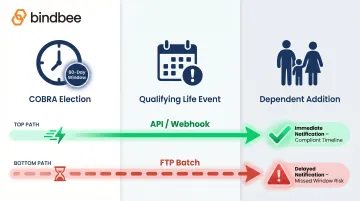
FTP cannot natively support event-driven triggers — a batch export runs on a fixed schedule regardless of whether anything actionable occurred. APIs with webhooks invert this model: the HRIS pushes a notification the moment a relevant event happens, and the benefits platform reacts immediately.
For COBRA, QLEs, and dependent changes, that difference between hours and seconds isn't just an architecture preference — it's the difference between a compliant workflow and a missed deadline.
Which Should You Choose?
The "right" integration method is dictated by four factors:
1. Source system capabilities — Does the HRIS, payroll platform, or carrier support APIs? If not, FTP may be the only option.
2. Data freshness requirements — Do eligibility records need to update in real time, or is overnight batch processing acceptable?
3. Compliance and security posture — Are you handling HIPAA-regulated ePHI that requires scoped access controls and audit trails?
4. Engineering capacity — Can your team build and maintain per-system file parsers, or do you need a normalized integration layer?
Situational Recommendations
Choose API if:
- The source system supports REST APIs (most modern HRIS platforms do)
- Data freshness matters — real-time eligibility, event-driven workflows, life event notifications
- You're integrating with many employer systems and need to avoid per-system format negotiation
- HIPAA compliance requires scoped access and token-based authentication
Choose FTP/SFTP if:
- The vendor only supports file exports (legacy payroll platforms, traditional carriers)
- You're submitting bulk carrier files in mandated formats (834 EDI enrollment files)
- You're performing a one-time historical data migration during implementation
These are constraints, not preferences. Most teams would choose APIs if the option existed — but vendor capabilities often dictate the integration path.
The Hybrid Reality for HR Tech Teams
Many HR and Benefits platforms encounter both scenarios at once: modern HRIS systems with robust APIs running alongside legacy carriers or older payroll platforms that only export files.
Maintaining two separate integration pipelines — one API-based, one file-based — doubles engineering overhead and creates inconsistent data models downstream.
Bindbee's SFTP-to-API Bridge addresses this hybrid reality. It ingests legacy file-based data (CSV, XML, fixed-width formats) and delivers it through the same normalized API interface used for live system connections. This means:
- Engineering teams build one integration pipeline, not two
- Legacy file-based data flows through the same normalized data models as API-connected systems
- You don't have to wait for vendors to build APIs — the bridge modernizes the connection layer immediately
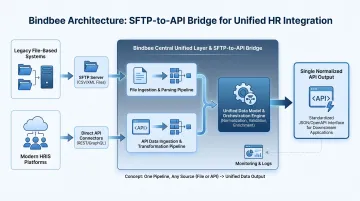
Bindbee's unified API normalizes data across 60+ HR and payroll systems — whether they connect via native API or file export — providing consistent Employee, Dependent, and Benefits data models regardless of the underlying source.
When API Wins (And When FTP Is Unavoidable)
Where a choice exists, API integrations consistently deliver better outcomes for HR and Benefits Tech:
- Faster employer onboarding — connections in hours instead of weeks
- More accurate eligibility data — real-time syncs eliminate overnight batch lags
- Lower maintenance overhead through normalized data models instead of per-system parsers
- Stronger compliance posture — scoped OAuth tokens replace shared system credentials
If you're building or operating an HR Tech or Benefits platform and need to connect to multiple HRIS, payroll, or carrier systems, explore how Bindbee handles both API and file-based connections through a single unified layer — eliminating the choice between modern and legacy integration architectures.
Frequently Asked Questions
What is the difference between an API and FTP?
FTP transfers data as batch files between systems on a schedule — one system drops a file, the other retrieves it later. An API enables direct, real-time data exchange through structured requests and responses. They serve different integration patterns rather than being direct substitutes: FTP fits batch-oriented workflows, while APIs enable real-time, event-driven architectures.
Is SFTP more secure than a standard API integration?
SFTP adds encryption over standard FTP but still relies on system-level credentials that often grant broader access than needed. API integrations using OAuth 2.0 are generally more secure for HR data: access is scoped to specific endpoints, tokens expire automatically, and no shared system passwords are stored on remote servers.
When should you still use FTP for HR data integrations?
Use FTP when the HRIS or carrier system offers no API support, when submitting mandated file formats to insurance carriers (like 834 EDI enrollment files), or during bulk historical data loads when migrating to a new platform. These are vendor-driven constraints, not architectural preferences.
Can you use both API and FTP in the same integration setup?
Yes — many HR Tech platforms support both simultaneously. For example, you might use an API connection to a modern HRIS while still receiving file-based feeds from legacy payroll or carrier systems. Bindbee's SFTP-to-API Bridge unifies both approaches, letting file-based data flow through the same normalized API interface as live system connections.
What are the limitations of FTP for benefits eligibility data?
FTP's batch nature means eligibility is only as current as the last scheduled transfer — often 12-24 hours behind. It lacks event-driven notification, requires manual file format maintenance for each HRIS, and cannot trigger real-time workflows on its own for time-sensitive life events like COBRA elections or qualifying life event enrollment windows.
How do APIs improve accuracy for employee benefits data?
APIs allow incremental, near-real-time syncs with structured error responses per record. When a validation error occurs, the API returns an immediate, machine-readable explanation, enabling automated retry logic and faster correction. Batch file processing, by contrast, delays error detection until after transfer completes — often requiring manual log review.