TLDR
- Integration support covers the customer-facing work of activating, authenticating, and troubleshooting integrations — not backend maintenance
- Core challenges: authentication failures, API versioning breaks, and support volume that outpaces headcount
- Effective strategies: productize integrations, build in observability, and enable self-service for customers
- Unified API platforms reduce support burden by normalizing data across many systems through one connection
- In HR Tech specifically, failed syncs during enrollment windows create compliance risk and customer churn
What Is Integration Support?
Integration support is the day-to-day service that helps customers select, activate, authenticate, monitor, and troubleshoot integrations between your platform and the other tools in their stack. It's delivered by customer success, technical support, or implementation teams — and it's often what separates a working integration from an abandoned one.
Integration support is not the same as integration maintenance. Maintenance is the backend work — code updates, API version upgrades, security patches — handled by engineering and DevOps. Support is the customer-facing layer that translates what's happening under the hood into answers customers can act on.
Who Provides Integration Support?
Support can come from several sources:
- Internal customer success or technical support teams
- The integration vendor's partner engineering team
- Automated tooling and documentation that enables customer self-service
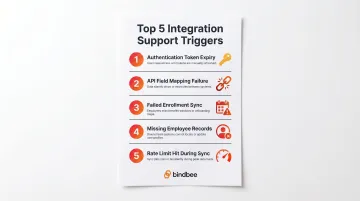
Common Support Triggers
Integration support interactions typically start when something breaks:
- Authentication tokens expire or rotate
- Data field mappings fail after an upstream API change
- Scheduled enrollment syncs don't fire
- New employee records don't appear in the connected system
- Rate limits are hit during high-volume sync windows
Each of these failures creates a support ticket — and each unresolved ticket erodes customer confidence. The business cost compounds quickly.
The Business Cost of Poor Integration Support
According to the MuleSoft 2026 Connectivity Benchmark Report (surveying 1,000+ IT leaders), 95% of organizations face integration challenges. The average enterprise runs 897 applications with only 29% integrated.
Poor integration support directly impacts retention. The ProfitWell Integrations Benchmark (analyzing 500,000 companies) found that products with four or more integrations show 18-22% higher retention rates. Users with integrations enabled are 58% less likely to churn (Crossbeam 2023).
When integrations break and support can't resolve issues quickly, those retention gains reverse fast. For SaaS companies selling into HR Tech and benefits, where data accuracy is non-negotiable, slow or ineffective integration support is a direct path to churn.
Key Terms and Concepts in Integration Support
These definitions cover the core building blocks of integration support — the models, mechanisms, and failure points your team will encounter most often.
Integration as a Service (IaaS)
Integration as a Service is a delivery model where a third party provides pre-built connectors, middleware infrastructure, and ongoing integration management as a service. The buyer doesn't build or host the integration layer themselves.
Unified APIs represent the most common Integration as a Service model in HR Tech—they abstract connections to dozens of HRIS and payroll systems behind a single standardized interface.
Unified API
A unified API normalizes data from many disparate systems (like 60+ HRIS, payroll, and benefits platforms) into a single standardized interface. Your product team builds once and gains access to dozens of integrations without managing each one individually.
How this reduces support overhead:
- One authentication flow instead of 60
- One data model instead of learning each provider's schema
- One set of documentation for all integrations
- Maintenance handled by the unified API provider, not your team
Integration Observability
Integration observability is the capability to monitor, log, and surface the internal state of running integrations—including error rates, sync statuses, data flow failures, and authentication issues.
Observability turns a "black box" integration into a diagnosable, manageable system:
- Logs record what happened (timestamps, actions, errors)
- Alerts proactively notify you when something goes wrong
- Dashboards surface integration health at a glance
Without observability, every issue escalates to engineering because front-line support can't diagnose it.
Webhooks and Event-Driven Integration
Webhooks are automated HTTP callbacks triggered by specific events—a new hire added, a termination recorded, a dependent change made. They contrast with polling-based integrations that check for changes on a schedule.
Why event-driven approaches reduce support burden:
One documented example (Webhook vs. Polling — Medium) shows a polling-based system running on 5-second intervals generated 17 million API calls per day, with 99.9% returning no new data. This triggered rate limiting, account suspensions, and significant infrastructure costs.
Event-driven webhooks eliminate stale data complaints and reduce infrastructure overhead by 99%+.
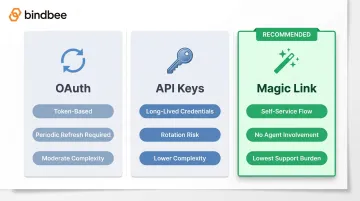
Authentication and Token Management
Authentication failures are among the most common integration support triggers. Tokens expire, credentials rotate, and multi-step auth flows time out.
Common authentication methods:
- OAuth – Token-based authorization requiring periodic refresh
- API keys – Long-lived credentials that providers sometimes rotate
- Magic Link – Embedded auth components that allow end users to authenticate without involving a support agent
The Magic Link approach shifts authentication from a support-mediated process to a customer self-service flow, cutting support ticket volume significantly.
SFTP-to-API Bridge
An SFTP-to-API bridge translates file-based data exports (common in legacy HRIS systems that can't expose a live API) into structured, queryable API responses.
When this matters:
Many enterprise HR systems still rely on scheduled file drops. Without an SFTP bridge, every sync cycle requires manual intervention:
- Downloading exported files
- Parsing provider-specific formats
- Validating data integrity
- Uploading results to the target system
A bridge automates this entire workflow, making legacy systems behave like modern APIs.
Common Challenges in Integration Support
Authentication and Credential Management at Scale
Keeping integrations authenticated is one of the most persistent support headaches. OAuth tokens time out, API keys get rotated by third parties, and enterprise HRIS systems often use non-standard auth flows.
Why this creates high-volume support:
- Each token expiry generates a support ticket
- Customers don't understand why re-authentication is needed
- Multi-step OAuth flows fail midway through
- Different HRIS systems require different credential types
If authentication isn't designed for self-service from the start, it becomes a recurring, high-volume support category.
API Versioning and Third-Party Breaking Changes
Third-party API providers (HRIS vendors, payroll platforms, benefits carriers) change their APIs without warning—deprecated endpoints, restructured data models, new required fields. Each change can break existing integrations instantly.
According to the Postman 2025 State of the API Report (5,700+ respondents):
- Only 26% of API teams use semantic versioning
- Only 17% perform contract testing
- 55% cite documentation as a blocker
Those numbers tell a clear story: most API providers don't have meaningful safeguards against breaking changes. Without semantic versioning or contract testing in place, downstream integration platforms absorb the maintenance burden every time an upstream provider ships an update.
Workday illustrates this well. Running on a biannual release schedule, Workday regularly deprecates features across integrations, core connectors, and web services — and some of those deprecated features are eventually deleted entirely, creating hard breaking changes for every dependent integration (Makse Group).
Scaling Support Without Scaling Headcount
If your support team must manually triage every integration issue for every customer, headcount grows proportionally with your customer base—economically unsustainable.
The cost of manual support at scale:
According to Forrester (2024), enterprises spend 30-50% of their total integration budget on ongoing maintenance activities including API updates, error resolution, and security patches.
The difference between services vs. productized models:
- Services model: Customized one-off integrations requiring dedicated support for each customer
- Productized model: One integration codebase configured per customer, requiring far less per-customer support effort
Gartner projects that by 2026, 80% of organizations will face a shortage of skilled integration developers, making productized integrations the only viable path at scale.
Lack of Logging and Error Visibility
When integrations don't emit useful, human-readable error messages and logs, every issue escalates to engineering because front-line support cannot diagnose it.
Good logging vs. bad logging:
| Bad Error Message | Good Error Message |
|---|---|
| "Process terminated unexpectedly" | "Remote server returned a 429 rate limit error; retry scheduled in 60 seconds" |
| "Authentication failed" | "OAuth token expired on 2026-01-15; customer re-authentication required" |
| "Sync error" | "Required field 'dependent_relationship' missing in record ID 12345" |
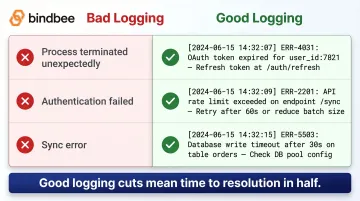
Good logging lets first-tier support close tickets that would otherwise sit in an engineering queue for days. That alone can cut mean time to resolution in half.
Core Components of an Effective Integration Support Strategy
Effective integration support doesn't happen by accident. It's built from three deliberate architectural choices: how integrations are structured, how they're monitored, and how much customers can do on their own.
Productize Integrations for Scalability
Shift from custom, one-off integrations to productized integrations: a single integration codebase that handles variation through configuration (sync direction, field mapping, notification preferences) rather than custom code per customer.
The operational payoff is significant:
- Simplified documentation across all customers
- Reduced per-customer support variance
- Self-serve activation through an integration marketplace or catalog
- Faster onboarding with predictable setup flows
Build Observability and Documentation In, Not On
Productized integrations only scale if your team can see what's happening inside them. That's where observability comes in — and it Observability and documentation cannot be retrofitted after the integration is live—they must be part of the build.
In practice, that means:
- Capturing structured error messages during development
- Building customer-facing dashboards showing sync status and logs
- Writing documentation as each integration is shipped
- Providing searchable error libraries for common issues
When support teams can access integration logs and status on their own (without routing every issue to engineering), resolution times drop and engineering capacity stays focused on product work.
Enable Customer Self-Service
Observability helps your internal teams move faster. Self-service takes that a step further by removing the ticket entirely.
Self-service is the highest-leverage investment in integration support: anything a customer can diagnose and resolve themselves removes load from the support team entirely.
Core self-service capabilities to build toward:
- Status dashboards showing sync health
- Replay/retry functionality for failed syncs
- Searchable error documentation with resolution steps
- In-product guided authentication flows
- Manual sync triggers accessible via dashboard or API
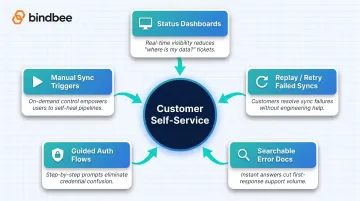
Each capability shifts a category of tickets out of the queue entirely — and moves resolution from hours to minutes for the customers handling it themselves.
Integration Support in HR Tech and Benefits Platforms
HR Tech and Benefits integrations carry unique complexity: they handle sensitive employee data (PII, health plan elections, dependent information), must comply with HIPAA and SOC 2 requirements, and operate on tight timing windows tied to enrollment periods, payroll cycles, and life events.
A failed sync during open enrollment isn't a minor inconvenience—it can mean employees lose coverage.
HRIS Fragmentation
HR and benefits platforms must connect with dozens of HRIS and payroll systems—ADP, Workday, Rippling, BambooHR, and many more—each with its own data model, authentication approach, and update cadence.
The Sapient Insights 2025-2026 HR Systems Survey (9,886 HR professionals from 4,670 organizations worldwide) references 1,539 distinct technology solutions across 22 HR tech segments—and that's a conservative count. Finch puts the total at "thousands."
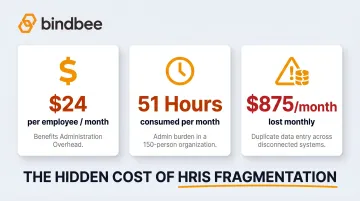
The engineering cost of supporting this fragmentation compounds fast. LiftHCM (August 2025) reports that benefits administration averages $24 per employee per month with disconnected systems. In a typical 150-employee organization, administrative tasks consume 51 hours monthly, and duplicate data entry alone costs approximately $875 per month.
How Unified API Platforms Reduce Support Burden
Unified API platforms like Bindbee reduce integration support burden by providing normalized, benefits-first data models across 60+ HRIS, payroll, and benefits systems through a single API connection.
Key capabilities that reduce support tickets:
- Incremental syncs run automatically, keeping data current without manual intervention
- Webhooks fire on life events—new hires, terminations, dependent changes—eliminating polling overhead
- API version upgrades, token rotation, and rate limiting are handled at the infrastructure level, not by your team
- Magic Link lets customers self-authenticate in minutes rather than weeks of back-and-forth
This architecture eliminates per-system support overhead, allowing HR Tech and Benefits teams to focus support resources on customer outcomes rather than connector maintenance.
Compliance Requirements
Group health plans are covered entities under HIPAA (45 CFR 160.103). Third-party integration platforms handling PHI must execute Business Associate Agreements (45 CFR 164.504(e)).
HHS OCR enforcement data (October 2024) shows 152 cases resulting in penalties totaling $144.9 million—an average of approximately $953,000 per case (HHS.gov).
Sync failures carry direct financial consequences beyond fines. Per LiftHCM:
- A single benefits enrollment error costs an average of $400 to resolve
- Delayed termination data triggers COBRA notification penalties averaging $110 per day per affected employee
Frequently Asked Questions
What is integration support job description?
Integration support roles sit within customer success or technical support teams. Core responsibilities include helping customers configure integrations, troubleshoot authentication and data sync issues, monitor integration health, and escalate complex failures to engineering.
What is the integration service?
Integration service is a professional offering (a software platform or API layer) that connects separate software systems so data flows accurately between them. It typically covers connectivity, ongoing monitoring, and support for data synchronization across applications.
What is an example of integration as a service?
A unified API is a good example: a platform that provides pre-built, maintained connectors to dozens of third-party systems (like HRIS, payroll, and benefits platforms) through a single API endpoint. Engineering teams receive the integration infrastructure and ongoing maintenance as a service rather than building it in-house.
What does integration mean?
Integration in software terms is the process of connecting two or more separate systems so they can share and synchronize data automatically. It eliminates manual data entry and reduces the errors that come with it, giving teams consistent, up-to-date information across every platform.
What is 24/7 technical support?
24/7 technical support refers to around-the-clock availability of a support team or automated monitoring system to address integration failures, authentication issues, or data sync errors at any hour. This is particularly important for integrations that run on automated schedules outside business hours.