Introduction
QuickBooks has solid documentation and a well-structured RESTful API — but building a production-ready integration is harder than it looks. OAuth token management, minorversion parameters, rate limit handling, and cross-system data consistency all require careful attention. Miss any one of them and your integration either fails silently or corrupts accounting data.
This guide is for developers and technical teams at HR tech platforms, payroll systems, and fintech companies syncing financial data between their products and customers' QuickBooks instances.
If you're building a product integration — not just connecting internal tools — you're dealing with multi-tenancy, per-realm token storage, and customer-facing OAuth flows, all while maintaining financial data integrity.
Without careful implementation, stale tokens crash scheduled syncs, missing minorversions return incomplete records, and poor error handling creates duplicate journal entries. This guide walks through each of those failure points and shows you how to handle them correctly — from OAuth setup through error recovery and data consistency.
TL;DR
- QuickBooks uses OAuth 2.0 authentication : create an Intuit Developer account, configure an OAuth app with the correct scopes, and test in sandbox before production
- The accounting scope (com.intuit.quickbooks.accounting) covers invoices, bills, customers, journal entries, and most financial entities
- Access tokens expire after 60 minutes : implement proactive refresh logic using the refresh token to maintain uninterrupted data sync
- Rate limits cap at 500 requests per minute per realm ID : use exponential backoff and batch operations to avoid failures
- For platforms integrating with multiple HRIS systems alongside QuickBooks, a unified API layer like Bindbee cuts integration engineering overhead — teams typically recover bandwidth within the first deployment cycle
What Is the QuickBooks API?
The QuickBooks API (formerly the QuickBooks Online Accounting API) is a RESTful interface that exposes core accounting entities through standardized JSON endpoints. You can read and write customers, vendors, invoices, bills, payments, journal entries, and financial reports. The API runs on the Intuit Developer platform at developer.intuit.com.
Two distinct API surfaces exist:
| API Surface | OAuth Scope | Use Case |
|---|---|---|
| QuickBooks Online Accounting API | com.intuit.quickbooks.accounting | Accounting data: invoices, bills, customers, journal entries, reports |
| QuickBooks Payments API | com.intuit.quickbooks.payment | Payment processing: credit card charges, bank account debits |
Most integrations only need the accounting scope. Which scope you need depends partly on how you're integrating — and there are two distinct patterns:
| Integration Type | Who Controls Both Ends? | Credential Complexity |
|---|---|---|
| Internal — connects your own tools to your QuickBooks instance | You | Single set of credentials |
| Product — connects your SaaS product to each customer's QuickBooks instance | Your customer authorizes access | Unique realm ID + OAuth tokens per customer |
Product integrations are the harder, more common scenario for HR tech and payroll platforms. Each customer has a unique realm ID (QuickBooks' identifier for a company), and you must manage OAuth tokens, API calls, and error handling independently for every account.
The API organizes entities into four groups:
- List entities — Account, Customer, Vendor, Employee
- Transaction entities — Invoice, Bill, Payment, JournalEntry, Purchase
- Report entities — ProfitAndLoss, BalanceSheet, CashFlow
- Inventory entities — Item
How to Set Up Your QuickBooks API Integration
QuickBooks API integration follows a fixed sequence: account creation, app configuration, OAuth implementation, sandbox testing, then production. Each stage depends on the previous one — skip or rush any step and you'll hit authentication failures or data integrity problems that are significantly harder to debug later.
Prerequisites and Access Requirements
Before writing code, ensure these are in place:
- Active QuickBooks Online subscription or sandbox access via the Intuit Developer portal
- Registered Intuit Developer account
- Clarity on required scopes (accounting, payments, or both)
- Secure server-side environment to store Client ID and Client Secret (never expose these client-side)
Critical: Understand your target users' QuickBooks subscription tier. Certain entities and report endpoints behave differently across plans.
Step-by-Step Integration Setup
Create an Intuit Developer account
Visit developer.intuit.com and register. This automatically provisions a sandbox QuickBooks Online company for development and testing. You can create up to 10 sandbox companies, each valid for two years.
Create a Development Workspace and OAuth app
Inside your workspace, create an OAuth app and select the appropriate scopes:
com.intuit.quickbooks.accountingfor financial data accesscom.intuit.quickbooks.paymentfor payment processing
This generates your Client ID and Client Secret.
Implement OAuth 2.0 authorization code flow
The flow works like this:
- Redirect users to Intuit's authorization endpoint
- Capture the authorization code on your callback URL
- Exchange the code for an access token and refresh token
- Store both tokens securely, indexed by realm ID
Token lifecycle (critical to understand):
- Access tokens expire after 60 minutes
- Refresh tokens expire after 100 days of inactivity
- Refresh token values can rotate every 24 hours — always store the latest refresh token returned from any API call
Make your first API call against sandbox
Use the base URL:
https://sandbox-quickbooks.api.intuit.com/v3/company/{realmId}/Pass the access token in the Authorization header. Always specify the
minorversionparameter — the base version dates to 2014 and lacks modern fields. Current minorversion is 75.GET /v3/company/{realmId}/customer?minorversion=75 Authorization: Bearer {access_token}Set up webhooks
Register your endpoint in the app dashboard and subscribe to entity-level events (invoice creation, payment updates).
Always verify the
intuit-signatureheader before processing any payload. Verification works by computing an HMAC-SHA256 hash of the raw request body using your app's Verifier Token as the key, then Base64-encoding the result and comparing it against the header value.
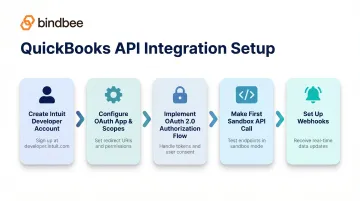
With all five steps complete, you're ready to validate the integration against realistic scenarios before moving to production.
Testing and Validation
Test both happy paths and failure scenarios in sandbox before going live:
Happy paths:
- Successful invoice creation
- Customer sync
- Payment capture
- Token refresh without user intervention
Failure scenarios:
- Expired tokens (401 errors)
- Invalid realm IDs
- Malformed JSON
- 429 rate limit responses
Indicators of a correctly functioning integration:
- Tokens refresh automatically without user intervention
- Entity reads return current data with expected fields populated
- Write operations (POST/PUT) return the created/updated object with an assigned ID
- Webhook events arrive and are processed idempotently (no duplicate processing)
QuickBooks API Integration Use Cases
Sync payroll journal entries from HR/payroll platforms
HRIS and payroll tools can map compensation, deductions, and employer contributions to QuickBooks' journal entry structure and push daily payroll summaries. This keeps finance teams' general ledgers accurate without manual data entry.
Example: Gusto (used by 40,000+ US businesses) automatically posts wages, taxes, and reimbursements to QuickBooks' expense section each time payroll runs. For platforms serving multiple employer clients, you'll need to manage each client's QuickBooks realm ID independently.
Automate invoice creation from CRM or billing systems
When a deal closes or a subscription renews in a CRM or billing platform, trigger a POST to /v3/company/{realmId}/invoice with the relevant customer reference, line items, and payment terms. This eliminates the manual handoff between sales and finance teams.
Surface QuickBooks financial data inside HR or benefits platforms
Benefits and HR platforms can pull balance sheet data, expense reports, or departmental cost data from QuickBooks report endpoints to give HR leaders real-time budget context alongside headcount and benefits cost data.
Note: Report endpoints like BalanceSheet and TransactionList cap at 400,000 cells per response. Implement date-range pagination logic to stay within limits. Intuit recommends limiting report date ranges to six months per request.
For HR tech and benefits platforms: If your product needs to pull employee data from multiple HRIS systems AND push workforce cost data into QuickBooks, Bindbee's unified HRIS API pairs naturally with direct QuickBooks API calls to cover the full pipeline. Bindbee handles:
- HRIS authentication and data normalization across 60+ platforms
- Real-time syncing from systems like Workday, ADP, and Dayforce
- A single connection point, replacing dozens of individual integrations
Common QuickBooks API Integration Challenges and Fixes
These three issues account for the majority of QuickBooks API integration failures in production. Each has a specific root cause and a reliable fix.
OAuth Token Expiry Breaking Data Syncs
Problem: API calls start returning 401 Unauthorized errors mid-sync, disrupting scheduled data flows.
Likely cause: The access token expired after 60 minutes and the refresh logic either wasn't implemented or failed silently.
Fix: Implement proactive token refresh that checks token expiry before each API call (or on a 55-minute interval) and uses the stored refresh token to obtain a new access token. Log refresh failures as critical alerts — the refresh token expires after 100 days of inactivity, at which point users must re-authorize.
Rate Limit Errors Causing Dropped Records
Problem: Integration returns 429 Too Many Requests errors under high-volume sync operations, and some records fail to write.
Likely cause: Exceeding the 500 requests/minute/realm ID limit, often triggered by bulk backfill operations or unthrottled loops.
Fix:
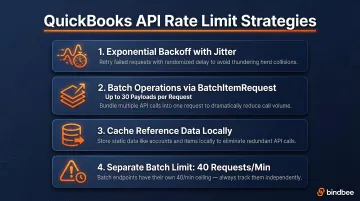
- Implement exponential backoff with jitter on all API calls
- Use batch operations (BatchItemRequest endpoint) for bulk writes — each batch supports up to 30 payloads and counts as one request
- Cache frequently read reference data (item lists, chart of accounts) locally to avoid redundant GET requests
- Note: Batch requests have a separate limit of 40 per minute
Data Duplication in Financial Records
Problem: Invoices, journal entries, or customer records appear duplicated in QuickBooks after sync runs.
Likely cause: Retry logic on failed POST requests without idempotency checks. A timed-out request may have already succeeded server-side. Retrying it creates a duplicate.
Fix: QuickBooks doesn't support idempotency keys the way modern fintech APIs do. Instead:
- Use the RequestId parameter on POST requests to ensure a request is processed only once
- Enable CustomTxnNumbers in Preferences and leverage DocNumber uniqueness to catch duplicates (triggers Error 6140 for duplicate transactions)
- Query for existing records before creating new ones using the query endpoint with filtering
- Use the ChangeDataCapture endpoint to detect what was actually created or modified during a sync window
Pro Tips for a Successful QuickBooks API Integration
Always specify the correct minorversion in your API requests
The base version (released 2014) is missing fields that most modern integrations depend on. Research the changelog in Intuit's documentation and pin your integration to the minorversion that includes all fields your data model requires. Document this explicitly so future engineers don't inadvertently drop it.
Important: Intuit is discontinuing support for minorversions 1-74 on August 1, 2025. All active integrations must upgrade before July 31, 2025.
Design your integration for multi-tenancy from day one
Each QuickBooks company is identified by a unique realm ID. If you're building a product integration (not internal tooling), you'll have many customers with their own QB instances. Architect the following components to be keyed by realm ID from the start — retrofitting this later is far more time-consuming than doing it right upfront:
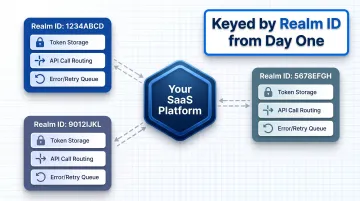
- Token storage and refresh logic
- API call routing and rate limit tracking
- Error handling and retry queues
Log every API interaction with timestamps, realm IDs, request/response payloads, and error codes
QuickBooks' developer community and Intuit support respond far faster when you can share specific error details. Internal debugging of financial data discrepancies is nearly impossible without detailed logs.
Frequently Asked Questions
Is the QuickBooks API free?
API access is included with a QuickBooks Online subscription at no additional cost. The Intuit App Partner Program offers a free Builder tier with Core API calls (writes like creating invoices) unmetered and CorePlus calls (reads/queries) capped at 500,000 credits per month. Usage is subject to rate limits of 500 requests/minute/realm ID.
What API does QuickBooks use?
QuickBooks uses a RESTful API with JSON responses, secured via OAuth 2.0 for authentication. The two primary API surfaces are the QuickBooks Online Accounting API (covering financial entities like invoices, bills, journal entries) and the QuickBooks Payments API (for payment processing).
What apps does QuickBooks integrate with?
QuickBooks integrates with over 750 apps via the Intuit App Store, including CRM platforms like Salesforce, payroll tools, e-commerce platforms, HR systems, and custom applications built using the QuickBooks API.
Does QuickBooks have AI integration?
QuickBooks introduced AI-powered features natively through Intuit Assist (launched November 2024), including automated categorization, receipt extraction, and cash flow insights. External applications can use the QuickBooks API to feed financial data into their own AI models, such as FP&A tools that pull general ledger data for AI-driven reporting and forecasting.
Is QuickBooks Desktop going away in 2026?
Intuit announced that QuickBooks Desktop 2023 support ends May 31, 2026, covering technical support, security updates, and access to Payroll, Payments, and Bank Feeds. Teams building new integrations should focus on the QuickBooks Online API, as Desktop's separate API surface will lose support alongside it.