Low-code iPaaS solutions have emerged as a practical answer to this challenge — enabling teams to deploy integrations faster, with less custom code and fewer dedicated engineering resources. This article explains what low-code iPaaS is, how it differs from traditional integration approaches, and which key features matter most for HR tech and benefits platforms.
TLDR
- Low-code iPaaS enables integration through visual tools and pre-built connectors instead of extensive custom development
- It balances speed and flexibility — faster than full "pro code" development, more powerful than pure no-code tools
- For HR tech and benefits platforms, low-code iPaaS can cut onboarding time by 76% and free engineering bandwidth for core product work
- Essential features include pre-built connectors, real-time sync, visual workflow designers, and enterprise-grade security compliance
- Gartner projects 70% of new enterprise applications will use low-code or no-code tools by 2026
What is Low-Code iPaaS?
Low-code iPaaS is an Integration Platform as a Service that uses visual development tools, pre-built connectors, and drag-and-drop interfaces to connect applications, automate data flows, and synchronize systems — without requiring extensive custom coding. Gartner defines iPaaS as "a vendor-managed cloud service that enables end users to implement integrations between applications, services and data sources."
Traditional integration meant writing point-to-point code or configuring enterprise middleware like ESBs (Enterprise Service Buses). This approach was slow, specialist-dependent, and difficult to scale as SaaS adoption grew.
By 2008, the ESB model was already showing its limitations as enterprises struggled with complex, custom-coded middleware. Cloud-native iPaaS platforms emerged as the practical alternative — faster to deploy, easier to maintain, and built for multi-cloud environments.
The "low-code" distinction matters. Unlike fully no-code tools (which require zero technical input), low-code platforms still allow developers to add custom logic, transformations, or connectors where needed — making them suitable for more complex enterprise requirements. Gartner's Critical Capabilities research evaluates both "Business Technologist Experience" and "Integration Specialist Experience," indicating that modern iPaaS platforms serve both audiences.
On the infrastructure side, the vendor handles scaling, updates, and reliability. Engineering teams stay focused on building integrations rather than maintaining the systems underneath them.
Fusion Development Model
The fusion model splits responsibilities across two groups working within the same platform:
- Citizen developers (ops teams, business analysts) handle configuration-level tasks using the visual interface
- Professional developers write custom logic, transformations, and connectors for complex requirements
- Both groups work in parallel, so neither waits on the other to move forward
This structure lets organizations ship integrations faster without forcing business teams through a developer queue.
Key Features of a Low-Code iPaaS Platform
The right low-code iPaaS platform bundles several capabilities that determine how fast, reliable, and maintainable your integrations actually are. Here's what to look for.
Visual Workflow Designers
Drag-and-drop canvases let teams map data flows between systems visually, generating the underlying logic without manual coding. This makes integrations faster to build, easier to document, and accessible to business analysts who understand processes but don't write code.
Pre-Built Connectors and Libraries
Pre-built connectors handle authentication, protocol differences, and system-specific logic for popular platforms — so teams aren't rebuilding solved problems from scratch. Leading vendors offer extensive coverage:
- Workato advertises 1,200+ pre-built connectors
- Boomi lists 1,000+ prebuilt connectors
- MuleSoft offers hundreds of certified connectors
Real-Time and Scheduled Data Sync
Most platforms support both event-driven (webhook-triggered) and batch/scheduled sync modes. That flexibility matters: some workflows need instant triggers (a new hire added in the HRIS), while others run fine as nightly eligibility refreshes.
Monitoring, Alerting, and Error Handling
Production integrations need visibility. Enterprise-grade platforms include dashboards that track integration health, flag failures, and automatically retry failed events. In benefits and HR workflows, a missed sync can directly affect an employee's coverage — so this isn't optional infrastructure.
Security and Compliance Controls
Built-in authentication, role-based access, encryption, and audit logging are table stakes. Gartner lists "Security and Compliance" as a Critical Capability when evaluating iPaaS vendors. Relevant certifications to verify include:
- SOC 2 Type II
- ISO 27001
- HIPAA compliance (required when handling employee benefits and dependent data)
Low-Code vs. No-Code vs. Traditional Integration
Choosing the wrong integration approach costs time, money, and engineering goodwill. Here's how the three options compare — and where each one actually fits:
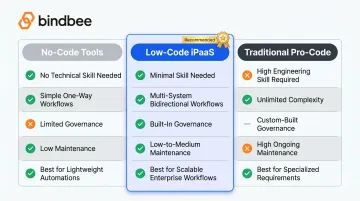
| No-Code Tools | Low-Code iPaaS | Traditional ("Pro Code") | |
|---|---|---|---|
| Technical skill needed | None | Minimal | High (engineering team required) |
| Workflow complexity | Simple, one-way | Multi-system, bidirectional | Unlimited |
| Governance & error handling | Limited | Built-in | Custom-built |
| Maintenance burden | Low | Low-to-medium | High (ongoing) |
| Best for | Lightweight team automations | Scalable enterprise workflows | Highly specialized requirements |
No-code tools like Zapier or IFTTT are fast to set up and require no technical background. They handle shallow, one-way automations well — think "notify Slack when a form is submitted." Where they break down: complex multi-field data syncs, bidirectional workflows, or anything requiring error handling and audit trails.
Low-code iPaaS sits in the middle ground that most enterprise teams actually need. It supports bidirectional sync, custom logic, and governance while keeping engineering overhead low. Workflows like employer onboarding or eligibility data sync — where data moves across multiple systems and needs to stay current — are squarely in its wheelhouse.
Traditional pro-code integration offers maximum control but at a steep cost: significant engineering time upfront, plus ongoing maintenance every time an upstream API changes. It's justified when platform capabilities genuinely can't meet the requirement — not just when a team prefers familiarity with custom code.
Most modern organizations use a combination. Gartner forecasts that by 2026, 70% of new enterprise applications will use low-code or no-code technologies. The iPaaS market itself grew 23.4% to $8.5 billion in 2024, driven by AI, low-code/no-code adoption, and SaaS proliferation.
Benefits of Low-Code iPaaS for HR Tech and Benefits Platforms
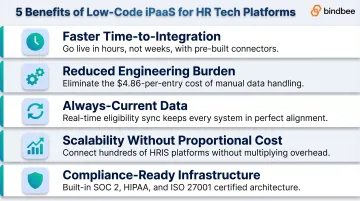
For HR tech and benefits platforms specifically, low-code iPaaS delivers advantages that general integration tools often miss. The five most material ones:
Faster time-to-integration. Pre-built connectors and visual designers compress build time from weeks of custom development to hours or days — critical when onboarding new employer clients who each arrive with a different HRIS.
Reduced engineering burden. Engineering teams stop writing one-off connectors and start focusing on core product. EY research via Paycom puts the cost of manual HR data entry at $4.86 per instance in 2025, and manual payroll creation at $20.83 per instance — costs that automation eliminates.
Always-current data. Real-time sync and automated incremental updates keep eligibility records, dependent data, and enrollment elections accurate across systems. A 2024 Alight survey found over half of companies incurred payroll penalties in the prior five years. Stale data is usually the culprit.
Scalability without proportional cost. A low-code iPaaS handles hundreds of HRIS connections without a matching increase in integration headcount. The HR Tech market is on track to grow from $42.34 billion in 2025 to $77.74 billion by 2031 — that growth compounds the integration problem for any platform trying to scale manually.
Compliance-ready infrastructure. For platforms handling benefits data, payroll records, and dependent health information, using a vendor that is already SOC 2 Type II, ISO 27001, and HIPAA compliant shifts the compliance burden off your team — reducing audit scope and security risk.
Bindbee as a Specialized Example
Bindbee is a purpose-built low-code iPaaS designed specifically for HR tech and benefits platforms — not adapted from a general-purpose integration tool. It connects 60+ HRIS, payroll, and carrier systems through a single unified API, with data models built around benefits from the ground up: Employee Benefits, Employer Benefits, and Dependent Benefits as distinct objects.
A few specifics worth noting:
- Setup time: under 1 day, versus 4–8 weeks for native API connections
- Legacy system support: an SFTP-to-API bridge handles systems that only export flat files — covering the full spectrum from modern cloud HRIS to file-based carriers
- Certifications: SOC 2 Type II and ISO 27001 certified
How to Choose the Right Low-Code iPaaS Solution
Match the Platform to Your Integration Layer
- General-purpose enterprise iPaaS (MuleSoft, Boomi) works best for internal workflow automation across a broad SaaS stack
- Embedded iPaaS (Workato Embedded, Workato's embedded offering) is designed for B2B SaaS companies that need to offer customer-facing integrations at scale
- Domain-specific iPaaS (like Bindbee for HR tech) is purpose-built for a vertical, with pre-normalized data models and pre-built connectors for the exact systems your customers use
For HR tech and benefits platforms, domain-specific or embedded iPaaS gets you live faster — because the connectors and data models for your ecosystem already exist.
Evaluate Connector Coverage and Data Normalization
The key question isn't whether a platform connects to a given HRIS — it's whether it normalizes data across systems into consistent models. A "dependent" record from Workday should look identical to one from ADP. Look for platforms that:
- List supported systems explicitly
- Describe their data models in documentation
- Offer pre-built connectors for the HRIS/payroll systems your customers use most
Assess Security, Support, and Maintenance Ownership
Check that the vendor holds certifications your compliance environment requires. Then ask a harder question: who owns integration maintenance when a connected system changes its API?
MuleSoft's release notes illustrate how often APIs shift. Before committing, confirm:
- Compliance certifications in place (SOC 2 Type II, HIPAA, ISO 27001)
- Clear ownership of connector updates when upstream APIs change
- Whether version changes require engineering work on your end or are handled by the vendor
Frequently Asked Questions
What is low-code integration?
Low-code integration connects applications and automates data flows using visual tools and pre-built connectors rather than extensive custom code. This enables both developers and non-technical users to build and manage integrations faster than traditional development approaches.
What are examples of low-code?
Low-code integration platforms span multiple categories. Zapier and Make offer simple automations for individual use cases. MuleSoft and Boomi serve enterprise iPaaS needs across diverse systems. Specialized tools like Bindbee focus on HRIS and benefits system connectivity for vertical-specific requirements.
What is the difference between low-code iPaaS and no-code integration?
No-code tools require zero technical input and suit simple, one-way automations. Low-code iPaaS supports complex workflows, bidirectional data sync, and custom logic — making it the right fit for multi-system integrations that need to evolve alongside business requirements.
What are the key features of a low-code iPaaS platform?
Core capabilities include:
- Visual workflow designers and pre-built connector libraries
- Real-time and scheduled data sync
- Monitoring and alerting tools to track integration health
- Built-in security and compliance controls
When should a company use low-code iPaaS instead of building integrations in-house?
When maintaining integrations with many external systems — especially those with frequently changing APIs — low-code iPaaS cuts maintenance overhead and avoids the long-term cost of custom infrastructure. It's especially worth considering when engineering resources are limited or speed to market is a competitive advantage.