Introduction
For HR Tech and Benefits Tech companies, integrations aren't a feature — they're the product. Your team depends on reliable connections to dozens of HRIS, payroll, and benefits systems, which means the platform you choose to power those connections is one of the most consequential infrastructure decisions you'll make. IT teams already spend 39% of their time building custom integrations, yet only 29% of enterprise applications are actually connected. That gap is both a resource drain and a competitive liability.
The evaluation challenge is real. A growing number of platforms promise fast connectivity and broad coverage, making it easy to pick a vendor on surface-level criteria — then pay for it in maintenance costs, security incidents, or slow customer onboarding months later.
This guide walks through the technical, security, compliance, and domain-specific criteria that product and engineering leaders should pressure-test before committing to an integration platform.
TLDR:
- IT teams spend ~40% of their time on custom integrations, yet only 29% of enterprise apps are connected
- Verify SOC 2 Type II, ISO 27001, and HIPAA compliance — and assess documentation quality, not just certifications
- Benefits-specific data models (dependents, enrollments, elections) matter more than generic HR connectors
- Zero-maintenance guarantees and predictable pricing are non-negotiable for sustainable customer growth
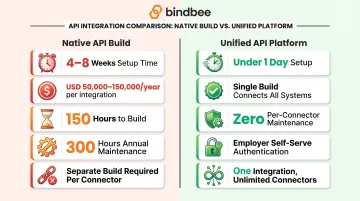
- Modern unified APIs deploy in under a day; native builds take 4–8 weeks
What Is a Third-Party Integration Platform?
A third-party integration platform connects your product to external software systems—HRIS, payroll, benefits carriers—without requiring you to build every connection from scratch. Product teams use these platforms to handle authentication, data normalization, rate limiting, and ongoing maintenance, freeing engineering time for core product work.
Platform Types for HR and Benefits Tech
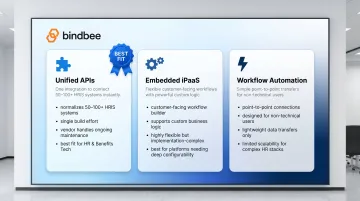
Three main platform categories serve different use cases:
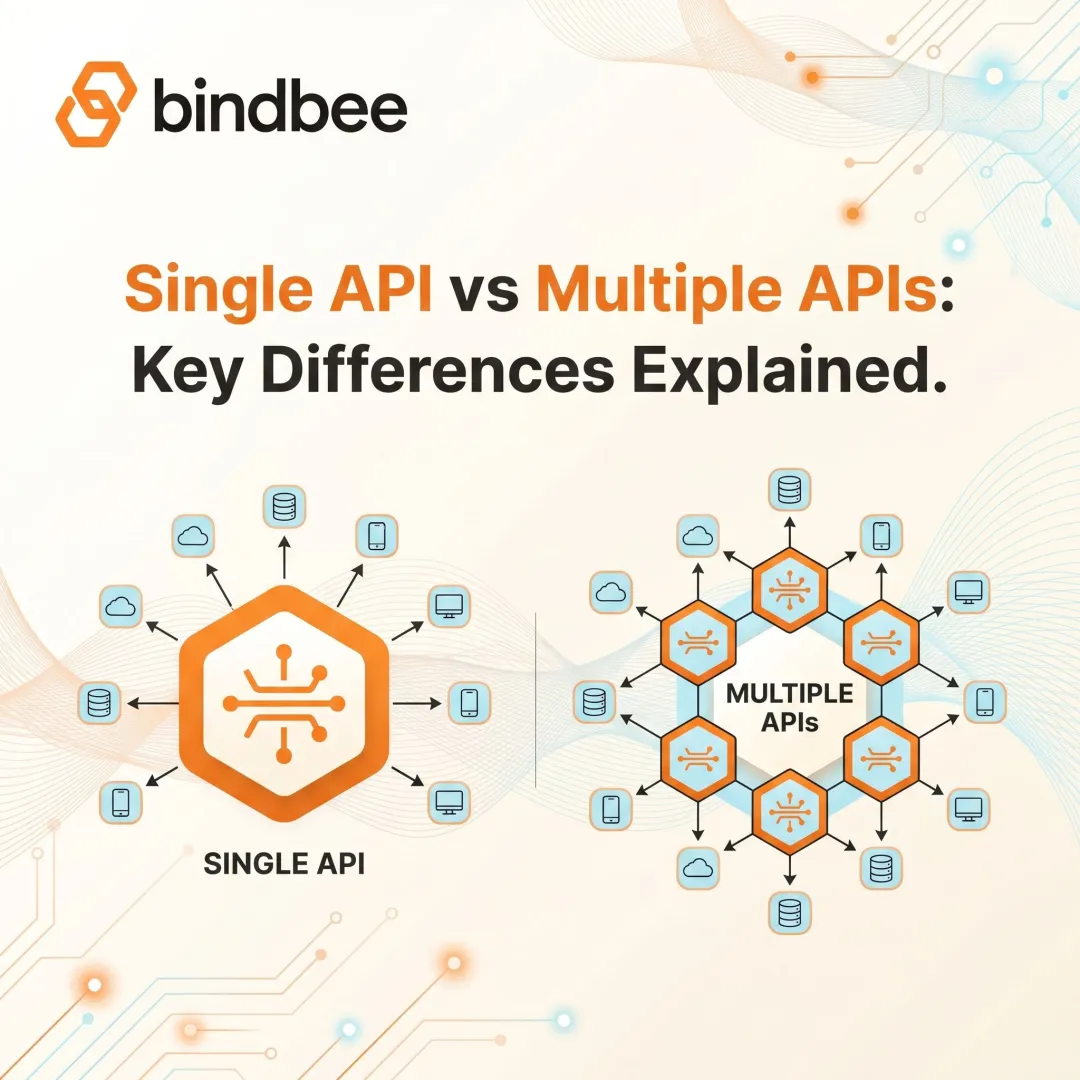
Unified APIs normalize multiple systems (often 50-100+ HRIS platforms) into a single standardized API. Your team builds once and connects to many, with the vendor handling all connector maintenance, schema updates, and data normalization.
Embedded iPaaS (Integration Platform as a Service) tools offer flexible, customer-facing workflow integrations. These platforms allow your customers to build custom integration logic through your product's UI, making them ideal for complex, non-standard workflows that require customization beyond basic data access.
Workflow automation tools like Zapier connect simple point-to-point integrations for non-technical users. They're best suited for marketing automation or lightweight data transfers—not the mission-critical benefits and payroll data flows that HR Tech products require.
For HR and Benefits Tech companies managing sensitive employee data at scale, unified APIs are the clearest fit. When data accuracy directly drives benefit elections and eligibility decisions, the coverage and compliance requirements rule out the other two categories for most production use cases.
Why Getting Your Evaluation Right Matters
The cost of a poor platform selection compounds quickly. Engineering teams that choose the wrong platform often end up maintaining brittle point-to-point integrations, fielding constant data sync errors, and diverting developer bandwidth away from core product work. According to MuleSoft's 2025 Connectivity Benchmark, organizations spent an average of $4.7 million on custom integration labor in 2023—a 31% increase from the prior year.
Cost overruns are only part of the problem. A slow or unreliable integration platform creates compounding operational damage:
- Delayed customer onboarding when new employer connections take weeks instead of hours
- Eligibility data gaps that leave end users without accurate coverage information
- Competitive exposure when prospects compare your integration list against a rival's
Integration infrastructure is a direct growth lever. MuleSoft's research shows 29% of IT projects miss deadlines, and 83% of leaders tie those delays to lost revenue.
In HR and benefits contexts, the stakes are especially concrete. Data errors can affect employee benefit elections, dependent coverage, and compliance reporting. ERISA penalties alone can reach $195 per day per employee for enrollment data mistakes—which makes a rigorous evaluation framework non-negotiable.
Key Technical Criteria to Evaluate
API Design and Documentation Quality
Assess whether the platform provides a well-documented, REST-based API with clear endpoint definitions, consistent data schemas, and versioning policies. Poor documentation is a reliable predictor of integration fragility and developer frustration. During evaluation, test the documentation yourself—can a new developer on your team understand how to authenticate, pull employee records, and handle errors in under an hour? If not, that friction will multiply across every integration you build.
Look for interactive API references, code samples in multiple languages, and transparent changelog documentation. Platforms that treat documentation as an afterthought inevitably force your team to reverse-engineer behavior through trial and error.
Data Normalization and Coverage Breadth
Evaluate how many systems the platform supports and, critically, whether it normalizes data across those systems into a consistent schema. With G2 listing 8,951 total HR software products, a platform that connects to 60 systems but returns different field names or structures for each defeats the purpose of a unified integration layer.
Key questions to ask vendors:
- Do employment status enumerations (active, terminated, leave of absence) use consistent values across all systems?
- How are custom fields surfaced—through a unified
custom_fieldsobject or scattered across provider-specific endpoints? - Can you pull dependent relationships, benefit elections, and plan configurations through the same standardized models regardless of whether the source is ADP, Gusto, or BambooHR?
A platform with true normalization should let you write integration logic once and apply it universally, not maintain conditional mapping logic for each connector.
Setup Speed and Time-to-Value
Benchmark how long it actually takes to go from signed contract to a working integration in production. Modern unified API platforms can be operational in hours or days rather than the weeks typically required by native API builds. A single API integration costs between $50,000 to $150,000 per year. That figure includes approximately 150 hours to build and 300 hours of annual maintenance per integration.
Compare that to unified API platforms, which eliminate per-connector build time entirely. Bindbee, for example, enables technical setup in under a day through its Magic Link authentication component, allowing employers to connect their HRIS in minutes without IT involvement. That's a meaningful difference from the 4-8 week timelines common with native integrations.
Sync Reliability and Data Freshness
Confirm whether the platform offers automatic incremental syncs, not just one-time data pulls. Stale data is a critical failure mode in benefits and HR workflows where employee status, dependent changes, and enrollment elections change continuously. Open enrollment windows and qualifying life events create narrow timeframes where outdated information can produce irrevocable errors.
Sync frequency requirements vary by use case—daily syncs may suffice for payroll reporting, but benefits administration often requires near-real-time updates when life events occur. Ask vendors:
- What is the default sync cadence, and can it be customized per customer?
- How does the platform handle partial sync failures?
- Is there automatic retry logic with exponential backoff?
Webhook and Event Notification Support
Check whether the platform emits webhooks for key lifecycle events—new hires, terminations, dependent changes, life events—so your product can react in real time rather than waiting for a scheduled batch job. Event-driven architectures reduce latency and improve data accuracy, particularly for benefits workflows where a dependent addition or employment termination must trigger immediate downstream actions.
Confirm webhook payload structures are consistent and include sufficient context (employee ID, event type, timestamp) to process events without additional API calls.
Custom Field Support
Custom field support is a hard blocker that surfaces late—typically when enterprise customers with non-standard data configurations begin onboarding. Ensure the platform can surface custom fields defined by employers in their HRIS. Employers often store benefits eligibility rules, division codes, or job classification data in custom fields that don't map to standard schemas.
Ask vendors for examples of how their platform handles custom field mapping and whether there are limits on field types (text, dates, multi-select dropdowns, nested objects).
Security, Compliance, and Data Governance
Certification Baseline
Establish which certifications are non-negotiable for your use case. SOC 2 Type II and ISO 27001 are the standard baseline for SaaS data infrastructure: these certifications validate that a vendor has implemented security controls and subjected them to independent audit over a defined period.
For health and benefits data, HIPAA compliance and GDPR readiness add essential layers. HR data appeared in 81.7% of data breach incidents analyzed across 141 million file records, while third-party involvement in breaches doubled from 15% to 30%.
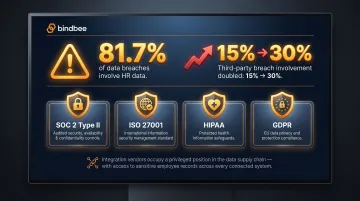
Integration vendors sit at a privileged position in your data supply chain. They must meet the same security bar as your core application.
Data Handling and Residency Policies
Understand exactly where employee data is stored, how long it is retained, who at the vendor has access, and whether data residency options exist for customers in regulated regions. Identify gaps during due diligence, not after a breach.
Critical questions for vendors:
- Is data encrypted in transit and at rest? Which encryption standards (AES-256, TLS 1.2+)?
- Do you store customer credentials, or do you use OAuth tokens with limited scopes?
- Can data be stored in specific geographic regions (e.g., EU for GDPR, US for HIPAA)?
- What is your data retention policy, and can customers request deletion on demand?
Authentication and Access Controls
Evaluate how the platform handles employer authorization flows. Look for secure, auditable connection mechanisms (such as embedded authentication components that simplify customer consent without exposing credentials) that reduce the risk of unauthorized access.
Platforms that require customers to share raw HRIS credentials introduce unnecessary risk. OAuth-based flows or vendor-managed authentication (like Bindbee's Magic Link) eliminate credential exposure while maintaining security and auditability.
Incident Response and Transparency
Ask vendors for:
- Documented incident response procedures and historical uptime data
- Clear communication protocols for security events, including timelines and customer notification processes
- References from existing customers, specifically about how the vendor handled past incidents
Transparent communication during incidents is the clearest signal of operational maturity. Opacity about past events is a red flag, not a neutral data point.
Ongoing Compliance Maintenance
Confirm whether the vendor proactively maintains compliance as regulations evolve, or whether that burden shifts to your engineering team. Updates to HIPAA guidance and new state-level privacy laws are ongoing — your integration layer needs to keep pace.
California's CCPA employee data exemption expired January 1, 2023, meaning California employee data is now fully subject to consumer privacy rights. Vendors must absorb these changes without requiring customers to rebuild integrations.
HR and Benefits-Specific Integration Considerations
Benefits-First Data Models
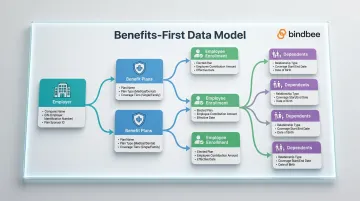
Generic HR integration platforms often expose only basic employee and employment fields, missing the benefits-specific data structures that Benefits Tech and HR Tech products actually need. Evaluate whether the platform has distinct data models for employee benefits, employer plan configurations, and dependent coverage, rather than forcing you to reverse-engineer benefits data from raw payroll records.
Platforms built for benefits administration should expose plan names, coverage tiers, employee and employer contribution amounts, plan types (HSA, FSA, health, dental), and provider details as first-class data objects—not buried in nested payroll fields.
Dependent Data Completeness
Incomplete dependent data is one of the most common failure points in benefits integrations. Confirm the platform captures dependent relationships, coverage elections, and effective dates — not just employee records.
Employers need accurate dependent demographics, relationship types, and coverage start/end dates to comply with carrier requirements and avoid enrollment errors. Also verify whether the platform distinguishes between dependents eligible for coverage and those actually enrolled, and whether elections are linked to specific employer benefit plans.
Enrollment Sync Accuracy
Confirm that enrollment data — plan selections, tier elections, and coverage start/end dates — syncs in real time when elections change. Gaps here translate directly into incorrect employee coverage. During open enrollment, errors that don't flow immediately can become irrevocable until the next plan year.
Beyond real-time sync, check whether the platform tracks enrollment changes as discrete events. This lets your product audit when elections were modified and by whom — critical for compliance and carrier reconciliation.
Legacy System Support
Many employers still use HRIS or benefits systems that only export flat files via SFTP rather than modern APIs. Check whether the platform bridges these legacy file-based systems into an API-compatible format. Support for both API-based and SFTP-based connectors directly expands your addressable market to mid-market and SMB employers who haven't yet migrated to cloud-native HRIS platforms.
Employer Onboarding Experience
The speed of a new employer connection matters more than most teams anticipate. Platforms that require weeks of IT involvement on the employer side create direct friction in your own customer onboarding. Look for self-serve or guided authentication flows that reduce that lift.
Bindbee is built specifically for this scenario. Its Magic Link authentication component and pre-built connections to 60+ HR and benefits systems let employers connect in hours rather than weeks, with customers reporting up to a 76% reduction in onboarding time. Employers authenticate without generating API keys or involving IT teams, removing a significant bottleneck from go-live timelines.
Vendor Reliability, Support, and Long-Term Fit
Track Record and Customer References
Look beyond the vendor's own case studies—ask for references from companies in your vertical (HR Tech, Benefits Tech, Insurtech) and probe specifically on data accuracy, uptime consistency, and how the vendor responded when things went wrong. A vendor's response to incidents reveals more about their operational maturity than their marketing materials ever will.
Ask references:
- How often do you encounter data sync issues?
- When API changes break integrations, how quickly does the vendor restore functionality?
- Does the vendor proactively communicate planned maintenance or upstream system changes?
Maintenance Ownership and Zero-Maintenance Guarantees
Clarify who owns integration maintenance when an upstream HRIS updates its API or changes its data schema. Vendors that push this responsibility back to your engineering team eliminate a core benefit of using a third-party platform in the first place.
The best platforms absorb 100% of connector maintenance without requiring any action from your engineering team. That means:
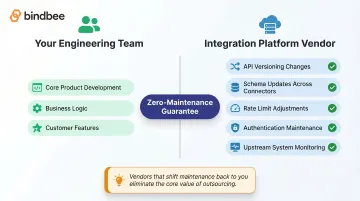
- API versioning and authentication changes
- Schema updates across connected systems
- Rate limit adjustments as usage grows
If a vendor hedges on this commitment, budget for ongoing maintenance overhead that defeats the cost savings you expected from outsourcing integrations.
Scalability and Pricing Model Alignment
Confirm that the platform's pricing scales predictably as your employer count and data volume grow. Opaque or consumption-based pricing that spikes unexpectedly at scale is a frequent source of vendor regret. Model your projected costs against realistic growth scenarios before signing. Ask vendors for pricing examples at 100, 500, and 1,000 connected employers to identify inflection points where costs jump.
Transparent tier-based pricing provides more predictability than usage-based models that charge per API call or data volume, which can create runaway costs as your customer base scales.
Frequently Asked Questions
What is a third-party platform?
A third-party platform is any software service or infrastructure layer developed and operated by an external company—not the original system vendor—that connects two or more applications or delivers additional functionality on top of existing systems.
What are some third-party platforms?
Relevant examples in the HR/benefits context include unified APIs like Bindbee that normalize data from dozens of HRIS and benefits systems, embedded iPaaS tools for customer-facing workflow integrations, and workflow automation tools like Zapier for simpler, direct app-to-app connections.
What is the difference between a native integration and a third-party integration?
A native integration is built directly into your product using your own engineering resources and connects to a single target system, while a third-party integration uses an external platform to establish the connection. The key tradeoff is build time and ongoing maintenance versus speed and breadth.
How do I know if a third-party integration platform is secure enough for employee and benefits data?
Verify key certifications—SOC 2 Type II, ISO 27001, HIPAA compliance, and GDPR readiness—and review the vendor's data handling policies, access controls, and incident response documentation. Requesting a security questionnaire and recent audit reports during evaluation is standard practice before sharing any sensitive employee data.
How long should it take to set up a third-party HR integration?
Modern unified API platforms can establish initial connections in under a day, compared to the 4-8 weeks typically required for native API integrations. Setup time is a strong signal of a platform's maturity and is worth benchmarking during vendor evaluation.
What is a unified API and how does it differ from building native integrations?
A unified API normalizes access to multiple systems —60+ HRIS platforms, for example— through a single standardized API, so your team builds once and connects to many. Native integrations require a separate build, maintenance cycle, and API relationship for each new system you support.