The challenge is real: 39% of IT teams' time is spent creating custom integrations, according to the 2025 MuleSoft Connectivity Benchmark Report. Meanwhile, the Sapient Insights Group's 28th Annual HR Systems Survey references 1,539 technology solutions across 22 HR Tech segments—a fragmentation that forces HR Tech builders to support dozens of systems just to achieve market coverage.
This article defines out-of-the-box and custom integrations, compares them across the dimensions that matter most to HR Tech builders, surfaces hidden costs that accumulate over time, and introduces a third option: unified API infrastructure.
TLDR:
- Custom integrations take 2-12 weeks to build per system and cost approximately $18,000 upfront plus ongoing maintenance
- Out-of-the-box connectors deploy faster but often lack critical HR data fields like dependent benefits and coverage elections
- Maintenance costs compound—supporting 10 custom integrations means 10 separate update streams when APIs change
- Unified API platforms normalize 60+ HRIS systems through a single integration, reducing setup from weeks to hours
- Engineering teams spend 30-40% of time on integration support instead of core product development
What Are Out-of-the-Box Integrations?
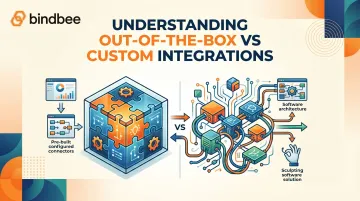
Out-of-the-box (OOTB) integrations are pre-built connectors provided by software vendors or third-party platforms that work immediately upon configuration with minimal custom code. For HR Tech teams, this means deploying a connector that syncs employee data, payroll runs, or benefits enrollment on a set schedule without writing API calls or managing authentication flows directly.
Example: A benefits administration platform using an ADP Workforce Now connector can pull employee demographics, department assignments, and compensation data through a vendor-provided integration that handles OAuth authentication, field mapping, and sync scheduling automatically.
Core Benefits for HR Tech Teams
OOTB connectors offer four practical advantages for HR Tech teams:
- Fast deployment — connectors go live in hours or days, not weeks, skipping scoping and development sprints entirely
- Lower upfront engineering cost — your team configures settings rather than writing code from scratch
- Vendor-managed maintenance — when ADP changes authentication methods or releases a new API version, the connector vendor handles the update, not your engineers
- Predictable data schema — you know exactly which employee fields the connector returns (name, email, hire date, department) and can build application logic around them reliably
Key Limitations
OOTB connectors are built for the broadest common use case, which creates gaps for benefits administration:
- Missing critical HR data fields such as dependent relationships, benefits elections, coverage effective dates, and enrollment status
- Limited edge case handling for complex scenarios like mid-year plan changes or qualifying life events
- Functionality gated by vendor roadmap — when your customer uses a niche HRIS, you wait until the connector vendor prioritizes it
The standardization that makes OOTB connectors fast also makes them inflexible. When you need to pull custom fields, handle nested dependent data, or trigger workflows based on life events, pre-built connectors often fall short.
What Are Custom Integrations?
Custom integrations are purpose-built connections developed in-house (or by contractors) using a target system's native API, file exports (SFTP/EDI), or webhooks. In HR Tech, this means building direct connections to platforms like Workday, BambooHR, Rippling, or UKG — retrieving exactly the data fields your product needs, structured the way you need them.
Genuine Advantages
Custom integrations offer three meaningful advantages for teams with the engineering capacity to build them:
- Data mapping control: Extract any field the API exposes — including custom fields that vary by organization, such as dependent birthdates, coverage tier selections, and contribution breakdowns.
- Sophisticated sync logic: Trigger enrollment events from HRIS webhooks for life events (marriage, birth, adoption), handle real-time updates instead of batch syncs, and apply conditional logic based on eligibility rules.
- Build on your own schedule: If a high-value customer uses a niche HRIS, you can start development immediately rather than waiting for a connector vendor to prioritize it.
Core Drawbacks
The advantages come with four compounding costs that teams often underestimate:
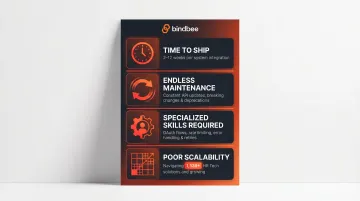
Time to ship. A single native integration typically takes 2–12 weeks — covering scoping, development, QA, and security review. Supporting five popular platforms can total 10–20+ weeks of engineering effort.
Maintenance that never ends. HRIS vendors continuously release API updates, deprecate endpoints, and change authentication methods. BambooHR's API changelog shows multiple breaking changes between 2015 and 2026 — OAuth 2.0 migration, webhook restructuring, field removals. Workday alone ships biannual releases and is currently at API v46.0.
Specialized skill requirements. Your team needs deep familiarity with OAuth flows, rate limiting, webhook security, error handling, and data normalization across incompatible API designs. That expertise is scarce and limits who can maintain the integrations long-term.
Poor scalability. Each new HRIS connection restarts the build cycle from scratch. With 1,539 HR Tech solutions across 22 segments documented in the Sapient Insights survey, achieving broad market coverage through custom builds alone stops making sense.
Out-of-the-Box vs. Custom Integrations: Key Differences
Deployment Speed
OOTB integrations deploy in hours or days. Custom integrations require 2-12 weeks per system for scoping, development, and testing. This gap compounds when supporting multiple platforms—five custom integrations can consume 10-20+ weeks of engineering effort before the first customer connects.
That velocity difference hits directly in sales cycles. When a prospect asks "Do you integrate with UKG?" during a demo, an OOTB connector means "yes, we can be live this week." A custom build means "we can have that ready in 2-3 months."
Flexibility and Data Depth
Custom integrations win on specificity. Your team maps any available API field, handles nested objects (dependent benefits, coverage tiers, plan elections), and builds conditional sync logic — giving you full control over which fields sync, when they sync, and how errors are handled.
OOTB connectors return a standardized, often reduced dataset. A typical connector might sync:
- Employee name, email, department, and hire date
- Basic job and compensation fields
- Standard employment status
What it frequently omits: custom fields, dependent relationships, and benefits enrollment details.
Why this matters in benefits administration: Dependent data isn't optional. You need dependent names, relationships, birthdates, and which benefit plans cover each dependent. Coverage tier selections (employee only, employee + spouse, family) and plan election details — contribution amounts, effective dates — are core requirements. OOTB connectors frequently lack this depth.
Total Cost of Ownership
OOTB integrations appear cheaper upfront but may require supplemental custom work or workarounds. Custom integrations carry higher initial build costs but are often justified for high-value, frequently used connections.
Custom integration costs:
- Initial development: approximately $18,000 based on 240 engineering hours at $75/hour
- Total first-year cost: approximately $26,000 including build, maintenance, and support
- Annual maintenance: 10-25% of initial build cost depending on API complexity
- For enterprise APIs (SAP, NetSuite, Workday): often closer to 25% annually
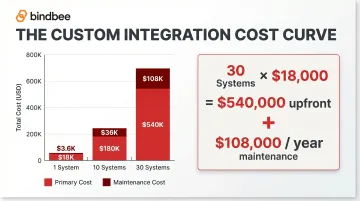
Scaling math: Ten custom integrations at $18,000 each = $180,000 initial investment. At 20% annual maintenance per integration, that's $36,000 per year in ongoing costs just to keep existing integrations working.
Maintenance Burden
Beyond the build cost, there's an ongoing maintenance burden that custom integrations never shed. Each HRIS vendor releases API updates, deprecates endpoints, and changes authentication methods — and your internal team has to catch every one of those changes.
BambooHR's documented API changes include:
- March 2025: OAuth 2.0 launched as primary authentication, replacing legacy API keys
- August 2025: Breaking change removing webhook scheduling features and specific database fields
- July 2025: API routing centralization requiring URL format updates
Workday releases biannual updates and maintains 56 service categories in its Web Services Directory. Maintaining a custom Workday integration means tracking version migrations across dozens of service endpoints.
OOTB integrations shift this maintenance to the vendor. When ADP changes authentication requirements, the connector provider updates their integration — your team receives the change automatically without touching code.
Summary Comparison
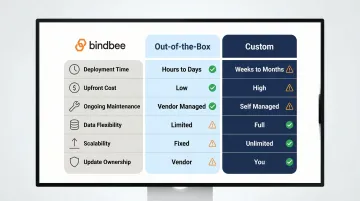
| Dimension | Out-of-the-Box | Custom |
|---|---|---|
| Deployment Time | Hours to days | 2-12 weeks per system |
| Upfront Cost | Low (configuration only) | High ($18,000+ per integration) |
| Ongoing Maintenance | Vendor-managed | Internal team (10-25% annually) |
| Data Flexibility | Standardized, limited fields | Full API access, custom fields |
| Scalability | Limited by vendor coverage | Limited by engineering capacity |
| Update Ownership | Vendor handles API changes | Internal team monitors & patches |
The Hidden Costs of Custom HRIS Integrations HR Tech Teams Often Miss
API Versioning and Deprecation Costs
HRIS vendors release new API versions regularly and deprecate older ones. Each deprecation requires engineering time to migrate, test, and redeploy—costs that accumulate across every system in your custom integration portfolio.
Workday ships biannual releases and is currently at API v46.0. Deprecated web services include Update_Employee_Personal_Info, replaced by granular alternatives like Change_Legal_Name and Change_Licenses—requiring code changes to use the new endpoints.
BambooHR's 2025 OAuth migration from legacy API keys to OAuth 2.0 required every custom integration to update authentication flows. The April 2025 deprecation of the oidcLogin endpoint and gradual deprecation of the User API Key login flow meant engineering teams maintaining custom BambooHR integrations needed to schedule migration work or risk integration failures.
Maintaining 10 custom integrations means monitoring 10 separate changelog feeds, testing 10 migration paths, and deploying 10 updates — each on the HRIS vendor's timeline, not yours.
Engineering Opportunity Cost
Every engineering sprint spent building or maintaining an HRIS integration is a sprint not spent on core product features. The 2025 MuleSoft Connectivity Benchmark Report found that IT teams spend 39% of their time creating custom integrations.
Without structured support, engineering teams spend 30-40% of time on integration support instead of core product development. That's two days per week per engineer — not building your differentiated features, but troubleshooting why a Paylocity sync failed or updating a Gusto webhook handler.
The same MuleSoft survey found 83% of respondents believe integration delays equate to lost revenue opportunities. When engineers are maintaining HRIS connections instead of shipping features that win deals, the real cost isn't salary — it's product velocity you'll never recover.
Compliance and Security Upkeep
HR data is sensitive: PII, benefits elections, dependent Social Security Numbers, health information. Custom integrations must independently maintain compliance with HIPAA, SOC 2, GDPR, and other frameworks — requiring security audits, penetration testing, and data-handling policy updates that add cost and overhead beyond the technical build.
SOC 2 Type II costs:
- Audit cost: $7,000-$150,000 depending on auditor (Big 4 firms typically cost at least $150,000)
- Total investment: $80,000-$350,000 including preparation and remediation
- Annual maintenance: $10,000-$60,000
- Evaluation period: 3-12 months
Each custom integration handling PII or benefits data must meet these requirements independently. Build five custom integrations across five different HRIS APIs, and each one becomes a separate data pathway requiring its own documentation, testing, and audit coverage during SOC 2 certification.
HIPAA compliance applies when systems handle protected health information (PHI), including benefits data. SaaS vendors that create, receive, store, or transmit PHI are classified as business associates and must execute Business Associate Agreements. That compliance burden scales with every integration you add. 67% of companies rate security as a top criterion when evaluating software, making compliance certifications both a regulatory requirement and a sales prerequisite.
Customer Onboarding Delay Effect
When a new enterprise customer uses an HRIS your product hasn't integrated yet, the deal can stall or require a custom one-off build. This delays time-to-value for the customer and creates churn risk.
The business impact is measurable:
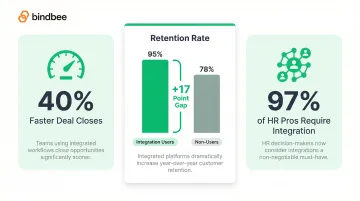
- Deals close 40% faster when integration compatibility is confirmed early in the sales process
- Customer retention is 95% for users with integrations versus 78% without — a 17-point gap that compounds over customer lifetime value
- 97% of HR professionals say it's important for apps to integrate with their employment systems
Real cost example: One enterprise deal required a $250,000 custom integration build for a deal worth $60,000 annual recurring revenue — meaning the custom integration cost exceeded four years of contract value.
Bindbee's unified API, with 60+ pre-normalized HRIS connections available from day one, eliminates this bottleneck entirely. Newfront reduced integration deployment from 8-12 weeks to 48 hours, enabling 3x faster enterprise client onboarding and removing HRIS compatibility as a deal blocker.
How to Choose the Right Integration Approach for Your HR Tech Product
Apply a Criteria-Based Decision Guide
Choose OOTB when:
- The integration covers a high-volume, standardized use case (basic employee roster data)
- The target system is supported by an existing quality connector
- Required data fields are commonly available across most HRIS platforms
- Speed to market matters more than data completeness
Choose custom or unified API when:
- The use case requires deep data: benefits elections, dependent records, life event triggers
- The HRIS is niche or not covered by available OOTB connectors
- You need to map custom fields or handle organization-specific configurations
- Data accuracy and completeness are non-negotiable (benefits administration, compliance reporting)
Scale as a Decision Factor
The criteria above work well for a single integration decision. The calculus shifts when you're managing 20, 40, or 60+ HRIS systems across a growing customer base — where neither pure OOTB (coverage gaps) nor pure custom (costs compound fast) holds up.
The coverage math: Building a single integration (one ATS like Greenhouse) might cover approximately 20% of target accounts. Building a category (Greenhouse + Lever + Workable) can reach around 60% coverage. But the Sapient Insights Group survey documents 1,539 HR Tech solutions—meaning comprehensive coverage requires dozens of integrations.
The cost math: At $18,000 per custom integration, supporting 30 HRIS systems costs $540,000 upfront plus $108,000 annually in maintenance (at 20% per integration). That's engineering capacity permanently redirected from product development to integration maintenance.
What works at 5 customers across 3 HRIS platforms breaks down fast at 50 customers across 20 platforms — and the cost curve doesn't flatten on its own.
Build vs. Buy Calculus for HRIS Integrations
Once scale enters the picture, the build vs. buy decision becomes less about technical preference and more about resource reality. Four questions drive it:
1. Internal engineering bandwidth
- How many engineers can you dedicate to integration work?
- What's your current ratio of integration time to product development time?
- Can you sustain 30-40% of engineering time on integrations as you scale?
2. Time-to-market pressure
- How fast do you need to onboard new customers?
- Are you losing deals due to missing HRIS coverage?
- What's the revenue impact of a 2-month integration delay per new HRIS?
3. Sensitivity of data being handled
- Are you managing PII, benefits elections, dependent information, or health data?
- What compliance certifications do your customers require (SOC 2, HIPAA, ISO 27001)?
- Can you maintain compliance independently for each custom integration?
4. Integration as differentiator vs. infrastructure
- Do custom integrations provide competitive advantage, or are they table stakes?
- Would customers pay more for deeper integration capabilities?
- Or do integrations simply enable your core product to function?
If your answers point to integrations as infrastructure — not advantage — and you need broad HRIS coverage without draining engineering capacity, a unified API provider like Bindbee gives you 60+ HRIS connections through a single endpoint, with zero maintenance overhead on your side.
A Third Option: Unified API Infrastructure for HR Tech
The Unified API Model
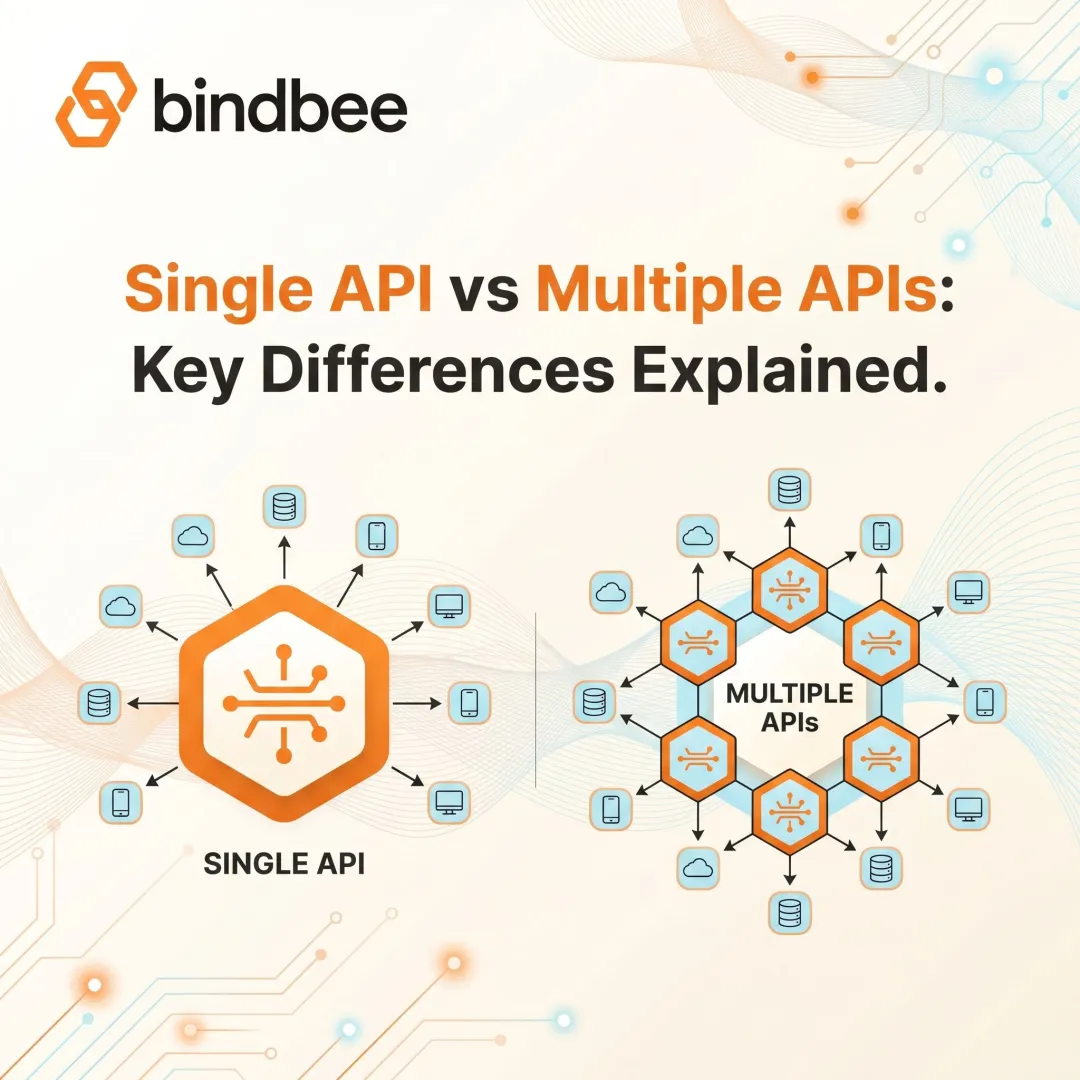
A unified API sits between OOTB and fully custom: a single normalized API that connects to dozens of HRIS, payroll, and benefits systems simultaneously, abstracting away per-system complexity. Product teams write one integration once and gain access to the entire ecosystem.
Instead of building separate integrations for Workday, BambooHR, Rippling, ADP, and Gusto—each with different authentication flows, field names, and rate limits—you integrate with a unified API that normalizes data across all systems into consistent models.
Example: To fetch employee benefits data, you make one API call to the unified API endpoint /benefits. The unified API handles whether the underlying system is Workday (requiring SOAP calls and complex field mappings) or Gusto (REST API with different field names). You receive benefits data in the same format regardless of source.
What Distinguishes HR-Specific Unified APIs from Generic iPaaS Tools
Generic iPaaS (Integration Platform as a Service) tools are workflow-oriented platforms for connecting internal systems, often IT-managed. Unified APIs are developer-first, embeddable infrastructure designed for product teams to offer native integrations.
Benefits-first data models handle the complexity unique to HR and benefits administration:
- Dependent relationships as first-class objects (not just nested fields)
- Coverage elections with tier selections, contribution amounts, and effective dates
- Enrollment events triggered by life events (marriage, birth, adoption)
- Employer benefits describing available plans, providers, and coverage options
Three additional capabilities separate HR-specific unified APIs from generic tools:
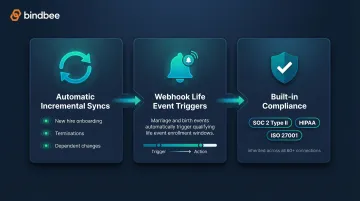
- Automatic incremental syncs keep data current without manual intervention—new hires appear immediately, terminations update in real-time, and dependent changes trigger webhooks rather than waiting for a batch export.
- Webhook support for life events enables event-driven workflows. When an employee gets married, the HRIS change triggers a webhook to your benefits platform, automatically opening a qualifying life event enrollment window.
- Built-in compliance (SOC 2 Type II, HIPAA, ISO 27001) means you inherit certifications across all 60+ connections through one certified integration instead of maintaining compliance independently for each build.
Bindbee is built specifically on this model—covering 60+ HRIS, payroll, benefits, and carrier systems through a single API, with setup measured in hours rather than weeks. Benefits platforms using Bindbee gain immediate access to enterprise systems (Workday, ADP Workforce Now, UKG) and SMB favorites (Gusto, Rippling, BambooHR) without building or maintaining individual connections.
When This Approach Is the Right Fit
Unified API infrastructure makes sense when:
- Your customers use 20+ different HRIS platforms. Building custom integrations for each becomes economically unfeasible at that scale.
- Onboarding speed affects sales velocity. Cutting setup from 4-8 weeks to 48 hours means faster deal closes, shorter time-to-value, and sales teams who can confidently commit to new platforms mid-cycle.
- Engineering time is better spent elsewhere. Reclaiming 30-40% of engineering capacity from integration maintenance frees resources for product features that actually win deals.
- You handle sensitive HR and benefits data. Inheriting SOC 2, HIPAA, and ISO 27001 through a certified provider reduces audit scope without building compliance infrastructure from scratch.
Healthee demonstrates this model in practice. Before Bindbee, every new employer meant weeks of back-and-forth getting census data, with custom integrations taking 2+ months each. After implementing Bindbee's unified API, employers connect their HRIS in minutes and go live the same day—enabling Healthee to pre-populate 90,000 employee profiles with demographics and dependent data for personalized insurance recommendations.
Frequently Asked Questions
What is an out-of-the-box integration?
An out-of-the-box integration is a pre-built connector between two systems that works immediately upon configuration without requiring custom code. In HR Tech, this means using a vendor-provided connector (like an ADP Workforce Now integration) that syncs employee data on a set schedule after you configure authentication and field mappings through a setup wizard.
What are the main types of system integrations?
The three main types are out-of-the-box (pre-built connectors ready to configure), custom (fully custom connections built in-house using native APIs), and unified API (middleware that normalizes many systems through a single integration point). OOTB is fastest but least flexible, custom offers complete control but the highest maintenance burden, and unified APIs balance broad coverage with reduced engineering effort.
When should a SaaS company choose custom integrations over out-of-the-box?
Choose custom integrations when required data depth, sync logic, or target systems fall outside available OOTB options. This most often applies to deep benefits administration needs—dependent relationships, coverage elections, life event triggers—or niche HRIS platforms without existing connectors, assuming you have the engineering capacity to own long-term maintenance.
How long does it take to build a custom HRIS integration?
Custom integrations typically take 2-12 weeks each, covering scoping, development, testing, and security review—so supporting five platforms can mean 10-20+ weeks of total engineering time. By comparison, unified APIs like Bindbee deploy in under one day versus 4-8 weeks for native custom builds.
What is the difference between out-of-the-box integrations and a unified API?
Out-of-the-box integrations are individual pre-built connectors for specific system pairs (one connector for ADP, another for Workday, another for BambooHR). A unified API is a single normalized layer that connects to many systems simultaneously—you write one integration that works across 60+ platforms, abstracting per-system differences and reducing the need to manage multiple separate connectors.