Introduction
Integrating Rippling with an existing HR system looks straightforward on the surface — the API is well-documented, the endpoints are logical — but production-ready implementations are another matter entirely. Rippling's broad REST API offers access to employee profiles, payroll, benefits, and device management—but building a reliable integration requires careful planning around data model alignment, OAuth authentication, sync logic, and edge-case handling. According to integration infrastructure benchmarks, even a basic HRIS integration MVP takes 6-8 weeks, and that's before addressing the production-ready error handling that separates prototypes from systems you can trust with live employee data.
Most teams building these integrations work at HR Tech companies, Benefits Administration platforms, or Third-Party Administrators (TPAs) pulling employee, benefits, or payroll data from Rippling into their own product. The margin for error is small: research shows that 68% of organizations use disconnected HR platforms, resulting in 31% higher error rates and 23% more time spent on administrative tasks.
Rush the integration, and the consequences compound quickly. Stale employee data breaks benefits enrollment, unmatched user records corrupt payroll runs, and maintenance overhead grows every time Rippling ships an API update.
This guide walks through the full integration process — from prerequisites through post-integration validation — with practical fixes for the failure points that trip up most teams.
TL;DR
- Rippling integration is technically feasible but requires API credentials, data model prep, and sync logic before writing code
- Employee data, benefits enrollment, and dependent records each need distinct field mapping and validation
- Common failures—user-matching errors, pay period misalignment, webhook gaps—are preventable with proper setup
- Validate across edge cases after go-live: terminations, life events, and dependent changes all expose gaps that pre-launch testing misses
- Teams building multiple HRIS integrations should weigh the 4–8 week build timeline per system against unified APIs that normalize Rippling alongside 60+ other HR systems in one connection
Integrating Rippling with Your Existing HR System
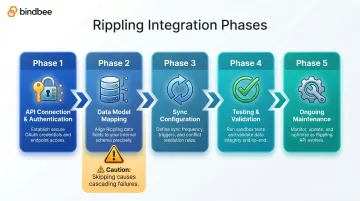
A successful Rippling integration unfolds in five distinct phases: API connection and authentication → data model mapping → sync configuration → testing and validation → ongoing maintenance. Skipping any phase creates problems that compound — mis-mapped employees, stale eligibility data, and sync failures that surface at the worst possible moments. The initial connection may take hours, but discovering that your user-matching logic fails for employees with multiple positions—three months into production, during open enrollment—will cost far more than getting the architecture right upfront.
What to Know About Rippling's API Before You Begin
Rippling exposes REST APIs covering employee profiles, payroll, benefits, and device/app management, organized around Rippling's internal hierarchy: company → work location → department → employee. This structure may not map cleanly to your product's schema, especially if you organize users by client account, location groups, or benefit plan eligibility rather than corporate org charts. Teams should audit this hierarchy before starting development.
That hierarchy choice also shapes your sync strategy. The API supports both polling-based syncs and webhooks for event-driven updates — and the right model directly affects data freshness and system load. Rippling's partner requirements mandate at least a 24-hour scheduled sync plus webhook listeners for lifecycle events. Both mechanisms are required: the polling cycle catches any webhook events that were missed.
Prerequisites and Requirements
Before integration begins, you must have an active Rippling account with API or connector access enabled. All customers must have the Rippling Identity & Access Management package to use partner integrations—attempting to connect without this package will fail at the authorization step.
Compatibility considerations:
- Confirm which Rippling modules your integration needs (HR, Payroll, Benefits, Time & Attendance)
- Verify the customer's Rippling plan includes those modules—leave/time-off data returns empty if the Time & Attendance module isn't provisioned
- Understand that benefits data flows through 500+ carrier-specific EDI and API integrations rather than a generic REST endpoint
Compliance and security non-negotiables:
Any integration accessing employee PII, benefits elections, or dependent data must handle data in compliance with SOC 2, HIPAA (for health data), and GDPR (for international employees). These requirements should be resolved before any customer data syncs—not after.
When integration should not proceed:
- Users in the target system cannot be matched by email, name, or employee ID
- The required connector (Time & Attendance, Identity & Access Management) is not provisioned
- The customer's Rippling account lacks the necessary modules for the data scope you need
Tools and Credentials Required
Before setup, gather:
- Rippling OAuth credentials (API keys are restricted to internal use; partners must use OAuth 2.0)
- Your product's API infrastructure: webhooks receiver endpoint, sync scheduler, secrets management
- Sandbox/test Rippling environment—trigger test authorization codes using
https://app.rippling.com/apps/PLATFORM/INSERTAPPNAME/redirect - Field mapping documentation between Rippling's data schema and your product's data model
Rippling does not provide a universal test environment by default. Teams should negotiate sandbox access or use a dedicated test company account to avoid running integration tests against live employee data.
How to Integrate Rippling (Step-by-Step)
The integration sequence follows a strict order: authentication → user matching → field mapping → sync configuration → event handling. Shortcuts in early steps, especially user matching, cause cascading failures that are difficult to diagnose after go-live.
Step 1: Authenticate and connect
Establish the API connection using Rippling's OAuth 2.0 authorization code flow. Authorization codes expire in 300 seconds (5 minutes), and access tokens last around 36 hours. Critical architectural note: one access token is valid for exactly one Rippling Company—multi-tenant integrations require managing separate OAuth flows and tokens per customer.
OAuth flow steps:
- Initiate the flow from your app
- Handle the redirect (Rippling sends
code,buy, andredirect_uriparameters) - Exchange the code for an access token via POST with Basic Auth header
- Store tokens securely with refresh logic
- Call
POST /platform/api/mark_app_installedto finalize installation - Authorize the specific data scopes your integration requires (HR, Payroll, Benefits)
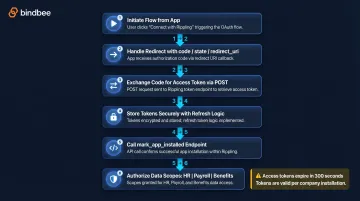
Verify the connection returns a valid company object via GET /platform/api/companies/current before proceeding.
Step 2: User matching and initial sync
Match existing employees across both systems using a combination of email, first name, last name, and employee ID. Rippling recommends using the uniqueId field—a permanent profile number unique to the company that persists even if an employee is rehired.
Handle unmatched users explicitly:
- Create new records for unmatched Rippling employees
- Flag unmatched users for manual review
- Surface mismatches in an admin UI rather than leaving them in an ambiguous state
Never skip unmatched users without explicit handling. Partial syncs create data drift that compounds over time and surfaces as "missing employee" errors during payroll or benefits enrollment.
Step 3: Map and normalize data fields
Align Rippling's employee profile fields to your product's schema. Core employee data includes:
- Employment type and start date
- Department, job code, and work location
- Manager (with nested manager object)
- Compensation details and FLSA status
Benefits data requires a different approach. Treat plan selections, coverage tiers, effective dates, and dependent relationships as distinct data objects—not flat employee attributes. Rippling models benefits data separately from core employee data and requires distinct API calls. Teams that only sync the core employee object miss benefits elections, dependent relationships, and coverage effective dates.
Custom field warning:
Custom field keys are not stable across Rippling tenants and must be retrieved from each company's configuration. Hardcoding custom field mappings will break in multi-tenant deployments.
Step 4: Configure sync logic and event handling
Set up recurring sync schedules and configure webhooks for critical lifecycle events. Rippling's requirements mandate:
- REQ14: At least a 24-hour scheduled sync that updates all employee details
- REQ15: A manual sync button for on-demand updates
- REQ13: A webhook listener for lifecycle events
Documented webhook events:
employee.createdemployee.updatedemployee.terminatedemployee.rehiredemployee.department_changedemployee.manager_changed
The 24-hour polling sync acts as a safety net: any missed webhook events get captured during the next scheduled run. This matters because Rippling does not publish webhook delivery SLAs in its public documentation, so relying on webhooks alone is a risk.
Post-Integration Validation
Confirm the integration works correctly before exposing it to production data. Run a full test sync against matched users, verify that profile field updates in Rippling propagate correctly, and confirm that terminated employees are archived (not just flagged inactive) in your product.
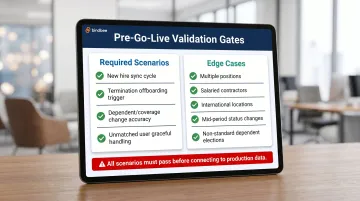
Validation scenarios that must pass before go-live:
- New hire flows through from Rippling to your system within one sync cycle
- Termination event correctly triggers offboarding in your system
- Dependent addition or coverage change updates benefits enrollment data accurately
- Unmatched users are handled gracefully without corrupting other records
Edge cases that must also pass before go-live:
- Employees with multiple positions
- Salaried contractors
- Users in international locations
- Employees undergoing mid-period status changes
- Dependents with non-standard coverage elections
Skipping this step is the most common cause of delayed integration failures. Document your test results and set a clear go-live gate: all required scenarios must pass before connecting to production data. Errors that slip through tend to surface during payroll runs or open enrollment — the two moments when data accuracy is least negotiable.
Common Rippling Integration Problems and How to Fix Them
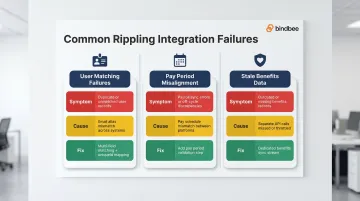
Most Rippling integration issues fall into three categories: identity and matching errors, sync timing failures, and field-level mismatches. Each breakdown below covers the symptom, the underlying cause, and a concrete fix.
Issue 1: User Matching Failures
Problem: Employees exist in both systems but are not matched, causing duplicate records or skipped syncs.
Likely cause: Email address discrepancies (display alias vs. primary email), or employees exist in Rippling under a different identifier.
Fix:
- Use a multi-field matching strategy (email + name + employee ID) with explicit fallback logic
- Treat Rippling's
uniqueIdfield as the permanent identifier — not email alone - Surface unmatched users in an admin UI instead of silently skipping them
- Document how your system handles manual match resolution for edge cases
Issue 2: Pay Period and Sync Timing Misalignment
Problem: Hours or payroll data sent to Rippling produce errors, or data syncs but doesn't reflect in the correct pay run.
Likely cause: Pay period dates in your product don't match the pay schedule configured in Rippling. Rippling requires that all synced users be assigned to a single pay schedule; deviations cause the entire export to fail.
Fix: Build a pay period validation step that compares your system's configured pay period against Rippling's before allowing any payroll data export. Surface a clear error (with an edit path) when periods don't match rather than allowing a silent partial sync.
Issue 3: Stale or Missing Benefits and Dependent Data
Problem: Benefits enrollment data, plan selections, or dependent records are missing or outdated despite changes in Rippling.
Likely cause: Benefits data in Rippling requires distinct API calls. Teams that only sync the core employee object miss benefits elections, dependent relationships, and coverage effective dates entirely.
Fix:
- Treat benefits data as a separate sync stream with its own schedule and validation logic
- Subscribe to Rippling's webhooks for life events — dependent additions, coverage changes, and qualifying events
- Don't rely on the daily employee sync alone; benefits state changes on its own cadence
Pro Tips for a Resilient Rippling Integration
Document every field mapping decision. Include deliberate choices to ignore or transform certain Rippling fields. This documentation becomes critical when Rippling updates its API schema or when a customer reports a data discrepancy months after go-live.
Plan for ongoing maintenance before you ship. Rippling periodically updates its API, adds new data fields, and deprecates old endpoints. Initial development accounts for only 30-40% of total cost of ownership; maintenance consumes 60-70%.
Factor in the engineering time required to track and implement these changes. For teams building integrations at scale, a unified HRIS API layer like Bindbee normalizes Rippling alongside 60+ other HR systems through a single connection and handles API maintenance automatically.
Test edge cases before declaring production-ready. Standard W2 hourly employees are rarely the problem. The bugs surface in edge cases:
- Employees with multiple concurrent positions
- Salaried contractors and international workers
- Employees undergoing mid-period status changes
- Dependents with non-standard coverage elections
These scenarios consistently expose gaps in integrations that only tested the happy path.
Conclusion
A successful Rippling integration is not primarily a connection problem—it is a data modeling, matching logic, and maintenance problem. Teams that invest upfront in proper field mapping, sync validation, and edge-case testing ship integrations that stay reliable as both Rippling and their own product evolve.
That architecture decision matters most before you write a single line of sync logic. The core principles hold regardless of approach:
- Map fields precisely — don't assume Rippling's schema matches your internal model
- Validate sync behavior against edge cases (terminations, rehires, mid-month changes) before go-live
- Build for ongoing maintenance, not just the initial connection
- Choose a unified API layer if native build costs would pull engineering away from core product
Whether you're building directly against Rippling's API or routing through an abstraction layer like Bindbee, the integration only earns its keep when employment data stays accurate without manual correction.
Frequently Asked Questions
What integrations does Rippling have?
Rippling supports 600+ integrations spanning payroll, benefits, scheduling, applicant tracking, identity management, and productivity tools, accessible via its App Directory and REST API. Integration depth varies by connector and the customer's Rippling plan.
What is Rippling in human resource management?
Rippling is an all-in-one workforce platform that consolidates HR, IT, payroll, and finance operations. Companies manage employee records, benefits, devices, and app access from a single system of record.
Is Rippling a good HR system?
From an integration standpoint, Rippling is a capable and widely adopted HR system with a robust API. Its breadth means integrating with it requires careful scoping of which modules are relevant. The quality of the resulting integration depends as much on the integrator's data modeling as on Rippling's API itself.
What big companies use Rippling?
Rippling serves companies ranging from fast-growing startups to mid-market enterprises, making it a high-priority integration target for HR Tech and Benefits platforms. Notable customers include Morning Consult, Barry's, and Clay, the last of which automated 80% of onboarding tasks using Rippling's workflow capabilities.
Does Rippling integrate with Slack?
Yes, Rippling integrates with Slack through its App Management module, automatically provisioning and deprovisioning Slack access based on employee lifecycle events including hire, departure, role changes, and department changes.
How long does it take to build a Rippling integration from scratch?
A native Rippling integration typically takes 4–8 weeks of engineering time depending on the data scope required. Teams needing to integrate with multiple HRIS systems can cut this timeline to under a week by using a unified API platform like Bindbee, which normalizes Rippling data alongside 60+ other HR systems through a single connection.