Introduction
Building a payroll, benefits, or workforce product means solving two problems simultaneously: the core product itself, and the integration plumbing required to make it work across your customers' existing HR systems.
That second problem is what actually consumes engineering teams. Your employer customers run Workday, ADP, BambooHR, Gusto, Rippling, and a dozen other platforms — each with different APIs, authentication flows, data schemas, and rate limits. Building native connections to all of them isn't a one-time project; it's a perpetual maintenance obligation.
According to an EY survey, one in five U.S. payrolls contains errors, and each error costs an average of $291 to correct. Most of those errors trace back to disconnected systems and manual data handling — exactly the problem that well-designed HCM integration solves.
This guide breaks down what HCM-payroll-benefits integration actually involves: the data flows that matter, how integration quality affects your product's value, and where the build-vs-buy math has shifted.
TL;DR
- HCM integration connects HR systems, payroll engines, and benefits platforms so employee data flows automatically across all tools
- Payroll accuracy, benefits eligibility, and ACA/COBRA compliance all depend on real-time data synchronization
- Building native integration with each HCM system takes 4–8 weeks and requires ongoing maintenance as APIs change
- One unified API connection covers 60+ systems and cuts setup from weeks to hours
- Benefits-specific data (dependents, coverage tiers, elections, effective dates) requires purpose-built data models that generic HRIS integrations don't expose
What HCM Integration with Payroll and Benefits Actually Means
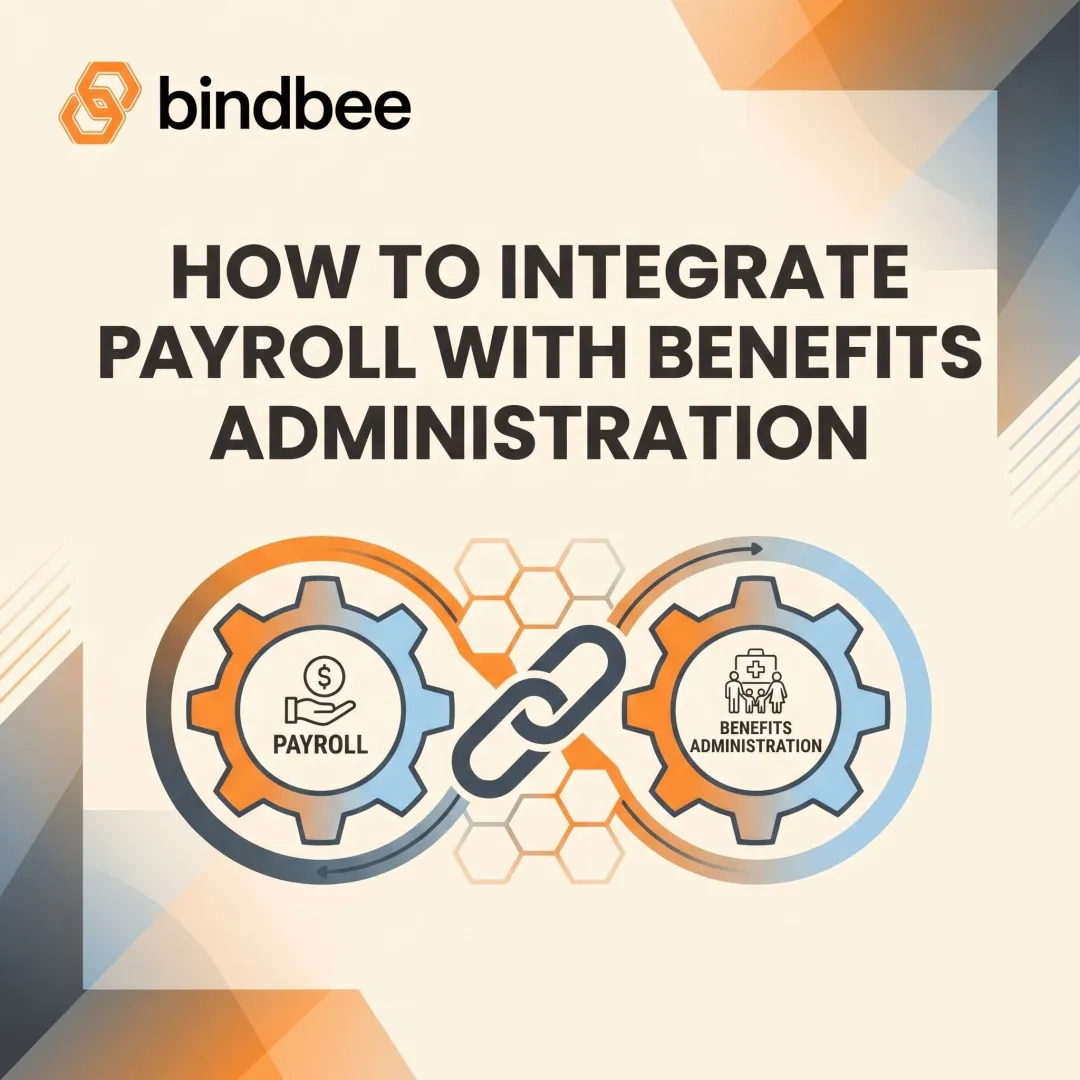
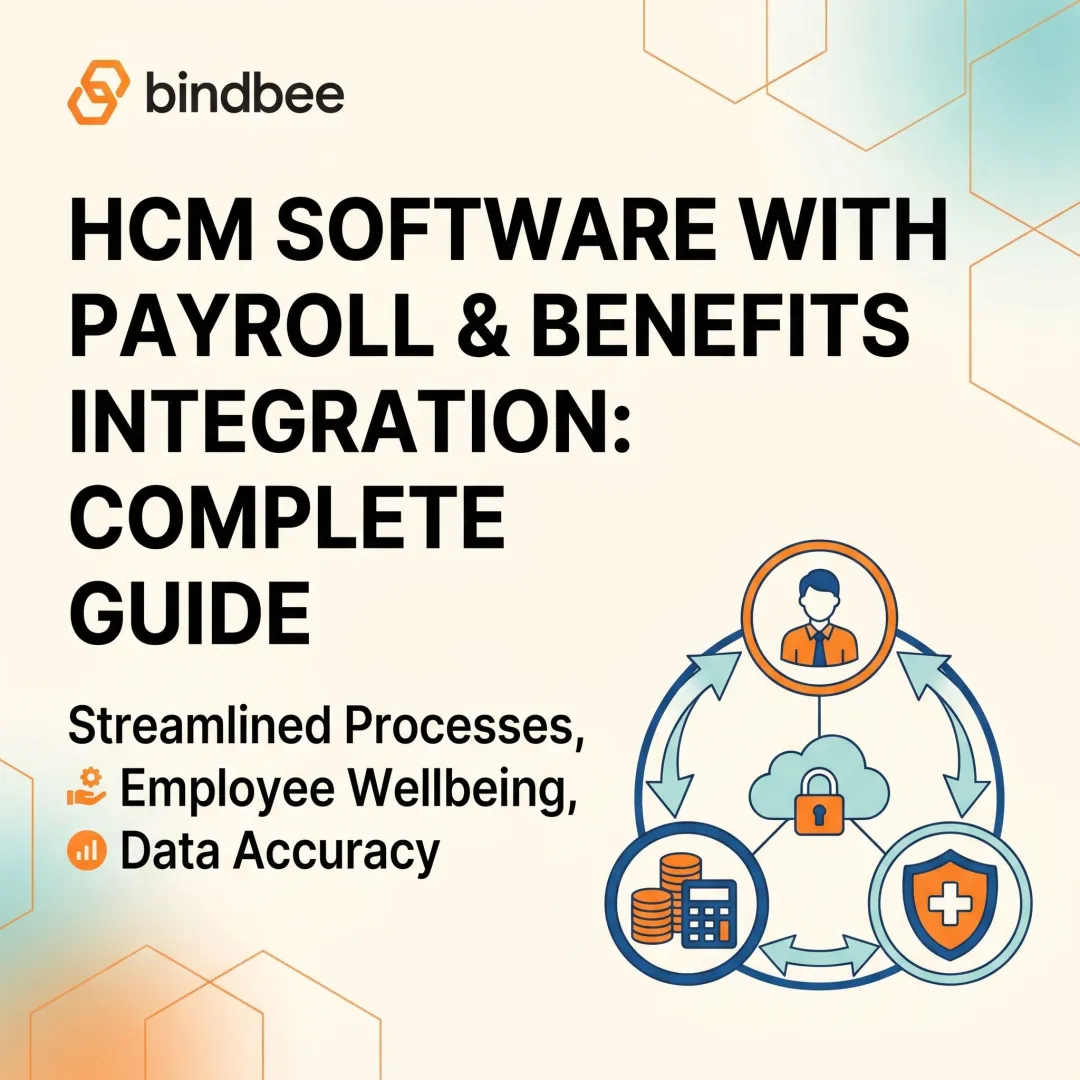
HCM integration is the process of connecting a Human Capital Management system — the HR system of record — with downstream payroll engines and benefits administration platforms so that employee data moves automatically without manual re-entry in each system.
Three distinct categories of systems are involved:
- HCM platforms (Workday, ADP Workforce Now, BambooHR, Rippling, Gusto, UKG, SAP SuccessFactors) — store the authoritative employee record
- Payroll engines — consume compensation, hours, deductions, and tax elections to process paychecks
- Benefits administration platforms — manage enrollment, carrier connections, dependent coverage, and eligibility
These are frequently separate systems that need to stay in sync. The architectural question is how they communicate.
Point-to-Point vs. Unified Data Model
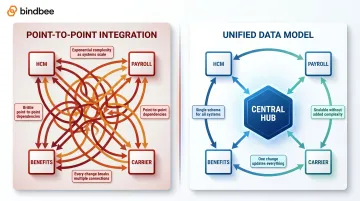
Point-to-point integration means each system talks directly to one other: HCM → payroll, HCM → benefits, benefits → carrier. With three systems, that's manageable. With ten, you're maintaining a web of custom connections where every upstream API change can break multiple downstream integrations simultaneously.
A unified data model approach normalizes all systems into a consistent, shared employee record. Every connected system reads from and writes to the same schema — so a change in the HCM flows cleanly to both payroll and benefits without custom mapping in each direction.
The distinction matters most as your customer base grows. Each new employer your platform onboards likely runs a different HCM — point-to-point complexity multiplies with every addition, while a unified model absorbs new systems without new custom work.
The Critical Data Flows in HCM-Payroll-Benefits Integration
Getting integration architecture right means understanding what specific data each system needs — and when it needs it.
Employee Master Data
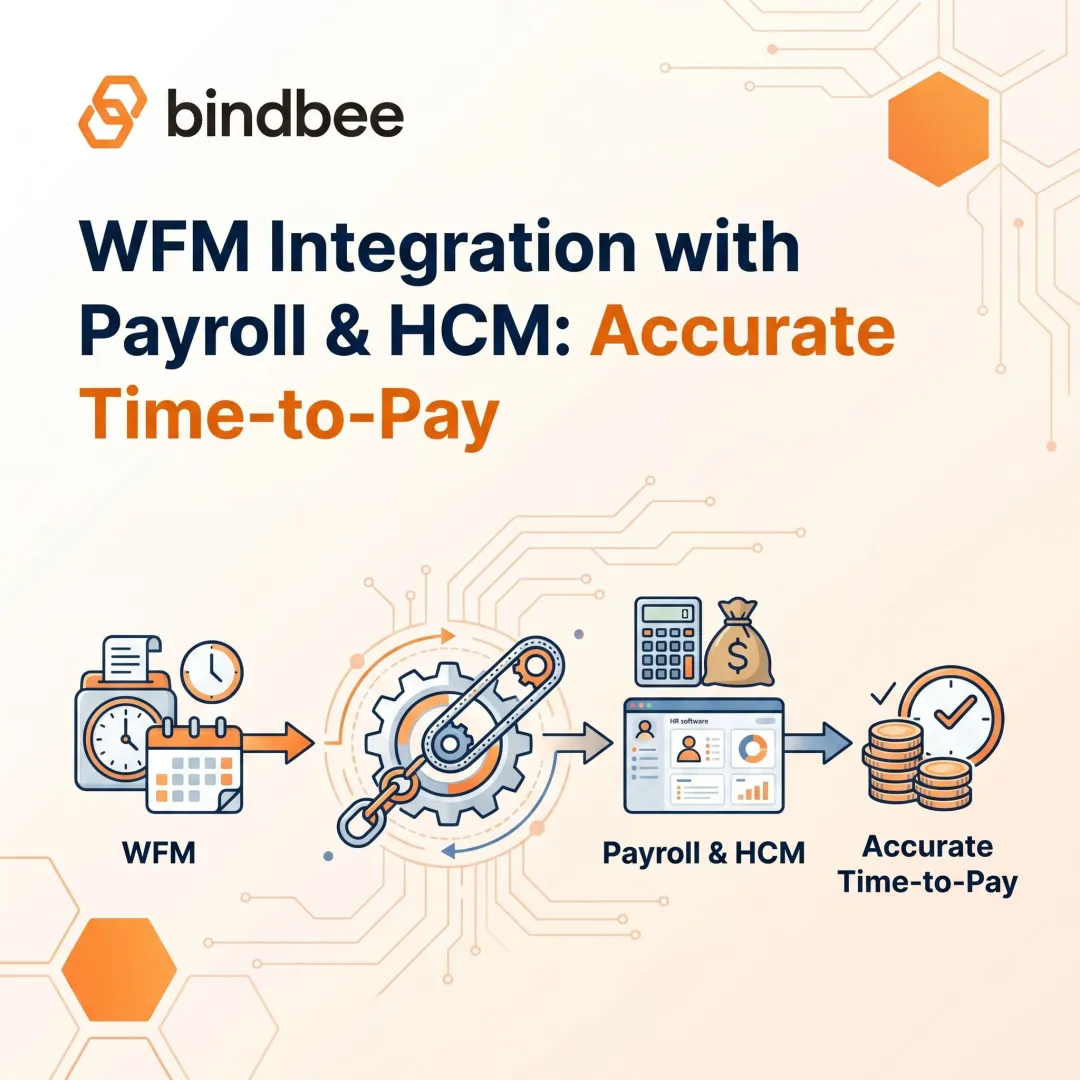
The foundation is bidirectional sync of core employee records: hire dates, employment status, job titles, compensation, department, cost center, and work location. Discrepancies between the HCM and downstream systems are the leading cause of payroll errors and compliance exposure.
A 1,000-employee organization spends an average of 29 workweeks per year correcting the most common payroll errors, per the same EY research. Most of that time traces back to mismatched or stale employee records. That data accuracy problem doesn't stop at the HCM — it cascades directly into payroll.
Payroll Data Flows
Payroll needs a precise set of inputs to calculate correct checks:
- Hours worked and pay rates
- Benefit deductions and pre/post-tax classifications
- Tax withholding elections
- Retroactive changes (rate adjustments, back-pay corrections)
- Status changes that affect pay (leaves, terminations, transfers)
With 53% of workers willing to consider leaving after just two payroll mistakes, according to HR Morning's reporting on Kronos research, payroll accuracy is tied directly to retention — not just compliance.
Benefits Enrollment and Eligibility Flows
Benefits platforms need more than a basic enrollment flag. The data required includes:
- Plan elections and coverage tiers (employee-only, employee + spouse, family)
- Benefit start and end dates, effective dates for mid-year changes
- Contribution amounts per plan, per employee
- ACA-relevant coverage details for reporting
90% of employers report open enrollment errors, costing billions annually. The data-lag window between HCM and enrollment systems is a primary driver — even short delays during open enrollment or qualifying life events can create compliance exposure.
Dependent Benefits: The Underserved Data Layer
Dependent data is where most generic HRIS integrations fall short. Benefits platforms need to track:
- Dependent relationships (spouse, child, domestic partner)
- Each dependent's enrollment elections and coverage tier
- Dates of birth, SSNs, and contact information for carrier submissions
- Coverage start and end dates at the dependent level
Standard HRIS API integrations return employee-level enrollment data. They don't expose a standalone dependent model with this level of granularity.
Bindbee addresses this by treating Employee Benefits, Employer Benefits, and Dependent Benefits as three separate structured objects — each with full dependent detail: relationship type, DOB, SSN, and linked plan data — rather than collapsing everything into generic HR fields.
Lifecycle Event Triggers
New hires, terminations, status changes, and dependent additions are time-sensitive. COBRA notification deadlines run 14–44 days from the qualifying event, with penalties of $110 per qualified beneficiary per day for non-compliance. ACA employer shared responsibility penalties reach $2,900 per employee for coverage failures.
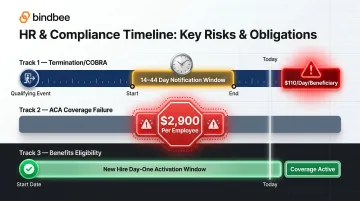
These deadlines make webhook-based event notifications essential. Scheduled nightly batch syncs are insufficient — a termination that happens at 3 PM shouldn't sit unprocessed until the next morning's file run.
Common Challenges When Connecting to HCM Platforms
System Fragmentation
Large enterprises use at least 9 distinct HR systems, and the HR tech market now exceeds 3,800 vendors. Any benefits or payroll platform selling to mid-market and enterprise employers will encounter Workday at one customer, ADP Workforce Now at the next, then Gusto, Paychex, UKG, Paycom, Ceridian Dayforce — each with differences across:
- Authentication protocols (OAuth, API keys, SAML)
- Data schemas and field naming conventions
- Rate limits and pagination behavior
- Versioning and deprecation cadences
The integration challenge isn't building one connection. It's maintaining dozens simultaneously while your engineering team is supposed to be building product.
Data Normalization
Even simple fields diverge across systems. "Employment status" might be ACTIVE/INACTIVE in one system, Full-Time/Part-Time/Terminated in another, and a numeric code in a third. "Benefit effective date" might be stored as MM/DD/YYYY in one platform and ISO 8601 in the next.
A single field-type mismatch can silently corrupt downstream payroll calculations or fail an eligibility check without surfacing an obvious error. Normalization logic needs to be explicitly designed and tested, not assumed.
Legacy System Compatibility
Many mid-market employers still run on-premises or SFTP-based HCM systems that don't expose REST APIs. HR tech vendors face a choice: skip these employers entirely, or build SFTP parsing and file-processing pipelines — which can take months to build and maintain, particularly when file formats vary by system.
Bindbee's SFTP-to-API Bridge handles this by ingesting CSV, XML, and fixed-width file formats from legacy systems, normalizing them into the same unified schema as direct API integrations. The consuming application sees identical data regardless of whether it came through a REST API or a daily SFTP file drop.
API Drift and Ongoing Maintenance
According to Postman's 2025 State of the API Report, 69% of developers spend 10+ hours per week on API-related work. For teams maintaining native HCM integrations, a significant chunk of that time goes to tracking vendor API updates, handling deprecated endpoints, and updating authentication flows.
Workday releases bi-annual API updates; ADP changes their API structure without a fixed schedule. Every such change can silently break a live integration. For a platform maintaining 10+ native connectors, this becomes a permanent engineering tax — engineering resources pulled away from building product to keep existing integrations running.
How a Unified API Approach Changes the Build Equation
The unified API model inverts the integration problem. Instead of each HR tech company building and maintaining native connections to every HCM system, a unified API layer normalizes data from 60+ systems into a single schema. Build one integration and cover every HCM system your customers run — without rebuilding anything as you add employers.
What This Means for Benefits and Payroll Platforms Specifically
Generic unified API tools normalize basic HR fields — employee names, job titles, employment status. Benefits and payroll platforms need more than that. Purpose-built infrastructure exposes:
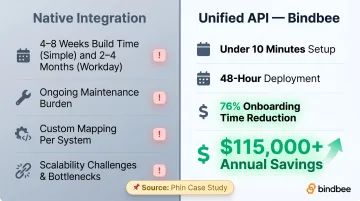
A medium-complexity native HCM API integration takes 4–8 weeks to build: documentation review, authentication setup, data mapping, testing, and deployment. Complex systems like Workday, which requires certification, can run 2–4 months.
Bindbee's setup process takes under 10 minutes for most customers. The employer authenticates via Magic Link (a drop-in auth component), Bindbee begins the initial sync immediately, and API access is available once the sync completes. The Phin case study documents integration deployment reduced from 8–12 weeks to 48 hours, with a 76% reduction in onboarding time and $115,000+ in annual development cost savings.
For Newfront, the impact was a 90% reduction in engineering time on integration development and $800,000+ in annual savings — largely by eliminating the need to build custom file-processing pipelines for legacy systems alongside direct API integrations.
Best Practices for Building Scalable HCM Integrations
Prioritize Real-Time for Lifecycle Events
Nightly batch syncs are adequate for stable data like job titles or department assignments. They are not adequate for:
- New hire onboarding (benefits activation needs to start on day one)
- Terminations (COBRA clock starts immediately)
- Qualifying life events (open enrollment windows are time-bounded)
Design integration architecture around event-driven webhooks for these flows. Batch syncs can supplement, but shouldn't be the primary mechanism for time-sensitive changes.
Design for Security and Compliance from Day One
HR and payroll data carries significant breach cost — the IBM Cost of a Data Breach Report (2025) puts the global average at $4.4 million, with employee data breaches reaching approximately $4.88 million. The security requirements for handling this data aren't optional add-ons.
Non-negotiable baseline:
- Encryption in transit and at rest
- Role-based access controls
- Audit logging with searchable history
- SOC 2 Type II (over 70% of enterprise buyers require it)
- ISO 27001 for international deployments
- HIPAA alignment for benefits and health data
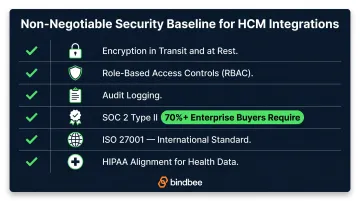
If you're evaluating integration infrastructure, treat these certifications as table stakes — not proof points. Missing any one of them will disqualify you from enterprise deals before the conversation starts.
Test the Edge Cases That Actually Break Things
Security architecture sets the foundation. What breaks it in production is untested edge cases — the scenarios most test suites skip entirely:
- Retroactive effective dates on enrollment changes
- Mid-year plan terminations with partial-month contribution calculations
- Dependent additions during open enrollment when the employee is also changing plans
- Benefits data for employees who are active in HCM but have a pending termination date
Validation logic should flag these anomalies and surface them for review rather than passing malformed records downstream to payroll or carrier feeds.
Frequently Asked Questions
What is HCM in payroll?
HCM (Human Capital Management) in the context of payroll refers to the system of record that stores employee data — compensation, employment status, tax elections, and deductions — which payroll engines consume to calculate accurate paychecks. When HCM and payroll are integrated, this data flows automatically rather than being manually re-entered each pay cycle.
What data flows between an HCM platform and a payroll system?
Core data exchanged includes employee demographics, compensation rates, hours worked, tax withholding elections, benefit deductions, and status changes. Payroll accuracy depends on the timeliness and completeness of this data; stale or missing fields produce incorrect paychecks.
What is the difference between HCM integration and a single HCM platform?
A single HCM platform houses all HR functions natively in one database. HCM integration connects separate specialized systems through APIs or data feeds. Many organizations integrate because best-of-breed tools (a dedicated payroll engine, a specialized benefits platform) outperform any single platform's native modules for their specific needs.
How long does it take to integrate with an HCM system?
Native HCM API integrations typically take 4–8 weeks for medium complexity, with complex systems like Workday running 2–4 months. Unified API platforms like Bindbee reduce this to under one day using pre-built, normalized connectors that skip the custom mapping work entirely.
How do benefits enrollment changes sync with payroll deductions?
When an employee's benefits elections change, the updated plan elections and contribution amounts must reach payroll before the next pay cycle. Integrated systems map those elections to deduction codes (such as MEDICAL_EE, HSA_ER) and write them directly to payroll — bypassing the manual entry that frequently causes errors or misses the cycle entirely.
What are the most common causes of HCM integration failures?
The most common failure points are:
- Schema mismatches between source and destination systems
- Vendor API changes that silently break existing connections
- Missing or malformed dependent data that fails validation downstream
- Batch-only sync cycles that miss time-sensitive lifecycle events
That last one carries real compliance risk: a termination caught in the next morning's file run — instead of in real time — can compress COBRA notification windows to the point of penalty exposure.