Introduction
Payroll errors cost more than money. They create compliance exposure, burn HR team hours on corrections, and quietly push employees to question whether they can trust the organization paying them. According to EY's 2022 HR Processing Risk and Cost Survey, the average company operates at only 80% payroll accuracy, making roughly 15 corrections per pay period. Each error costs an average of $291 to resolve.
The culprit usually isn't the payroll engine. It's the data pipeline feeding it.
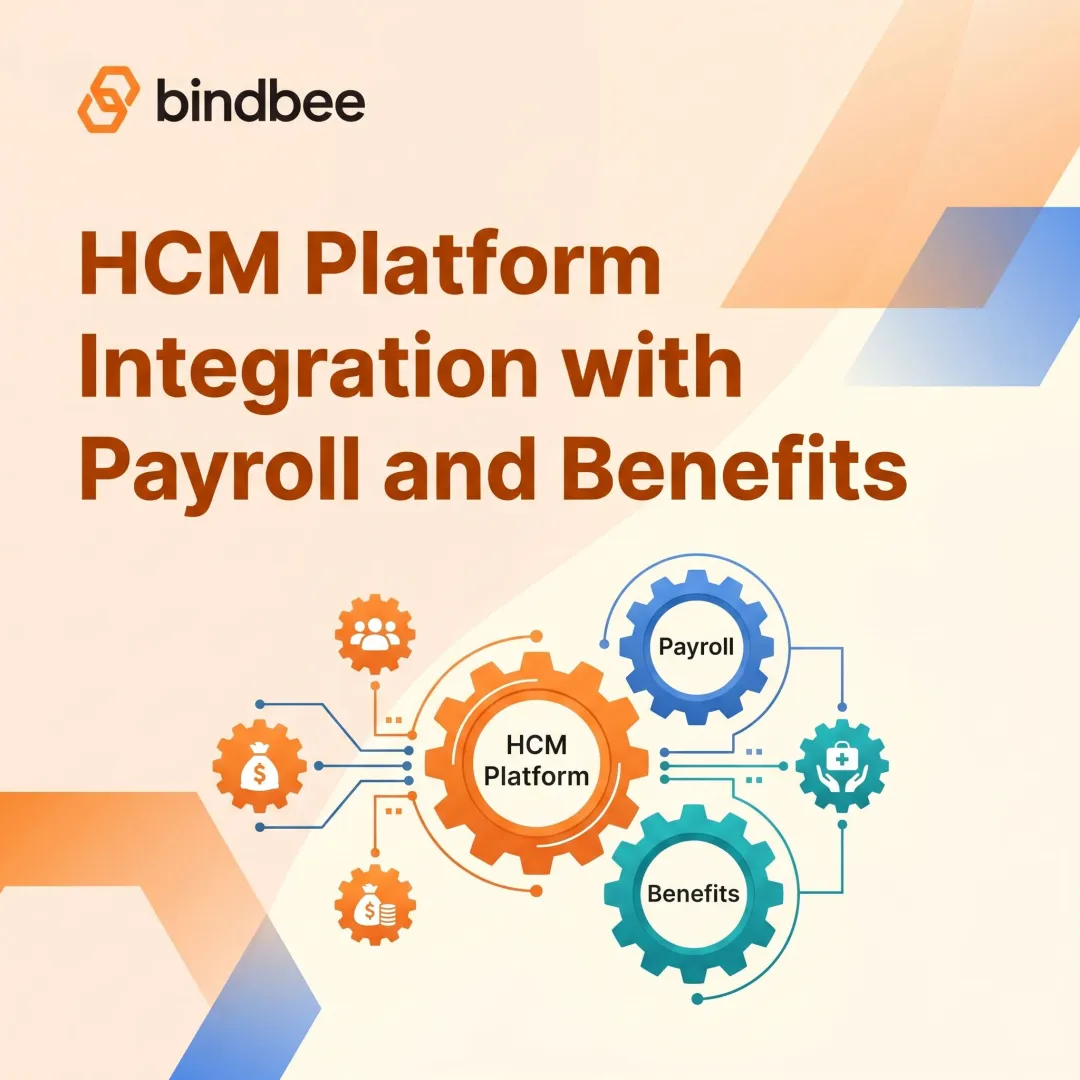
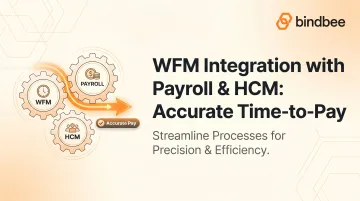
Accurate pay requires three systems working in sync:
- WFM (Workforce Management) — captures when and how long employees worked
- HCM (Human Capital Management) — holds who those employees are
- Payroll — converts both into compensation
When those three systems don't share clean, timely data, errors multiply at every handoff.
This post breaks down how that three-system relationship works, where data breaks down, and what a well-integrated time-to-pay pipeline actually looks like.
TL;DR
- WFM captures time, HCM holds employee records, and payroll computes compensation — accurate results require clean data flow across all three.
- Disconnected systems cause the most preventable payroll errors: wrong hours, missed pay codes, stale employee data, and delayed termination processing.
- WFM-to-payroll data must include rule-interpreted timesheets, leave balances, cost center allocations, and pay type mappings — not just raw clock data.
- API-based integrations beat flat-file approaches on accuracy, latency, and error detection.
- Before go-live: validate source data quality, define system of record ownership, set sync frequency, and run at least one parallel payroll cycle.
WFM, HCM, and Payroll: Understanding the Three-System Relationship
These three systems are routinely confused, bundled together in vendor marketing, or — worse — treated as interchangeable. Each owns a distinct slice of the employment data pipeline, and mixing them up creates real payroll errors.
WFM (Workforce Management) handles the operational layer: employee scheduling, time and attendance tracking, leave management, shift rostering, and absence accruals. WFM knows when employees worked, what rules applied to those hours, and what exceptions occurred. It's where overtime gets flagged, meal break compliance gets logged, and timesheets get approved.
HCM (Human Capital Management) is the system of record for the employee lifecycle. It stores employment status, compensation structure, job roles, cost center assignments, and onboarding/offboarding events. Both WFM and payroll depend on HCM for accurate employee context — it's the source of truth for who is being paid and under what terms.
Payroll is the output layer. It takes time data from WFM and employee data from HCM, applies tax rules and deductions, and produces compensation.
How These Systems Divide Responsibility
| System | Owns | Feeds Into |
|---|---|---|
| HCM | Employee master data, compensation structure, lifecycle events | WFM + Payroll |
| WFM | Timesheets, schedules, leave, attendance | Payroll |
| Payroll | Tax calculations, deductions, pay runs | Employee self-service (read-back) |
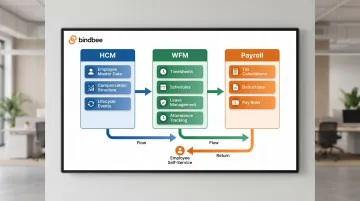
Many vendors offer suites combining all three. Many organizations don't use them. When these systems come from different vendors or different generations of software, the integration layer connecting them determines whether payroll runs cleanly or breaks at the seams.
Why Disconnected Systems Break the Time-to-Pay Cycle
When WFM and payroll don't share a live connection, time data has to be manually exported, transformed, and re-imported. Each handoff is a chance for data to arrive late, map incorrectly, or disappear entirely.
The Most Common Failure Modes
- Hours logged but not reflected in payroll — WFM approves a timesheet, but the export runs overnight. If payroll closes before the file lands, those hours are missing.
- Overtime rules applied in WFM but lost in transit — WFM applies the correct overtime multiplier, but the export schema doesn't map that pay type to payroll's earn code. The employee gets straight time.
- Terminated employees still on payroll — Offboarding in HCM doesn't sync to payroll in time. The terminated employee receives another pay run.
- Stale employee records — Job changes, pay rate updates, and cost center reassignments sit in HCM but haven't propagated to WFM or payroll. Every downstream calculation runs on outdated data.
The Compliance Cost
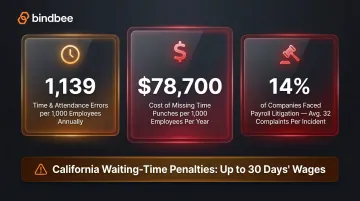
Time and attendance errors occur at a rate of 1,139 per 1,000 employees annually — the highest-frequency error category in EY's dataset. The single most expensive error type is missing time punches, which costs approximately $78,700 per 1,000 employees per year.
The legal exposure compounds on top of that: 14% of companies experienced payroll-related litigation in a single year, averaging 32 complaints per incident.
In jurisdictions like California, involuntary termination triggers an immediate final pay obligation. Waiting-time penalties can reach 30 days' wages — and a nightly flat-file batch cannot meet that deadline.
The Operational Drain
HR and payroll teams compensate for broken integrations the only way they can: manually. Small businesses spend 5–10 hours per pay period on payroll administration. At 15 corrections per cycle, roughly 2.5 hours of that is pure error remediation — a figure that compounds as headcount grows.
What Data Flows Between WFM, HCM, and Payroll
The architecture of WFM-HCM-payroll integration depends on what data travels in each direction — and whether it arrives in a usable state. Here's how each flow breaks down.
WFM → Payroll
Raw clock-in/clock-out records are insufficient. The data payload must be rule-processed before it leaves WFM — meaning overtime, shift differentials, meal break flags, and supervisor approvals have already been applied. The minimum required fields:
- Validated hours by earn code (regular, overtime, double-time)
- Shift differentials and premiums
- PTO, sick, and vacation hours taken
- Meal/rest break compliance flags (critical in California, Oregon, Washington)
- Cost center and department allocations
- Supervisor approval timestamp
- Pay period start and end dates
HCM → WFM
WFM needs to reflect the current workforce state at all times:
- New employee records (so schedules and timesheets can be created)
- Employment status changes and job role updates
- Pay rate changes with effective dates
- Termination events (to close out timesheets and prevent further scheduling)
HCM → Payroll
Before any payroll run executes, payroll needs:
- Compensation structure and effective dates
- Tax information and filing status
- Benefit deductions and elections
- Hire, transfer, and termination events
Payroll → WFM & HCM
After payroll finalizes, leave balances and payslips should sync back to WFM and the HCM's self-service layer. Employees checking PTO balances in their WFM app should see numbers consistent with what payroll processed — not last week's figures.
Often-Overlooked Auxiliary Data
Most integration plans cover employee and time data thoroughly. What gets missed is the reference data that makes field mappings work in the first place:
- Pay type / earn code mappings between WFM and payroll
- Cost center codes that must match across all three systems
- Public holiday calendars that WFM uses for premium calculations
- Organizational hierarchy used for GL posting and approvals
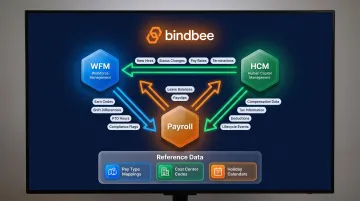
A mismatch in any of these reference tables produces silent failures: hours export correctly but land in the wrong pay bucket, with no error thrown to flag the problem.
Integration Approaches: Flat Files, APIs, and Unified Connectors
Not all integrations are equal. The architecture you choose determines your error rate, compliance exposure, and maintenance burden.
Flat-File (CSV/SFTP) Transfers
This is the most common legacy approach. WFM exports a structured file; payroll imports it on a schedule. It works — until it doesn't.
Limitations:
- Rigid field schemas break when either system updates its export format
- No real-time error feedback — failures surface only at the next manual review
- Inherently batch-oriented, so termination events can't propagate in time for same-day final pay requirements
- Encrypted API integrations reduce attack surface by up to 98% compared to CSV/SFTP file sharing
Direct API Integration
Modern WFM and payroll platforms expose REST APIs that enable real-time or near-real-time data exchange. When a timesheet is approved in WFM, an API call can immediately queue a payroll update rather than waiting for the overnight batch. Error handling is also structured: failed calls return explicit codes rather than silent file drops.
The tradeoff: building and maintaining a direct point-to-point API integration between two systems takes 4–8 weeks of engineering time. Building ten of them is impractical.
Unified API / Middleware Layer
When an HR Tech vendor or payroll platform needs to connect to multiple WFM and payroll systems, point-to-point native integrations break down fast. A unified API layer normalizes data across all systems, so one integration protocol handles many sources and destinations.
Bindbee's unified API connects 60+ HRIS, payroll, and WFM systems (including UKG, ADP, Gusto, Rippling, Paychex, and Ceridian Dayforce) through a single normalized data model. For legacy systems that only export flat files, Bindbee's SFTP-to-API bridge converts those file drops into the same structured API responses as native connections, so downstream applications receive consistent data regardless of the source.
Setup takes under a day versus 4–8 weeks for a native integration, with zero ongoing maintenance as vendor APIs update.
Grazzy, which needed real-time access to timesheet, PTO, and clock-in data for payout calculations, deployed 60+ integrations through Bindbee at once — eliminating biweekly manual CSV exports for roughly 75% of their customers in the process.
Integration Maturity Levels
| Level | Description | Compliance Risk |
|---|---|---|
| Manual reconciliation | No integration; HR exports and re-enters data | Very high |
| Flat-file exchange | Scheduled CSV/SFTP exports | High (latency, no error feedback) |
| Scheduled API sync | Periodic API calls, structured error handling | Medium |
| Real-time event-driven | Webhooks on key events (termination, hire, approval) | Low |
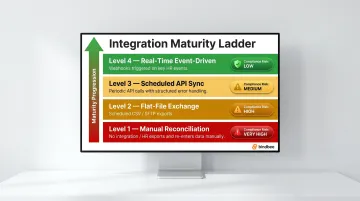
Most organizations with disconnected systems sit at level 1 or 2. Moving to level 3 resolves the majority of payroll error scenarios. Level 4 is required for jurisdictions with same-day final pay obligations.
Four Things to Validate Before Going Live
1. Data Quality in the Source System
Confirm that employee records in HCM are complete and accurate before the integration runs. Missing national IDs, incorrect cost center codes, or outdated pay rates propagate through every sync. Establish a data quality threshold as a formal go-live entry criterion — testing shouldn't begin until the source data passes it.
2. System of Record Ownership
Define which system owns each data type. A common working model:
- HCM owns employee master data and compensation structure
- WFM owns timesheets and attendance records
- Payroll owns finalized leave balances post-run
Without this, conflicting writes create sync loops — two systems overwriting each other's updates on every cycle.
3. Integration Frequency and Alerting
Match sync cadence to your compliance requirements:
- Real-time: New hires, terminations, pay rate changes
- Daily: Leave accruals, cost center updates
- Weekly or per-period: Timesheet exports ahead of payroll close
Set rule-based validation alerts that surface missing or mismatched records before they reach the payroll run — not after.
4. Parallel Run and Testing Phases
Payroll is binary: either the numbers are right or they aren't. Testing phases matter.
- SIT (System Integration Testing): Confirm systems communicate and data arrives in the correct format
- UAT (User Acceptance Testing): Run real payroll scenarios with actual employee data
- Parallel Run: Process payroll in both old and new systems simultaneously for 2–3 pay cycles, then compare outputs
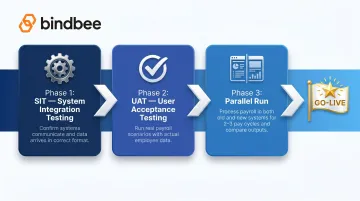
Skipping this phase means financial posting errors and accrual mismatches surface after go-live — where they require manual journal entries and amended payroll runs to fix. Infosys recommends completing all three phases before cutover.
Frequently Asked Questions
How do you ensure payroll accuracy and timely processing?
The core levers are real-time integration between WFM and payroll, rule-interpreted timesheets before export, and validation alerts that catch mismatches before a pay run executes. Define sync frequency based on your payroll schedule and compliance deadlines : terminations need near-real-time propagation, not overnight batch.
What is the difference between HCM and WFM?
HCM is the system of record for the employee lifecycle: compensation structure, employment status, job roles, and HR data. WFM is the operational layer for scheduling, time tracking, and leave management. Both feed payroll, but they serve distinct functions : HCM manages who employees are; WFM manages when and how long they worked.
What does workforce management software do?
WFM handles employee scheduling, time and attendance tracking, absence and leave management, and shift rostering. Its outputs (hours worked, leave taken, overtime, shift differentials) are the primary inputs into payroll calculation. WFM should process those hours against pay rules before sending data to payroll.
What data flows from WFM to payroll in an integration?
Key data elements include:
- Rule-interpreted hours by earn code (regular, overtime, double-time)
- Shift differentials, leave hours taken, and cost center allocations
- Pay rate overrides
Raw clock-in/clock-out data must be processed against pay rules before transfer. Unprocessed punch records are not payroll-ready.
Which workforce management system offers the most reliable time tracking features?
Reliability in time-to-pay workflows depends less on any single WFM system and more on how cleanly its data integrates with payroll and HCM. Evaluate WFM vendors on API capabilities, native payroll connectors, and real-time sync options — not just clock-in accuracy. A system with flawless time capture still fails if its export schema doesn't map correctly to your payroll earn codes.