The downstream consequences are measurable. According to a 2025 HiBob survey, 48% of payroll teams say manual data entry slows them down, and 41% spend 4–10 extra hours per pay cycle just fixing errors. For a 1,000-employee company, EY estimated that correcting payroll errors costs up to $922,131 annually.
This article covers what HR tech teams, payroll platform builders, and workforce management developers actually need to get right — operationally and technically — when connecting time tracking data to HRIS and payroll systems.
TL;DR
- Manual time-to-payroll data transfers are the leading source of payroll errors and compliance exposure
- FLSA requires per-workweek overtime calculation — averaging across pay periods is illegal
- Manager approval workflows and employee self-service portals catch errors before payroll runs
- Real-time, webhook-based sync prevents stale data from feeding payroll runs
- A unified API layer lets you support 60+ HR and payroll systems without rebuilding integrations one by one
What Is HR Payroll Time Tracking Integration?
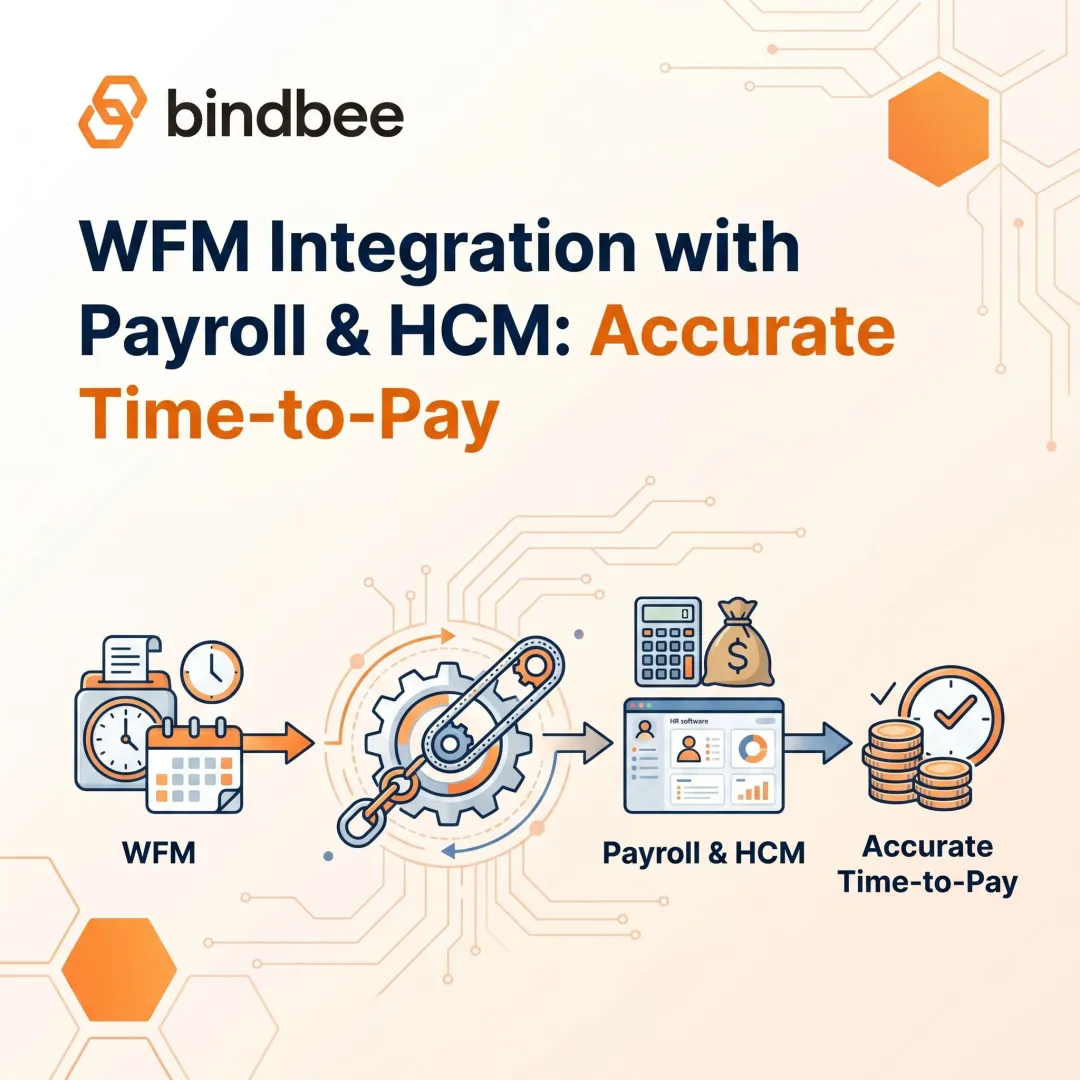
HR payroll time tracking integration connects time-capture systems — time clocks, mobile apps, timesheets — with HRIS and payroll platforms so that hours worked, overtime, breaks, and PTO flow automatically into compensation calculations. No manual re-entry, no CSV exports, no copying numbers between screens.
What Data Must Move
Per DOL Fact Sheet #21 (29 CFR Part 516), the minimum required data elements include:
- Hours worked each workday and total hours per workweek
- Regular hourly pay rate and basis for payment
- Total straight-time and overtime earnings
- All additions to or deductions from wages
- Date of payment and pay period covered
Beyond the federal minimum, a complete integration also passes shift differentials, on-call pay, paid and unpaid break durations, PTO usage, cost-center or job codes, and timesheet approval status with approver identity.
Two Integration Approaches
| Approach | How It Works | When It Fits |
|---|---|---|
| Point-to-point | Direct connection built between two specific systems | Single-system environments; limited scope |
| Unified API / middleware | Single normalized layer connecting 60+ systems | Multi-system environments; platform builders |
Point-to-point works when you have one payroll system and one time tracking tool that rarely changes. For HR tech teams building products that need to support dozens of customer payroll environments, a unified layer is the only workable approach, because every new customer with a different HRIS otherwise becomes a multi-week integration project. The rest of this guide covers how to build that integration well, regardless of which path fits your environment.
The Cost of Disconnected Systems
The American Payroll Association estimates an 8% human error rate when manually processing payroll. That number isn't surprising once you understand what manual transfer actually involves: re-keying hours from one system into another, reconciling format mismatches, translating pay codes, and catching rounding inconsistencies — all under a payroll deadline.
Where Errors Come From
HiBob's 2025 data breaks down the error types employees actually notice:
- 42% involved missing or incorrect overtime pay
- 28% involved wrong days or hours worked
- 26% involved incorrect salary or hourly rates
These aren't edge cases. They're the predictable output of systems that weren't designed to talk to each other.
Compliance Exposure
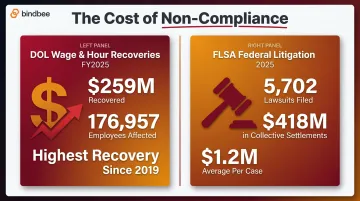
When time data doesn't automatically trigger overtime calculations — or fails to capture all compensable hours including pre-shift, remote, or off-clock work — organizations accumulate FLSA liability. The DOL's Wage and Hour Division recovered more than $259 million in back wages for 176,957 employees in fiscal year 2025, the highest recovery since 2019.
FLSA litigation ran parallel: 5,702 federal lawsuits in 2025, with collective action settlements totaling $418 million across 337 cases — averaging $1.2 million per case.
The Engineering Tax
For platform builders, maintaining point-to-point integrations carries its own compounding cost. Each HRIS vendor updates their API on their own schedule, and every update is a potential breakage. At 10 integrations, that's manageable. At 60, the maintenance burden becomes a full-time job — one that pulls engineering capacity away from the product work that actually drives growth.
Taken together, these three costs — payroll errors, compliance exposure, and integration overhead — don't stay isolated. They compound.
Operational Best Practices
Establish a Fixed Workweek and Enforce Time-Entry Deadlines
The FLSA defines a workweek as a fixed, recurring 168-hour period. Overtime must be calculated within that workweek — the law explicitly prohibits averaging hours across two or more weeks. If an employee works 30 hours one week and 50 the next, you owe overtime on the 10 excess hours in week two, regardless of the two-week average.
The workweek start day and time must be defined in your system — not just in an HR policy document. If it isn't hardcoded, overtime triggers won't fire at the right threshold.
On deadlines: set time-entry submission cutoffs 24–48 hours before payroll runs, with automated reminders for both employees and managers. Entries that arrive after the payroll lock require off-cycle corrections that consume HR time, introduce errors, and land poorly with employees expecting accurate paychecks.
Require Manager Approval Workflows Before Payroll Runs
A supervisor review step before data passes to payroll is the last checkpoint before errors become paychecks. But approval workflows only work if they're designed to surface anomalies — hours significantly above or below schedule, overtime spikes, missed punches. Bulk approvals that don't flag anything aren't a control; they're a rubber stamp.
Two things make approval workflows operationally valuable:
- Anomaly surfacing — configure thresholds that force a manager to actively review unusual entries rather than click through
- Documented approval trail — who approved what entry, and when, timestamped in the system
That audit trail isn't just good practice. Under the Anderson v. Mt. Clemens Pottery burden-shifting framework — reaffirmed by the Fifth Circuit in 2021 and the Seventh Circuit in 2025 — when employer time records are incomplete, the evidentiary burden shifts toward the employer in wage disputes. Manager-approved, system-captured records are a primary litigation defense.
Standardize Pay Codes and Data Mapping
Complex workforces generate multiple pay codes per employee per shift: base rate, shift differential, on-call pay, holiday premium, hazard pay. Each code must be precisely mapped between your time tracking system and payroll. A code that drops silently during transfer doesn't generate an error — it generates a back-pay liability that surfaces months later.
Getting the mapping right — and keeping it right — requires a repeatable process:
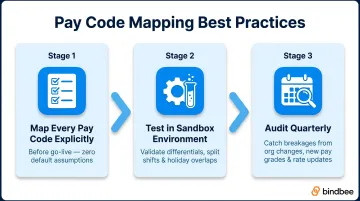
- Map every pay code explicitly before go-live, with no assumptions about default behavior
- Test in a sandbox environment using real-world edge cases (shift differentials, split shifts, holiday overlaps)
- Audit quarterly — org changes, new pay grades, and rate updates routinely break mappings that worked at launch
Enable Employee Self-Service Access to Time Records
Giving employees visibility into their own time records pays off in two concrete ways:
- Earlier error detection — employees who can check their hours while the pay period is open catch mistakes when a correction is a two-minute fix, not a multi-step exception process
- Fewer inbound correction requests — when employees can see their hours, they flag discrepancies proactively instead of discovering them on payday
- Reduced HR overhead — self-service shifts the first line of error detection to the employee, freeing HR to handle genuine exceptions rather than routine lookups
Technical Integration Best Practices
Normalize Time Data Across All Connected Systems
When time tracking data must flow into many different payroll platforms — each with different field names, data types, and rate structures — normalization is what keeps the integration maintainable. A unified data model that translates all incoming time data into a consistent format prevents per-system mapping gymnastics and reduces the surface area for errors.
This is the core architecture problem that unified API layers solve. Bindbee's unified API normalizes time, payroll, and employment data across 60+ HRIS and payroll systems — Workday, ADP, Gusto, Rippling, Paychex, UKG, BambooHR, and the long tail of regional systems — through a single connection. HR tech teams build once and cover their entire integration surface, rather than maintaining separate pipelines per system.
Grazzy, which handles tip disbursement and payroll integration for hospitality businesses, used this approach to eliminate a 2–3 week build cycle per integration and remove biweekly manual CSV exports for approximately 75% of their customers.
Prioritize Real-Time Sync and Webhooks Over Batch Transfers
Batch processing transfers data on a fixed schedule — nightly, typically. Payroll calculations that run between batches operate on data that may already be hours or days out of date. A shift completion, a manager approval, or a timesheet correction made after the batch window will be invisible to payroll until the next run.
Real-time incremental sync pushes data as events occur. Webhooks for life events — shift completions, timesheet approvals, punch-ins, terminations — trigger downstream payroll and HR actions automatically without polling.
HiBob's 2025 research found that 46% of payroll teams want seamless syncing with time-tracking tools, and 39% want systems that flag errors before processing. Both capabilities require event-driven architecture, not batch transfers.
Test Data Mapping in a Sandbox, Then Monitor Continuously
Before go-live, map every relevant field — employee ID, hours type, rate code, cost center — between your time tracking system and the target payroll platform in a sandbox environment. Test the edge cases that cause production failures:
- Missed punches (what happens to the day's hours?)
- Overtime triggers (does the system calculate correctly at the workweek boundary?)
- Multi-rate shifts (does each hour segment carry the right pay code?)
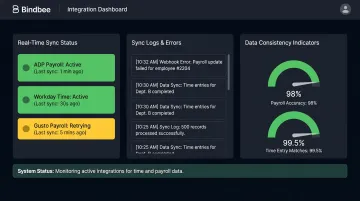
After go-live, set up automated data consistency checks and sync error alerts. Integration failures that surface silently produce incorrect payroll data with no immediate indication that anything went wrong. Bindbee's platform provides real-time sync status dashboards, detailed logs, and webhook-based error notifications, so failures surface before they affect a payroll run.
Plan for Zero-Maintenance Integration Architecture
HRIS and payroll vendors update their APIs on their own schedules. Breaking changes are infrequent but inevitable, and each one is a potential outage for every point-to-point integration downstream of it.
The practical alternative is building on an integration layer that absorbs upstream API changes internally. When a vendor updates their schema, the middleware handles it; the downstream application keeps receiving the same normalized data without any changes on your end. Papershift reduced integration deployment time from 90 days to under 24 hours using this approach, saving over $200,000 annually in development resources.
Compliance and Data Security
Payroll-time-tracking integrations don't just move data — they create legal exposure. Two compliance layers demand attention from any team building or procuring these systems: federal record-keeping rules and state-specific overtime logic. Both require more than good intentions; they require the right architecture.
FLSA Record-Keeping Requirements
Employers must retain payroll records for at least three years and time cards, work schedules, and wage calculation records for at least two years (29 CFR Part 516). This means integrated systems need durable, timestamped audit trails of all time entries, edits, and approvals — not just the final payroll figures.
Multi-State Complexity
State-level rules add significant compliance logic requirements:
| State | Daily Overtime Rule |
|---|---|
| California | 1.5x after 8 hrs/day; 2x after 12 hrs/day |
| Alaska | 1.5x after 8 hrs/day |
| Colorado | 1.5x after 12 hrs/day |
| Nevada | 1.5x after 8 hrs/day (below 1.5x min wage) |
| Federal FLSA | Weekly threshold only (40 hrs/week) |
Hardcoding a single overtime formula guarantees compliance failures in multi-state workforces. The integration layer must be configurable at the employee or location level to apply the correct rules automatically.
Security Baseline for Time and Payroll Data
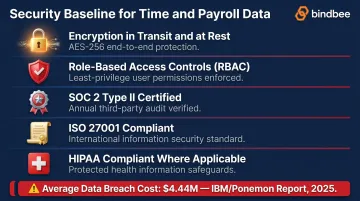
Any platform handling compensation and hours-worked data must meet these baseline requirements:
- Encryption in transit and at rest
- Role-based access controls limiting who can view or modify time and pay records
- SOC 2 Type II for enterprise buyer trust
- ISO 27001 for information security management controls
- HIPAA where health plan data intersects payroll deductions
Skipping any of these isn't just a technical risk — it's a financial one. The global average cost of a data breach is $4.44 million (IBM/Ponemon, 2025), and payroll data — SSNs, bank accounts, compensation figures — sits at the high end of breach severity.
Monitoring and Maintaining Your Integration
Integration requires ongoing operational attention — not just a launch-day configuration and a hand-off to payroll.
Schedule quarterly audits of time data patterns to identify systemic issues:
- Recurring missed punches at specific locations or shifts
- Overtime spikes clustered at period-end (a sign employees are padding hours before the lock)
- Approval timestamps that cluster immediately before the payroll deadline (rubber-stamp behavior)
- Rounding patterns that consistently undercount hours in the same direction
These patterns point to structural process failures — shift scheduling gaps, approval window misalignment, or misconfigured rounding rules — not individual mistakes. Fix the root cause, not the symptom.
Monitor sync logs continuously to catch issues before they reach payroll. Watch for:
- Sync errors and failed job runs
- Data freshness degradation (stale records reaching payroll)
- Field-mapping failures after schema changes
Whenever either the time tracking or payroll system undergoes a version update, reassess your integration configurations and confirm field mappings are intact before the next payroll run.
Frequently Asked Questions
How do you integrate time management and payroll?
Time management and payroll systems connect via APIs or a unified middleware layer that transfers hours worked, overtime, pay codes, and related data directly into payroll calculations — no manual re-entry at the transfer step.
How are timesheets used for payroll?
Timesheets capture hours worked per pay period. Once a manager approves them, the data passes to the payroll system to calculate gross pay, overtime premiums, and deductions. Errors at this stage propagate directly into paychecks, so accuracy matters most here.
What are the most common errors in payroll time tracking integration?
The top failure points: mismatched pay code mapping between systems, batch sync delays that feed stale hours into payroll runs, missing overtime triggers due to incorrect workweek configuration, and integration breakdowns caused by upstream API changes from HRIS or payroll vendors.
What data fields should be synced between time tracking and payroll systems?
Essential fields to sync:
- Employee ID and clock-in/clock-out timestamps
- Total regular and overtime hours
- Pay codes (base rate, shift differential, on-call)
- Break durations and cost center or job code
- Timesheet approval status with approver identity and timestamp
How does real-time sync differ from batch processing for payroll integration?
Real-time sync pushes time data as events occur — punch-ins, approvals, corrections — keeping payroll records current. Batch processing runs on a fixed schedule (nightly or weekly), which can leave payroll running on data that's hours or days stale when mid-cycle changes occur.
What compliance risks arise from poor time tracking and payroll integration?
Disconnected systems risk FLSA violations from missed overtime payments, incomplete audit trails that weaken wage dispute defenses, and multi-state compliance failures. Under the Anderson v. Mt. Clemens Pottery doctrine, missing time records can shift the legal burden of proof to the employer.