The consequences compound fast — incorrect deductions on paychecks, missed COBRA notification windows, ACA reporting errors that now carry penalties of up to $330 per return. And with approximately 665 distinct payroll providers operating in the US, building reliable connections across the employer landscape isn't straightforward.
This guide covers the pre-integration essentials, a four-step implementation process, the variables that separate integrations that hold up under operational pressure from those that quietly break, and how to choose the right technical approach for your platform's coverage needs.
TL;DR
- Payroll-benefits integration keeps employee records, enrollment elections, and deductions synchronized automatically — no manual entry required
- Before connecting systems, lock in API access, a field mapping spec, and HIPAA BAA plus SOC 2 compliance sign-off
- Four steps drive a working integration: data audit → approach selection → bidirectional sync with life-event webhooks → automated deduction codes
- Quality comes down to sync frequency, data normalization, bidirectionality, and complete dependent records
- Unified API platforms cut setup from weeks to under a day and reduce per-provider maintenance to zero
What You Need Before Simplifying Benefits Administration with Payroll
Skipping the pre-integration phase is the single biggest cause of failed implementations. Data quality gaps and access limitations discovered mid-build compound downstream errors and delay go-live by weeks.
System and API Access Readiness
Start by confirming what API access each payroll system actually exposes. Not every provider allows deduction writeback or provides full dependent data through their developer programs — verify this before writing a single line of integration code.
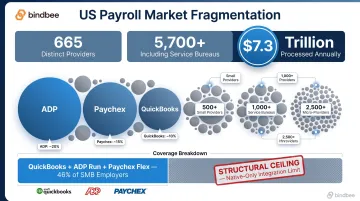
The US payroll market has roughly 665 distinct providers processing over $7.3 trillion annually, with the long tail extending to 5,700 when including service bureaus. Even connecting to the top three SMB providers — QuickBooks, ADP Run, and Paychex Flex — covers only 46% of SMB employers. Native-only strategies hit a structural ceiling quickly.
API coverage is only half the access problem. Before connecting any systems, confirm your compliance posture for each integration:
- HIPAA BAA: Required when your platform touches protected health information under 45 CFR Parts 160 and 164 — benefits enrollment data qualifies
- SOC 2 Type II: The de facto enterprise requirement for vendors handling HR and benefits data
- GDPR/CCPA: Applies based on employee geography, not just company headquarters
Data and Field Requirements
With access and compliance confirmed, the next step is locking down your data model. Define the minimum fields your platform needs from payroll, document them as a formal field mapping specification, and identify format inconsistencies across target systems before go-live — not during it.
Required fields to capture from payroll:
- Employee identifiers (ID, SSN)
- Employment status and hire/termination dates
- Compensation and pay frequency
- Dependent records: names, relationships, dates of birth
- Existing deduction codes
Required fields to write back to payroll:
- Updated deduction codes and contribution amounts
- Enrollment elections with effective dates
- Coverage tier changes from life events or open enrollment
How to Simplify Employee Benefits Administration with Payroll Systems
Step 1: Audit and Map Your Data Requirements
Before any technical work begins, enumerate every field your benefits platform needs to read from payroll and write back to it. This becomes your field mapping specification — the document that drives every integration decision downstream.
At this stage, identify data format inconsistencies across your target payroll systems. Employment status values, pay frequency labels, and deduction classifications are structured differently across providers. For example, one system may use FULL_TIME while another uses FT or 1. Resolving normalization at the mapping stage prevents errors that are difficult to trace later.
Audit checklist:
Read from payroll:
- Employee census, compensation, pay frequency
- Dependent records and coverage eligibility
- Existing deduction codes
Write to payroll:
- Deduction codes and contribution amounts
- Enrollment effective dates
- Plan elections
Document format discrepancies for each target system in this spec. Don't assume consistency across providers — it doesn't exist.
Step 2: Choose Your Integration Approach
Three primary paths exist, each with distinct trade-offs:
1. Native API integrations per payroll provider
- Build time: 3–6 months per system (engineering estimates from Finch's payroll landscape research)
- Coverage: Only the systems you build for
- Maintenance: Ongoing as providers update APIs and authentication methods
- Best for: 1–3 high-priority providers where deep custom field access is required
2. Unified API platform
- Build time: Under a day for initial setup; employer connections in hours
- Coverage: 60+ systems through a single integration
- Maintenance: Handled by the platform provider
- Best for: Benefits platforms needing broad employer coverage without proportional engineering cost
3. SFTP-to-API bridge
- Accepts CSV, XML, and fixed-width file formats from legacy systems
- Normalizes flat-file data into the same schema as direct API integrations
- Required for systems like isolved, bswift, and Plansource that expose benefits data only through file exports
- Best for: Employers on legacy platforms with no direct API access
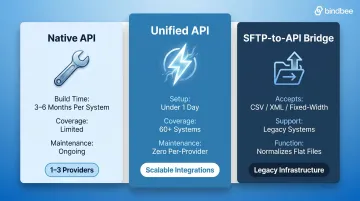
For benefits platforms needing broad employer coverage, unified API solutions like Bindbee offer benefits-specific data models — Employee Benefits, Employer Benefits, and Dependent Benefits as distinct objects — that map directly to how enrollment platforms consume and write data. Setup completes in under a day, with employer connections via Magic Link taking approximately five minutes.
Step 3: Establish Bidirectional Data Sync with Life-Event Webhooks
Configure two sync modes:
- Real-time webhooks for life-event triggers: new hire, termination, dependent addition, hours reduction, status change
- Scheduled incremental syncs for non-time-sensitive updates like compensation changes and pay frequency updates
Why real-time matters for compliance: COBRA requires employers to notify beneficiaries within 44 days of a qualifying event. A batch sync that runs weekly can consume nearly a quarter of that window before the benefits platform even receives the termination event. Similarly, the ACA's 90-day maximum waiting period begins from the eligibility date recorded in payroll — sync delays can push coverage start dates past the statutory limit.
Before go-live, validate:
- Employees can be matched across systems using stable identifiers
- Dependent records include relationship types and dates of birth
- Webhook alerts are configured for failed syncs and demographic mismatches
Step 4: Map and Automate Deduction and Contribution Codes
Map your benefits platform's plan deductions to the corresponding payroll deduction codes in each employer's system. Mismatched codes are the leading cause of incorrect paycheck deductions. A medical deduction labeled MEDICAL_EE in your benefits platform means nothing if the payroll system expects MED-EMP.
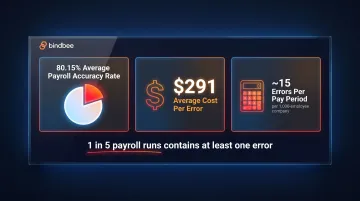
The stakes are real: the EY 2022 HR Processing Risk and Cost Survey found an 80.15% average payroll accuracy rate, meaning roughly one in five payroll runs contains at least one error. At $291 per error to correct, deduction mismatches are a measurable cost center for every benefits platform.
Configure bidirectional writeback so that when an employee changes elections, the updated deduction amount pushes to the payroll system automatically. Configure bidirectional writeback to cover the full range of election changes:
- Adding or removing a dependent
- Increasing or decreasing a 401(k) contribution
- Selecting a new coverage tier mid-year
No HR intervention required.
Bindbee handles this by transforming benefits elections into the specific deduction format each payroll system expects, mapping elections to codes like MEDICAL_EE, DENTAL_EE, and HSA_ER automatically. Clever Benefits eliminated spreadsheet reconciliation entirely this way, reducing payroll admin time by 70%.
Key Variables That Determine Integration Quality
Two integrations can both be technically "connected" yet produce completely different outcomes. These variables are what separate integrations that hold up from those that quietly generate compliance and accuracy problems.
Data Normalization Across Payroll Providers
Each payroll system structures data differently: field names, status codes, pay frequency labels, and deduction classifications all vary by provider. Without normalization, benefits logic breaks the moment an employer switches payroll providers or a new client onboards on a different system.
A normalized data model maps all providers to a consistent schema, making benefits logic portable. For retirement and benefits platforms, this means 401(k), HSA, and FSA amounts mapped correctly across weekly, bi-weekly, semi-monthly, and monthly payroll cycles with no manual cleanup required.
The downstream cost of skipping normalization: enrollment mismatches, incorrect eligibility determinations, and deduction errors that surface during ACA reporting season. With IRS good-faith relief for ACA reporting eliminated after 2020, penalties now run from $60 to $330 per incorrect return, with annual caps reaching $3,987,000 for large employers. Data normalization failures flow directly into Forms 1094-C and 1095-C.
Sync Frequency and Bidirectionality
Sync frequency determines compliance exposure. A weekly batch sync means a termination event recorded in payroll on Monday may not reach the benefits platform until the following week , consuming a significant portion of the 44-day COBRA window before any action is taken.
Event-driven webhooks eliminate this risk. When a termination, new hire, dependent addition, or status change occurs in the source system, the benefits platform receives the event at the moment it happens rather than waiting for the next scheduled sync.
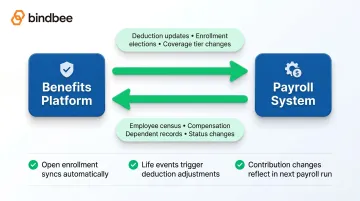
Read-only integrations pull data in but cannot push deduction updates back. That gap is precisely where most incorrect deductions originate. True bidirectional integration eliminates it:
- Open enrollment changes sync back to payroll automatically
- Life event updates trigger deduction adjustments without HR intervention
- Contribution changes reflect in the next payroll run without manual reconciliation
Common Mistakes When Connecting Benefits Administration and Payroll
Each of these mistakes quietly cancels out the time and compliance gains you integrated for in the first place:
- Connecting systems before resolving employee record discrepancies means sync errors compound over time — audit data quality in both systems before flipping the switch.
- Skipping deduction writeback turns every deduction change into a manual HR task, erasing most of the time savings the integration was meant to create.
- Building each payroll provider connection as a one-off generates technical debt that breaks independently whenever a provider updates its API.
- Relying only on scheduled batch syncs turns COBRA windows, ACA waiting periods, and new hire enrollment cutoffs into recurring compliance risks instead of automated checkpoints.
Choosing Between Native API Builds and a Unified API Platform
This decision affects how many employers a benefits platform can onboard, how quickly new payroll coverage can be added, and how much engineering bandwidth gets consumed by integration maintenance versus core product development.
When Native API Builds Make Sense
Native integrations work well when:
- Supporting a small, defined set of payroll systems (1–3)
- Enterprise clients require access to custom or proprietary fields not exposed through unified APIs
- Dedicated engineering bandwidth exists for ongoing API maintenance
The trade-off is real: each build takes 3–6 months, requires upkeep as provider APIs evolve, and with 665+ payroll systems in the US market, native-only coverage creates a structural ceiling on the employers a platform can serve. Achieving full market coverage through native builds alone would require roughly 166–332 engineering-years.
When a Unified API Platform Makes Sense
A unified API is the practical choice when a benefits platform needs to:
- Support a broad range of employer payroll systems quickly
- Avoid per-provider maintenance overhead
- Access a normalized, benefits-specific data model without the build cost
- Meet enterprise compliance requirements (SOC 2 Type II, ISO 27001, HIPAA) without separate infrastructure work
Bindbee's unified API connects to 60+ HRIS and payroll systems through a single integration: setup under a day, an SFTP-to-API bridge for legacy systems, built-in life-event webhooks, and SDKs in Python, Node, and Go.
A Magic Link authentication component lets employers connect their payroll system in roughly five minutes — no lengthy IT coordination required.
The results from platforms that made the switch:
- ThrivePass cut benefits admin onboarding from six weeks to under one week
- Healthee compressed integration deployment from 8–12 weeks to 24–48 hours
That recovered engineering time goes toward shipping product features — not maintaining connector code.
Frequently Asked Questions
What does a payroll and benefits administrator do?
A payroll and benefits administrator manages employee compensation processing (wages, tax withholdings, direct deposits) alongside benefits enrollment, eligibility tracking, and deduction management. When these functions run on integrated systems, the administrator's role shifts from manual reconciliation to strategic oversight — catching edge cases rather than re-entering routine data.
What are two best practices for establishing a payroll system?
First, standardize employee data fields and deduction codes from day one so downstream systems, including benefits platforms, can consume data consistently. Second, configure real-time or near-real-time sync with connected HR and benefits systems so life events trigger automatic updates rather than manual re-entry.
What are the top three most sought-after employee benefits?
According to SHRM's 2025 Employee Benefits Survey, health-related benefits (offered by 88% of employers), retirement savings plans (81%), and leave benefits (81%) consistently rank as the top three. All three require accurate, timely data exchange between benefits administration and payroll systems to function correctly.
What data needs to sync between payroll and benefits systems?
Five data categories must stay in sync between the two systems:
- Employee demographics and employment status
- Compensation details and pay frequency
- Dependent information (names, relationships, dates of birth)
- Existing deduction codes
- Benefits enrollment elections with effective dates
Missing any of these creates errors in enrollment processing or paycheck deductions.
What is the difference between a read-only and bidirectional benefits-payroll integration?
Read-only integrations pull data from payroll into the benefits platform but cannot push deduction updates back, so HR must manually enter every change. Bidirectional integrations allow the benefits platform to write deduction and contribution updates back to payroll automatically. This closes the enrollment-to-deduction loop without any manual intervention.
How long does it take to connect a benefits platform to payroll systems?
Native API integrations per provider typically take 3–6 months to build, plus ongoing maintenance. Unified API platforms cut initial setup to under a day, with individual employer connections completing in minutes using authentication components like Magic Link. The integration approach chosen is the single largest driver of your go-live timeline.